7-2 Adjustments
◼ Tilt the monitor
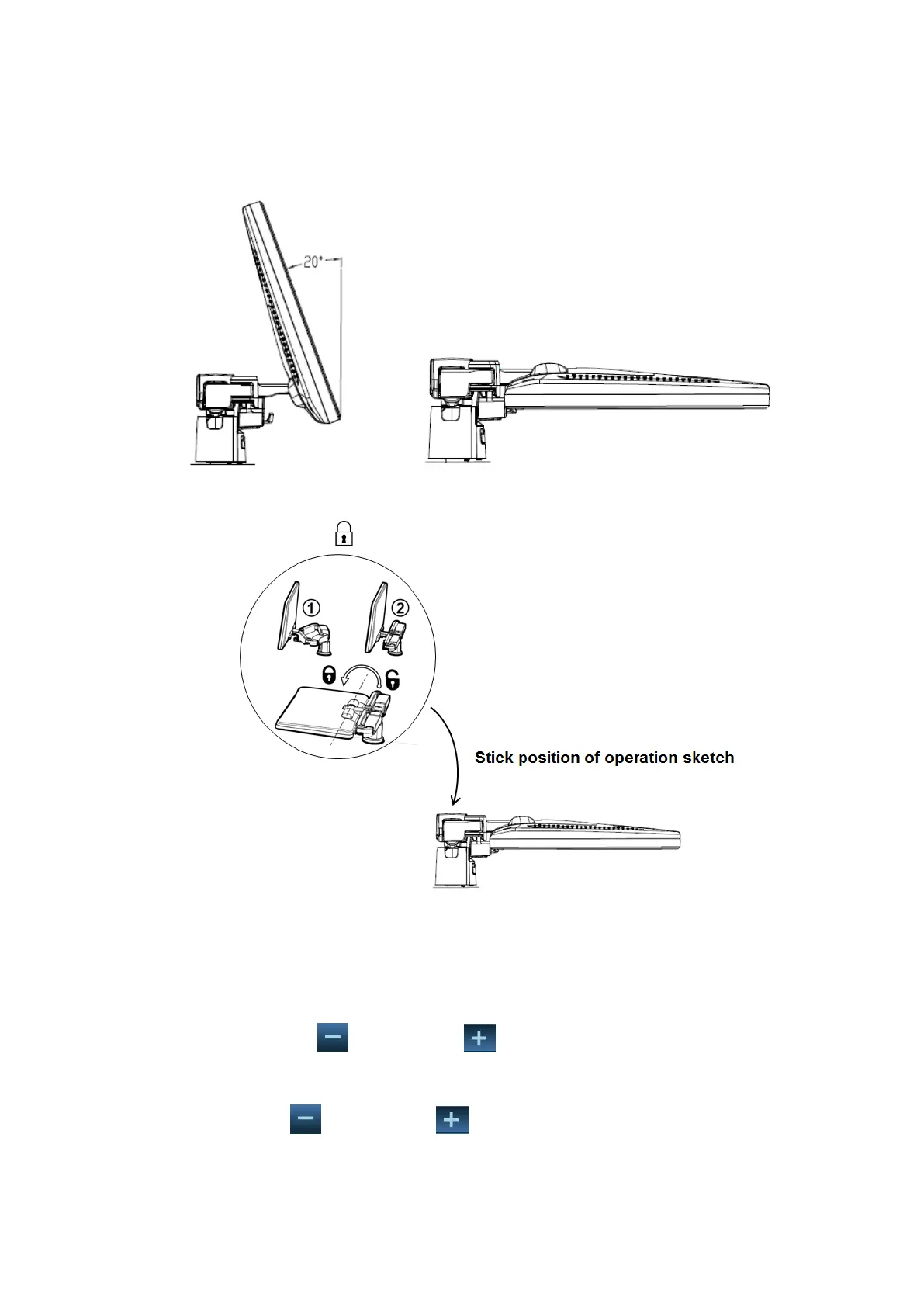
When positioned vertically, the monitor can be tilted 20° backward and can be tilted forward to
a horizontal position. When transporting or moving the system, keep the monitor in the
horizontal position, as shown below:
◼ Lock the monitor
To move the machine, first move the monitor and supporting arm to the middle position, and
lock the locking lever to state to avoid crash.
7.1.2 Brightness and Contrast Adjustment
◼ Brightness adjustment:
Press <F10 Setup>. Click [System]→[General]→ [LCD] and tap the brightness adjustment on
the touch screen. Tap to reduce and to enhance the brightness.
◼ Contrast adjustment:
Press <F10 Setup>. Click [System]→[General]→ [LCD] and tap the contrast adjustment on the
touch screen. Tap to reduce and to enhance the contrast.Restore the factory
default settings



 To Next Page