Optional Installation/Assembly 10-1
10 Optional
Installation/Assembly
10.1 Installing Optional Software
1. Copy optional key file to USB flash disk and plug USB flash disk to the port.
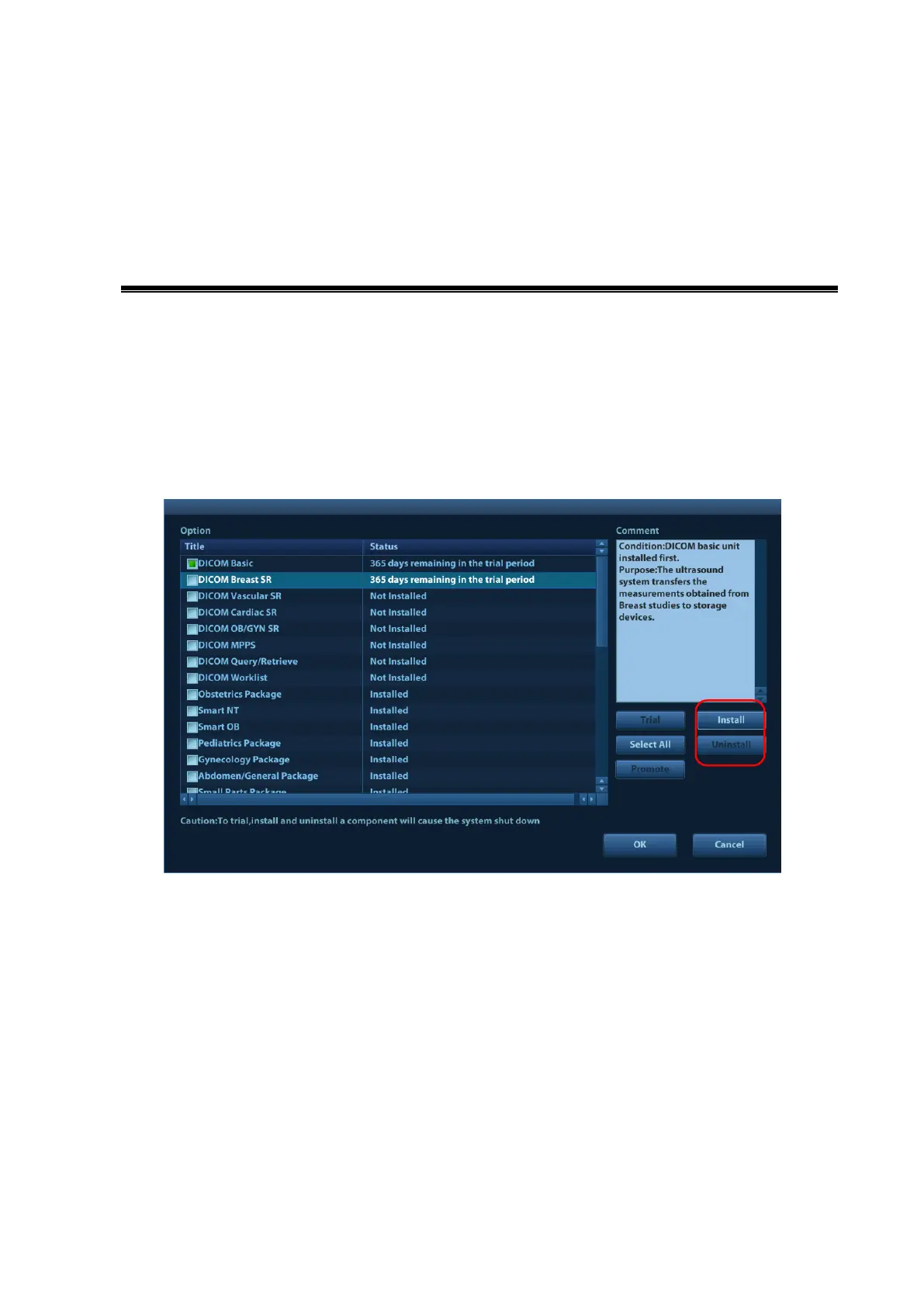
2. Open Setup menu. Select [Maintenance]-[Option]. Select the software package to be installed
from the list.
3. Click [Install]. Select key file from the dialog box, and then click [OK].
Select more than 1 option from the list and click [Batch Install] to install more than 1 option.
4. The options become Installed after the key files are installed. The corresponding function is
activated after returning from preset.
5. Option trial: select the corresponding software package, and then click [Trial].
10.1.1 Installing iClear
+
1. Acquire the iClear
+
Dongle and USB disk containing an optional key file.
2. Install the iClear
+
Dongle to the system. For details, please refer to "10.2.7 iClear+ Dongle".
Note:



 To Next Page