26
R
UNNING THE EX CONTROLLER DEPLOYMENT TOOL TO INSTALL THE MIVOICE BUSINESS VIRTUAL MACHINE
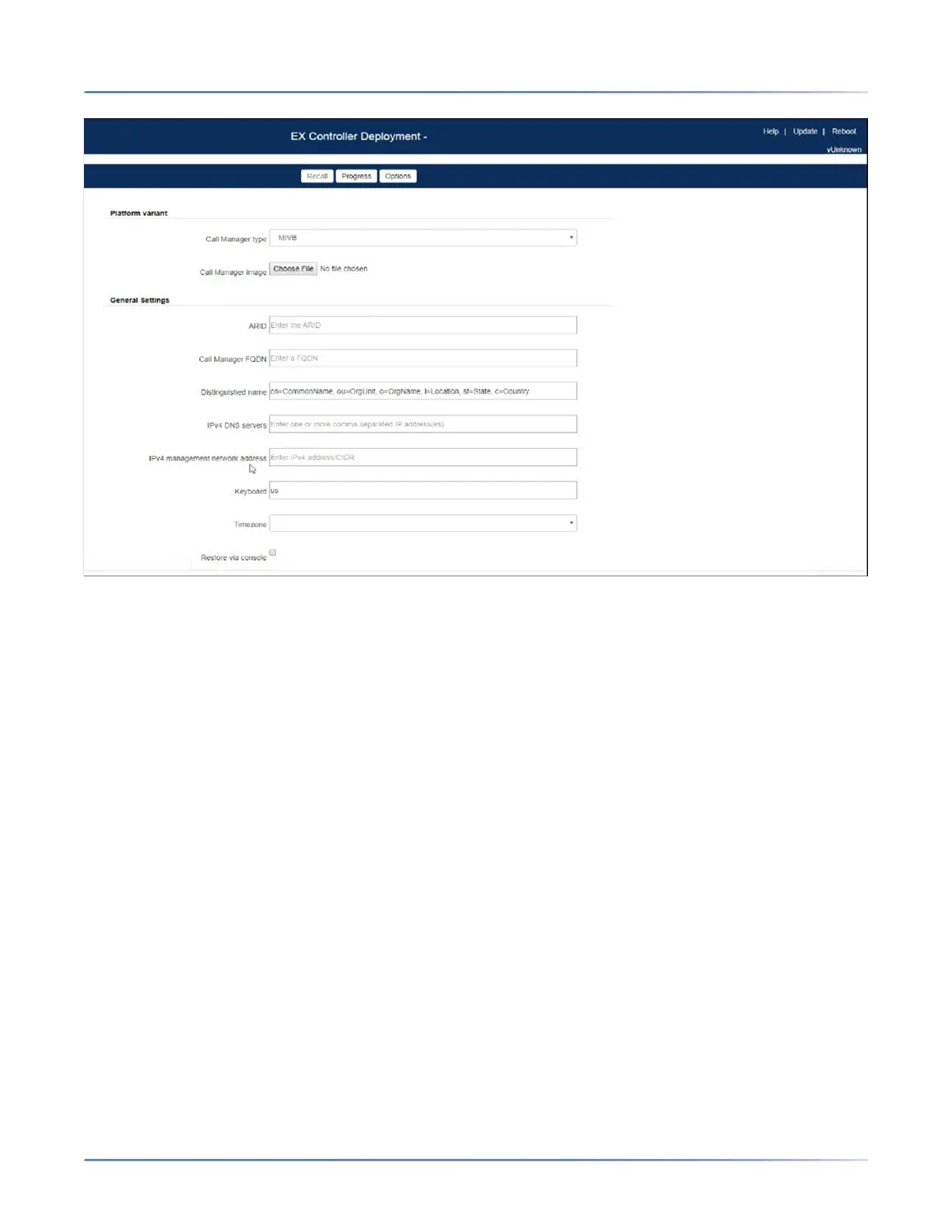
CHAPTER 4 SOFTWARE INSTALLATION
2. If you have the MiVB-9.x.x.x-yy.img.zip file on your local PC, click Choose File, and select
the MiVB-9.x.x.x-yy.img.zip file.
3. Under General Settings, enter the following details:
– ARID — The Application Record ID (ARID) for the MiVoice Business system to acquire and register
licenses with the Mitel Application Management Center (AMC). Optionally, you can license the
system after the deployment through Server Manager.
– Call Manager FQDN — The FQDN of the MiVoice Business virtual machine. For example,
coyote.acme.com, where coyote is the hostname and acme.com is the domain name (resolvable
by the IPv4 DNS server listed below)
– Distinguished name —The Distinguished Name (DN) of the MiVoice Business virtual instance that
is used to create a host certificate for the controller. For example, cn= coyote, ou= Research and
Development, o= Acme Company, I= Bangor, st= Maine, c= US. Leave the field as is.
NOTE: The hostname of the MiVoice Business system specified in the Call Manager FQDN
field must match the cn of the Distinguished Name field for the certificate generated during
the deployment.
– IPv4 DNS servers — The IPv4 address of one or more DNS servers of the network where the EX
Controller is installed; comma-separated in case of multiple DNS servers.
– IPv4 trusted network address — The IPv4 address of the management networks or trusted
networks from which you want to allow access to the MiVoice Business System Administration Tool
and the Server Manager by generating a certificate for HTTPS use.
4. (Optional) Select the Restore via console check box, if you want to enable restore via server console
option after the deployment. The Server Manager prompts the user to restore the system configura-
tion upon startup.
咨询订购:400-010-8885、 Support@mitel.com.cn



 To Next Page