27
R
UNNING THE EX CONTROLLER DEPLOYMENT TOOL TO INSTALL THE MIVOICE BUSINESS VIRTUAL MACHINE
CHAPTER 4 SOFTWARE INSTALLATION
NOTE: The controller does not support the Restore from another running server option.
5. Select Enable secure EX controller access to disable the SNMP v2 protocol on the EX Controller.
This blocks unsecure access to the controller.
It is recommended to leave the check box cleared to configure the MiVoice Business system using
the Mitel Configuration Wizard (MiCW) post deployment.
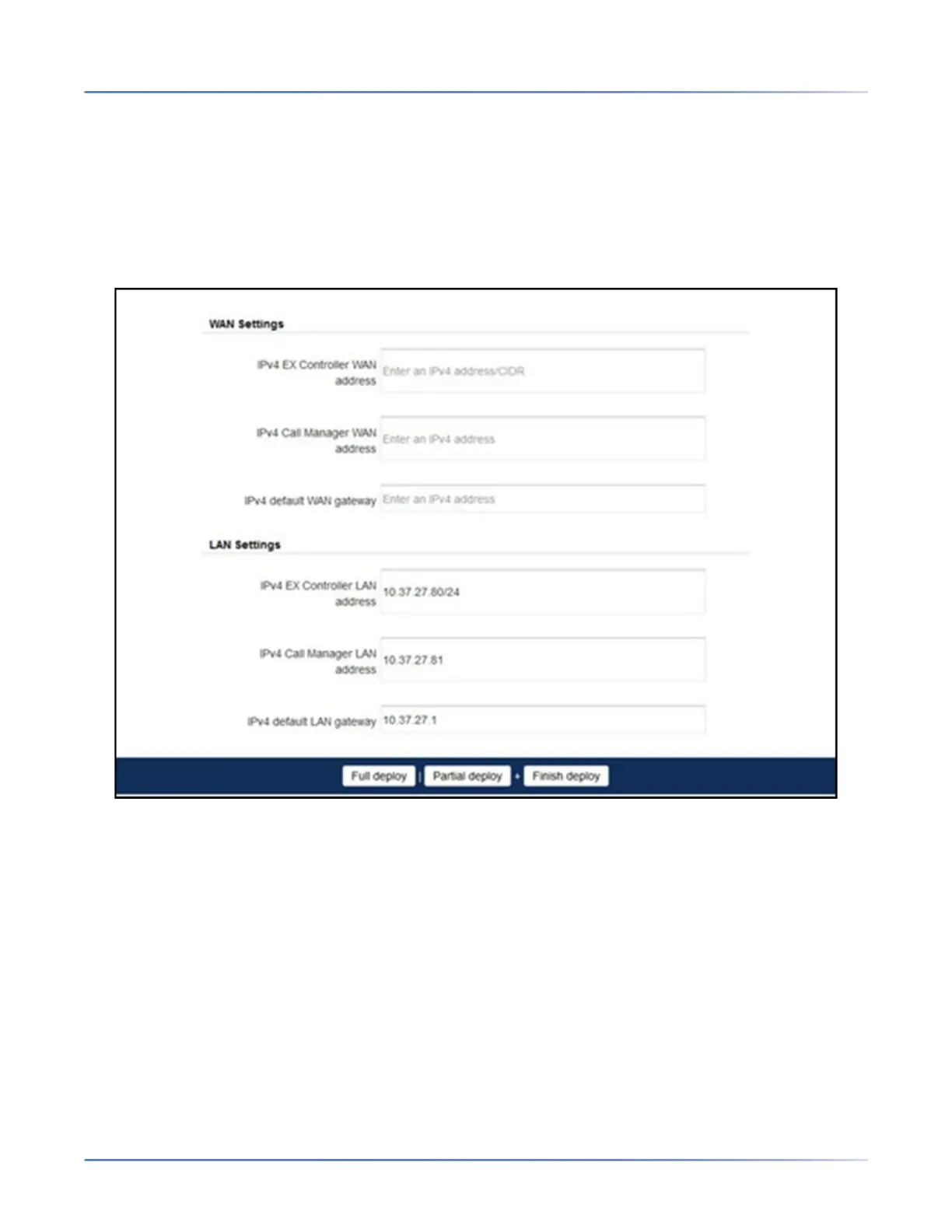
6. Leave the following WAN Settings blank unless you are setting up a WAN configuration for the EX
Controller:
a. IPv4 EX Controller WAN address
b. IPv4 Call Manager WAN address
c. IPv4 default WAN gateway
7. Under LAN Settings, specify the IPv4 LAN settings:
a. IPv4 EX Controller LAN address — IPv4 address with CIDR for the EX Controller Web GUI
that will overwrite the default IP address of the EX Controller Web GUI, 192.168.0.10. For
example, 10.211.13.42/12.
b. IPv4 Call Manager LAN address — IPv4 address for the MiVoice Business system virtual
machine. (No CIDR is required)
c. IPv4 default LAN gateway — IPv4 default LAN gateway address
8. If you want to perform a partial + finish deploy, skip this step and proceed to step 10. If you want to
deploy and enable the MiVoice Business virtual machine immediately, click Full deploy.
咨询订购:400-010-8885、 Support@mitel.com.cn



 To Next Page