USER GUIDE
Mitel 5634 VoWi-Fi Handset
2
Handset Description
This chapter gives an overview of the key features of the Mitel 5634 handsets, including the physical
design description, the use of icons and texts, as well as basic instructions for using alphanumeric keys.
This chapter includes the following sections:
•
2.1 Handset Overview, page 2
•
2.2 User Interface, page 3
•
2.3 Display Icons and Texts, page 5
•
2.4 Alphanumeric Keys, page 8
2.1
Handset Overview
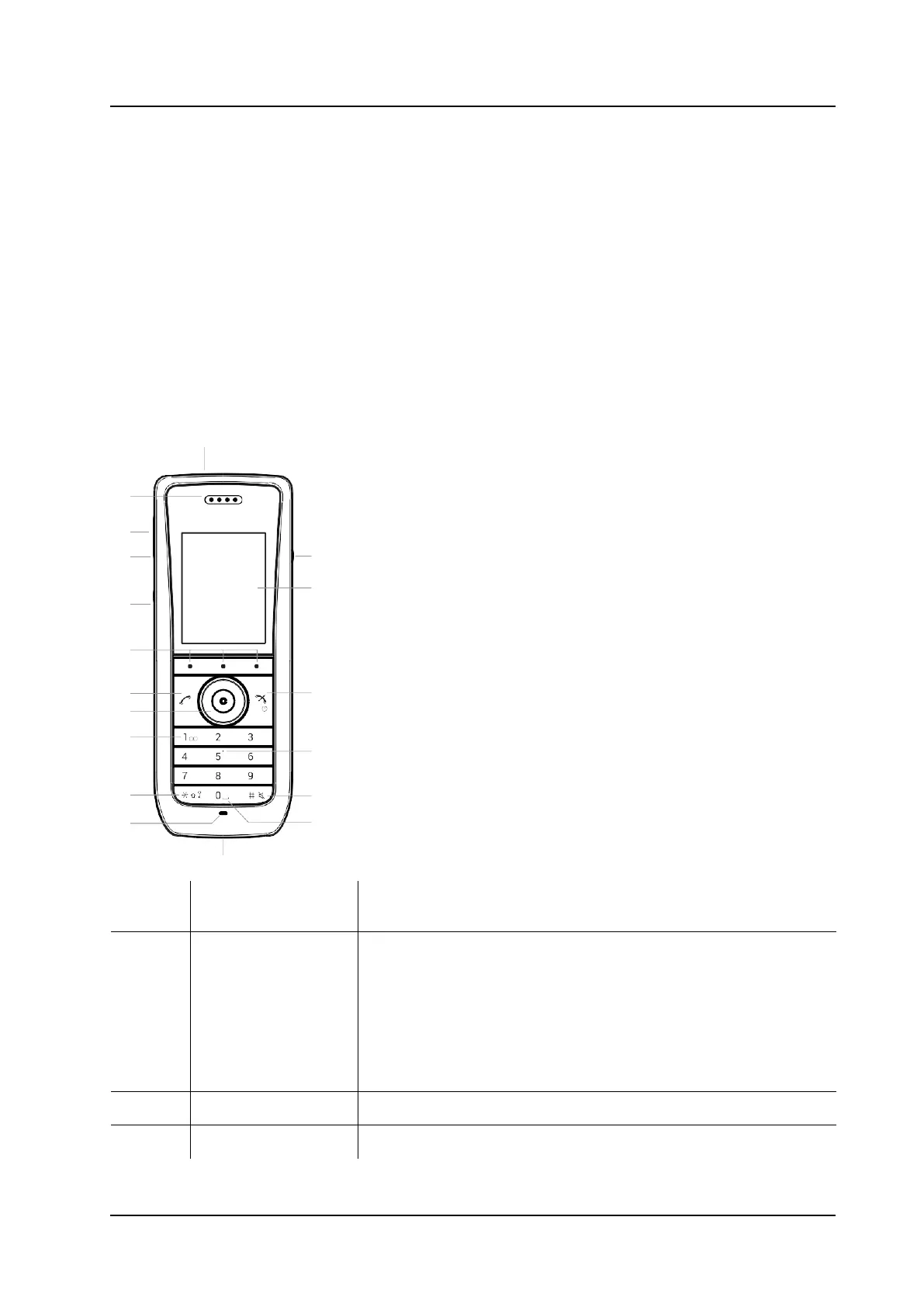
All handset models share the same external characteristics.
1
2
3
4
18
17
5
6
7 16
8
9
15
10 14
11
13
12
Number
External
Description
1
Top button
In case of 5634 or 5634 Services, the button can be configured for
different functions. Refer to the Define Multifunction Button , page
40.
In case of 5634 Alarm, the button is used as a push-button alarm.
Refer to the 6.1 Push-button and Test Alarms, page 32.
Using the button as Push-to-Talk (PTT) requires a 5634 Services
handset.
2
Earpiece speaker Used in voice communication.
3
Volume button (up) Used for increasing the speaker volume.



 To Next Page