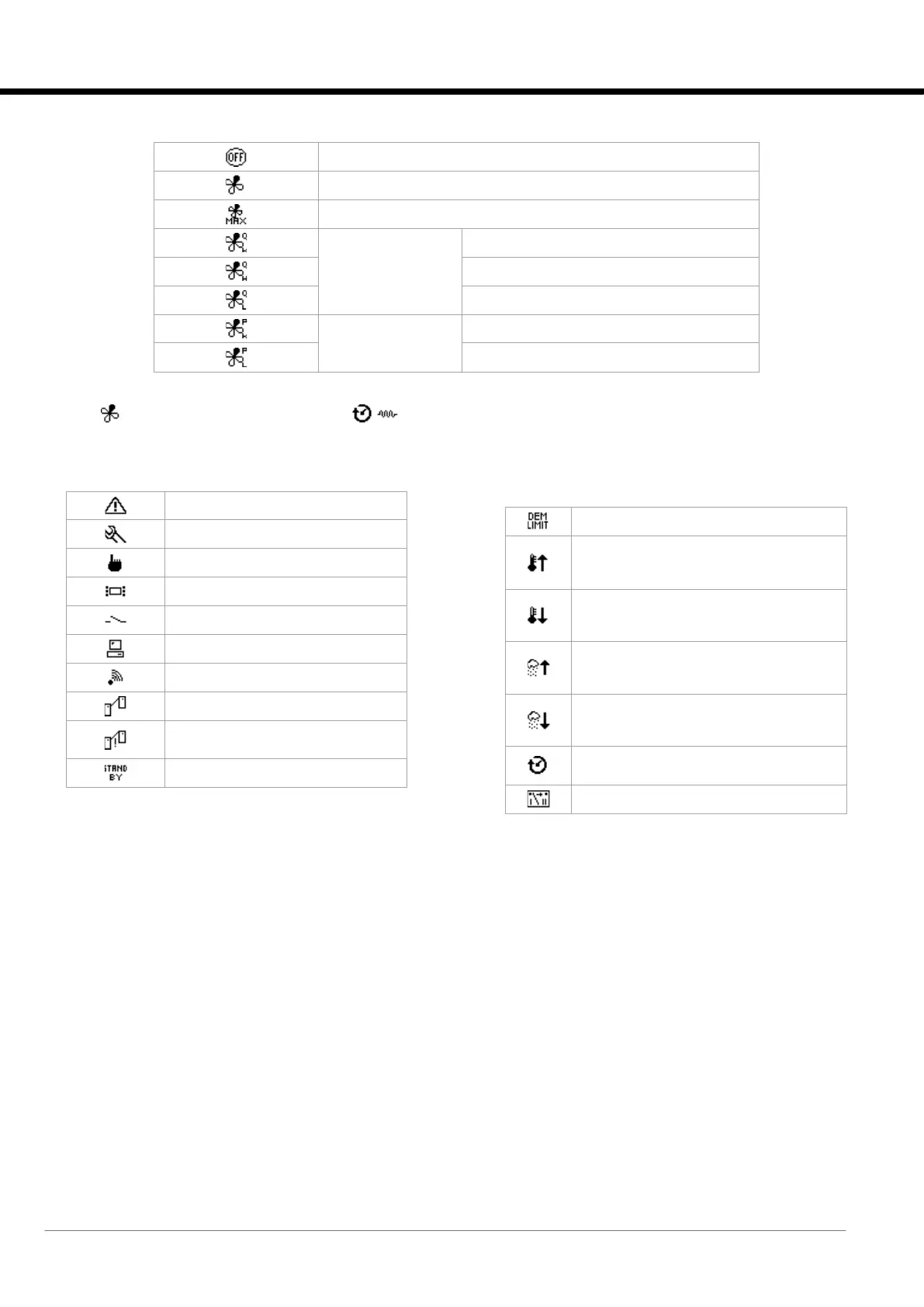
Area 1: general machine status
Unit operating in normal mode
Unit operating in maximum fan speed mode for fan alarm
Unit operating on
steady capacity
mode
Unit operating on
steady residual ∆P
mode
NOTE:
If the icon flashes at the same time as the icons, this means that the unit is on for Post-Ventilation of the electric
heaters (see the relevant paragraph in the “Heating” chapter).
Area 2: detailed status of the unit
Presence of an active alarm.
Unit on/off from terminal.
Unit on/off from remote contact.
Unit on/off from supervision system.
Unit on/off from KIPlink.
Unit turned on for LAN disconnection
alarm.
Unit in Demand Limit mode.
Unit on for exceeding the maximum room
temperature threshold
high ambient temperature.
Unit on for exceeding the maximum room
temperature threshold
low ambient temperature.
Unit on for exceeding the maximum room
temperature threshold
high ambient humidity.
Unit on for exceeding the maximum room
temperature threshold
low ambient humidity.
Unit on for electric heater post-ventilation
function.
Unit off and powered by ULTRACAP.






 To Next Page