34 MPSYSTEMS-M-001/06
0515 [
] – User Menu
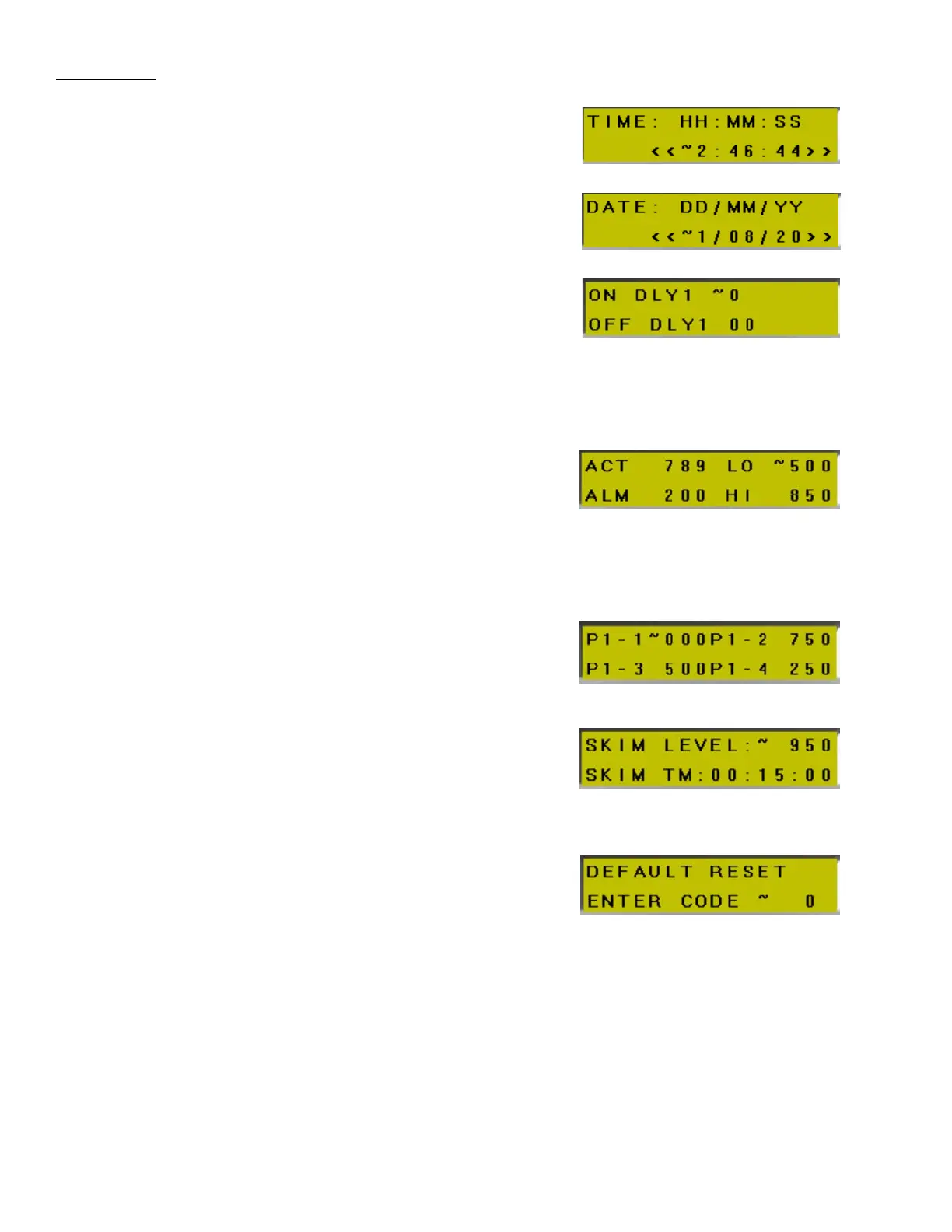
SET TIME -
Sets system time. 24hr Clock Format
(for scheduling and logging events)
DATE – DD/MM/YY
Sets system date
(for scheduling and logging events)
ON/OFF DELAY –
Sets time that must elapse before high
pressure system 1 starts when on signal is
received. Also sets the wait time before
the high-pressure system 1 shuts off after on
signal is removed.
Default = (0 sec, 0 sec)
TANK LEVEL SETTINGS –
Sets the tank level at which the Reservoir/
MP Tank will be refilled (LO), the level at which the
tank will stop filling (HI) and the level at which a
fill alarm is triggered (ALM). Also shows the current
tank level (ACT).
Default = (LO:500, HI:850, ALM:200)
HP1 PRESSURE OPTIONS –
Sets each of four (4) signal-selectable pressures
(PSI) for high pressure system 1.
Default = (P1:1000, P2:750, P3:500, P4:250)
RESERVOIR SKIM LEVEL/TIMER -
Selects tank level at which system will remove
floating oil from tank’s surface and the time
duration between skim events.
Default = (LEVEL: 950, TIME: 15 min)
DEFAULT RESET –
Reset PLC settings to factory defaults.
Code = 1234


 To Next Page