46 MPSYSTEMS-M-001/06
8.1.1. Filter Bag Replacement
1. Switch power to ‘OFF’ position;
2. Close valve to filter vessel that will be changed;
3. Let system pressure equalize for up to 30 seconds;
4. Remove 4 wing nuts on filter cover;
Lift away filter cover.
5. Slowly lift filter bag, using handles on filter bag;
Coolant/cutting fluid will gradually drain out of filter bag.
6. Install replacement filter bag;
7. Replace filter cover;
Secure 4 wing nuts.
8. Open corresponding valve and continue normal operation.
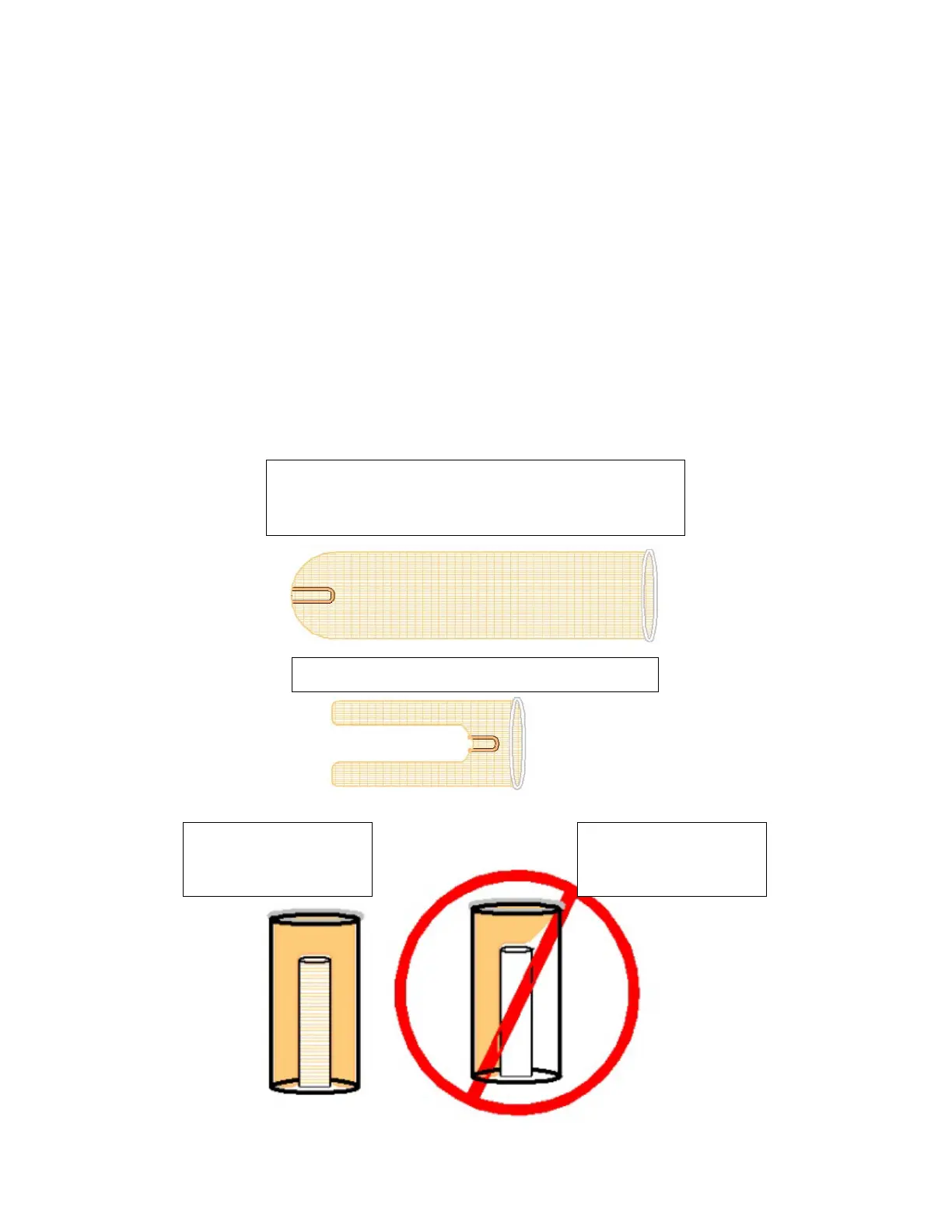
Grab tab, inside filter bag, pull towards embedded O-ring
(inside-out). Keep filter bag even all the way around, this
will make installing replacement bag much easier.
Filter bag should look similar to the image below.
Be sure filter bag slides
over filter cone, center
of filter basket.
Do not force filter bag
to one side of filter
basket cone!


 To Next Page