31 MPSYSTEMS-M-001/06
7.4.1. R/R2 Series PLC Settings
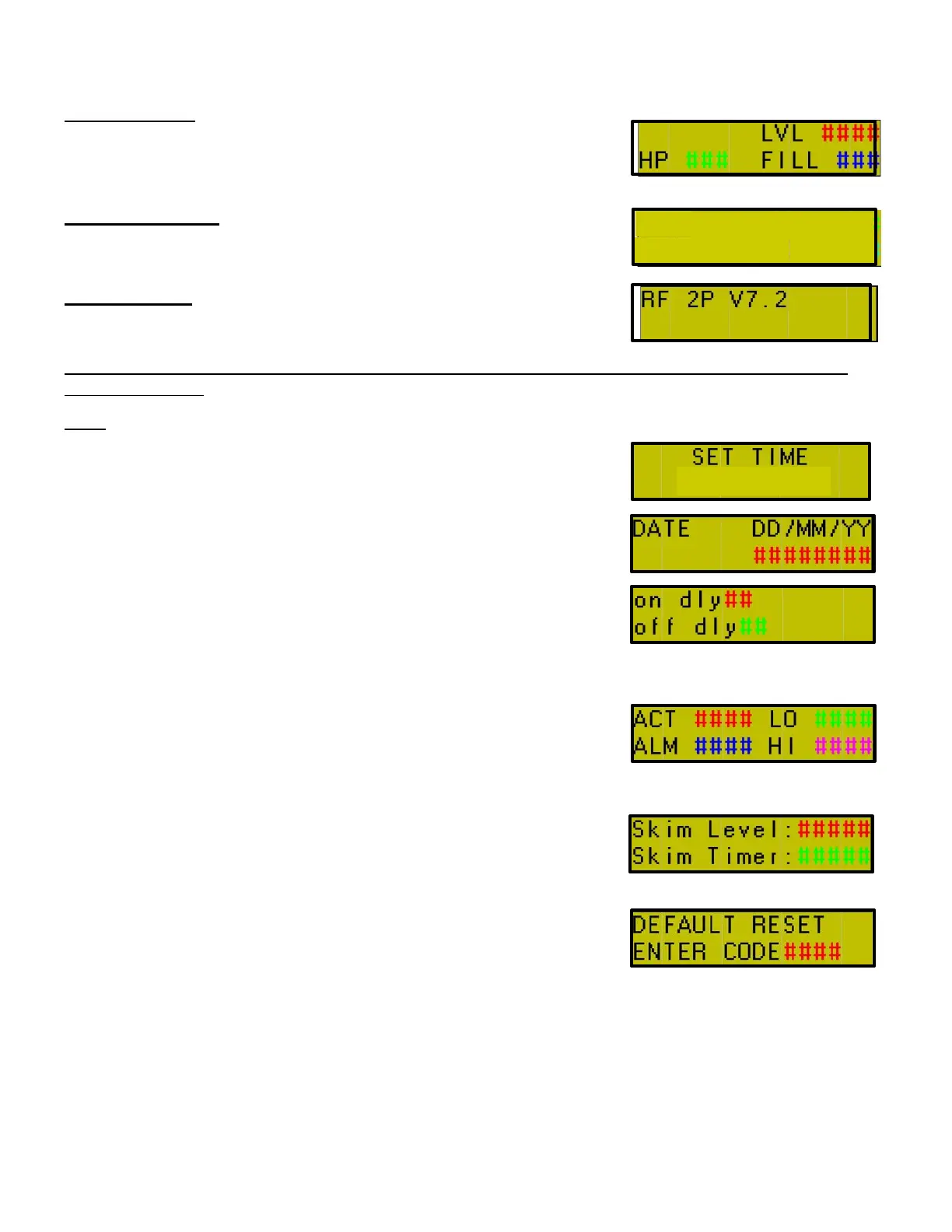
MAIN SCREEN
HP – High pressure ON/OFF
LVL – Current tank level
FILL – Indicates supply pump fill.
ALARM HISTORY
Using the down arrow (▼), from PLC main screen control pad, will
display 10 most recent alarms.
INFO SCREEN
ⓘ key on PLC will display current PLC version.
Press [1] & [2] keys simultaneously to access password screen. Use this function to access the
following menus.
0515 [
]
SET TIME - 24hr Clock Format
DATE - DD/MM/YY
ON/OFF DELAY - High pressure delay on Start/Stop. Set in 01
second increments.
FILL SETTINGS
ACT – Actual tank level.
LO – Level when supply pump
begins to fill tank.
ALM – Level when machine will
go into alarm.
HIGH – Level when tank is full.
SKIM LEVEL - Fills tank to over flow level, allows film to removed
from tank (950 maximum).
SKIM TIMER - Interval between skim function. Minutes:Seconds
(MM:SS)
DEFAULT RESET - Reset PLC to factory defaults.
Code = 1234


 To Next Page