59 MPSYSTEMS-M-001/06
0515 [
] – User Menu
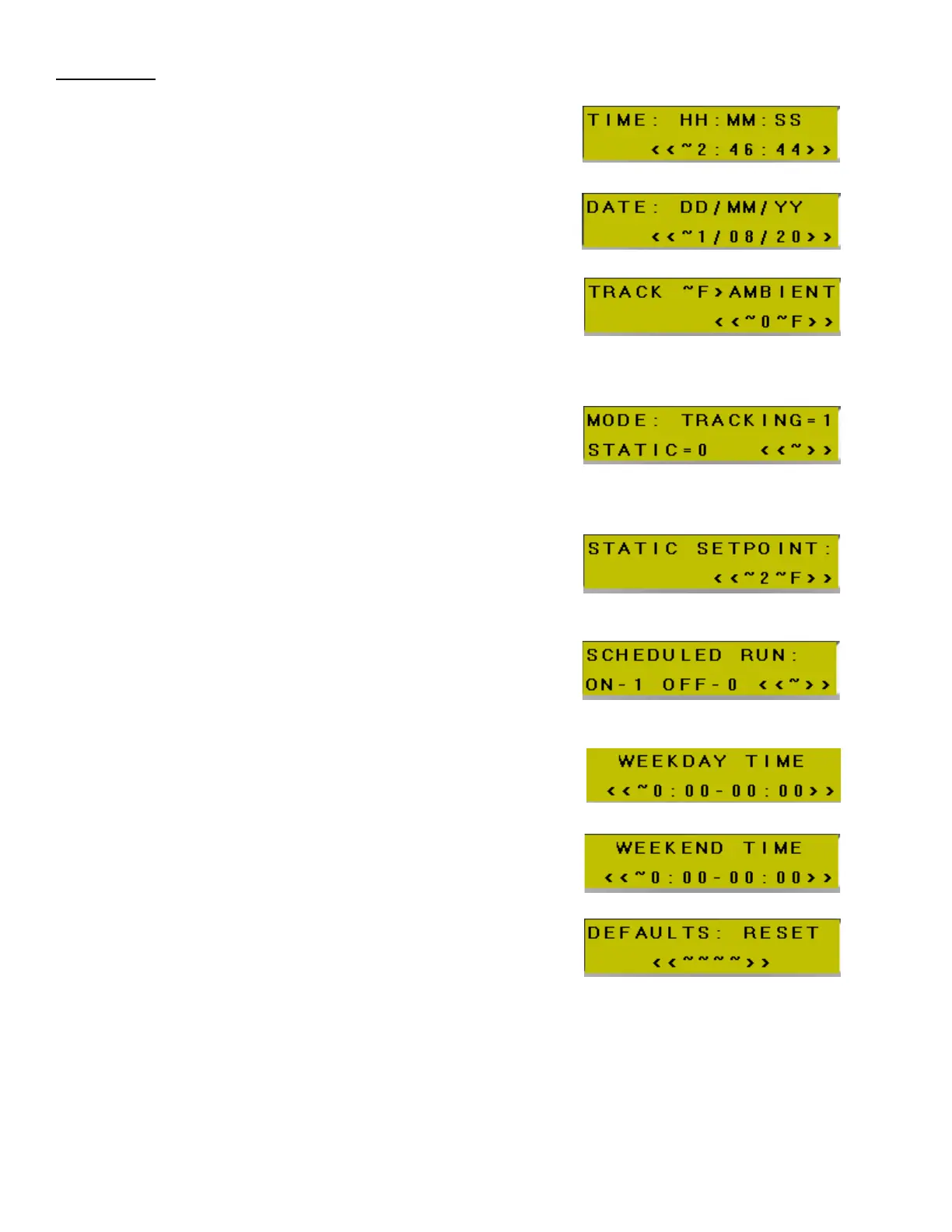
SET TIME -
Sets system time. 24hr Clock Format
(for scheduling and logging events)
DATE – DD/MM/YY
Sets system date
(for scheduling and logging events)
TRACKING TEMPERATURE
ABOVE AMBIENT –
Provides an offset (above ambient) when
chiller is set to tracking mode.
Default = 0°F
TEMPERATURE CONTROL MODE –
Determines if chiller’s target temperature will
be fixed (static) or allowed to match ambient
temperature (tracking).
Default =Tracking
STATIC TEMPERATURE –
Set static/constant temperature.
Default = 72°F
AUTOMATIC SCHEDULE ON/OFF -
Chiller runs automatically based
on day and time of the week.
Default = off
MON-FRI AUTOMATIC START/STOP –
Sets chiller start and stop times
Moday – Friday. 24hr format
SAT-SUN AUTOMATIC START/STOP –
Sets chiller start and stop times
Saturday – Sunday. 24hr format
DEFAULT RESET –
Reset PLC settings to factory defaults.
Code = 1234


 To Next Page