EasyManua.ls Logo

MST Impact NS5001 - Page 91

MST Impact NS5001
133 pages
To Next Page IconTo Next Page
To Previous Page IconTo Previous Page
Loading...
NS50 wireless network switch
User Manual
Revision C
Chapter 5: Configuration Using the Web Interface
© 2012 MST Global
Commercial in Confidence
81
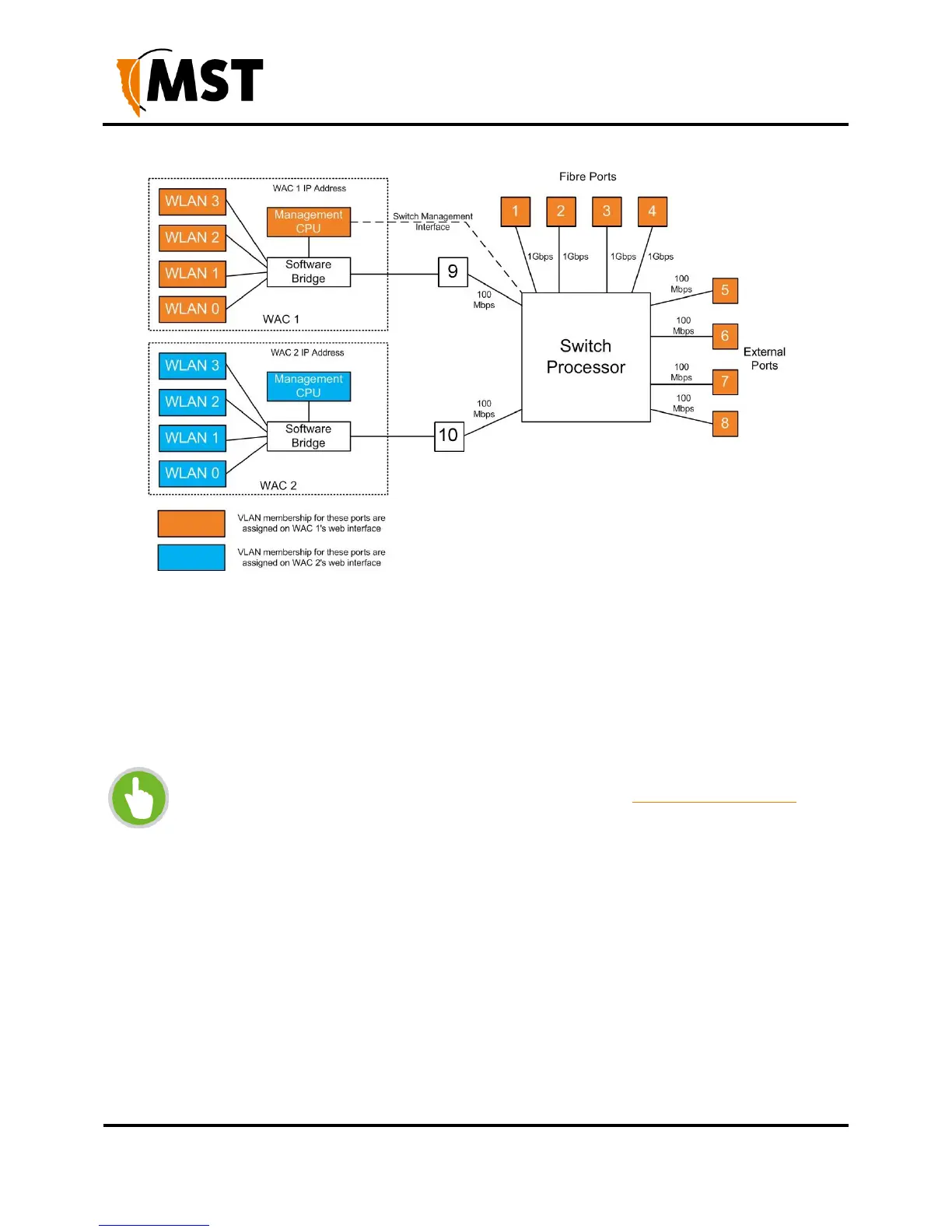
Figure 38: Logical block diagram of the Network Switch
To configure a port:
1. Set the Mode to be either Trunk or Access (for physical ports).
2. Select the VLAN Membership(s). For an Access port only one VLAN can be selected. For a
trunk port multiple VLANS can be selected.
3. Click Save Settings to save VLAN port map settings.
NOTE: To configure the VLAN port map properly, it is recommended to understand
the principles of VLANs. For more details on VLANs, see Understanding VLANs on
page 35.

Table of Contents

Other manuals for MST Impact NS5001

Related product manuals