4.6 Sentry II Temperature Control Lock and Unlock Features
The temperature control is equipped with a locking feature to prevent unauthorized adjustments to the
calibration, temperature set points, and unit of measure.
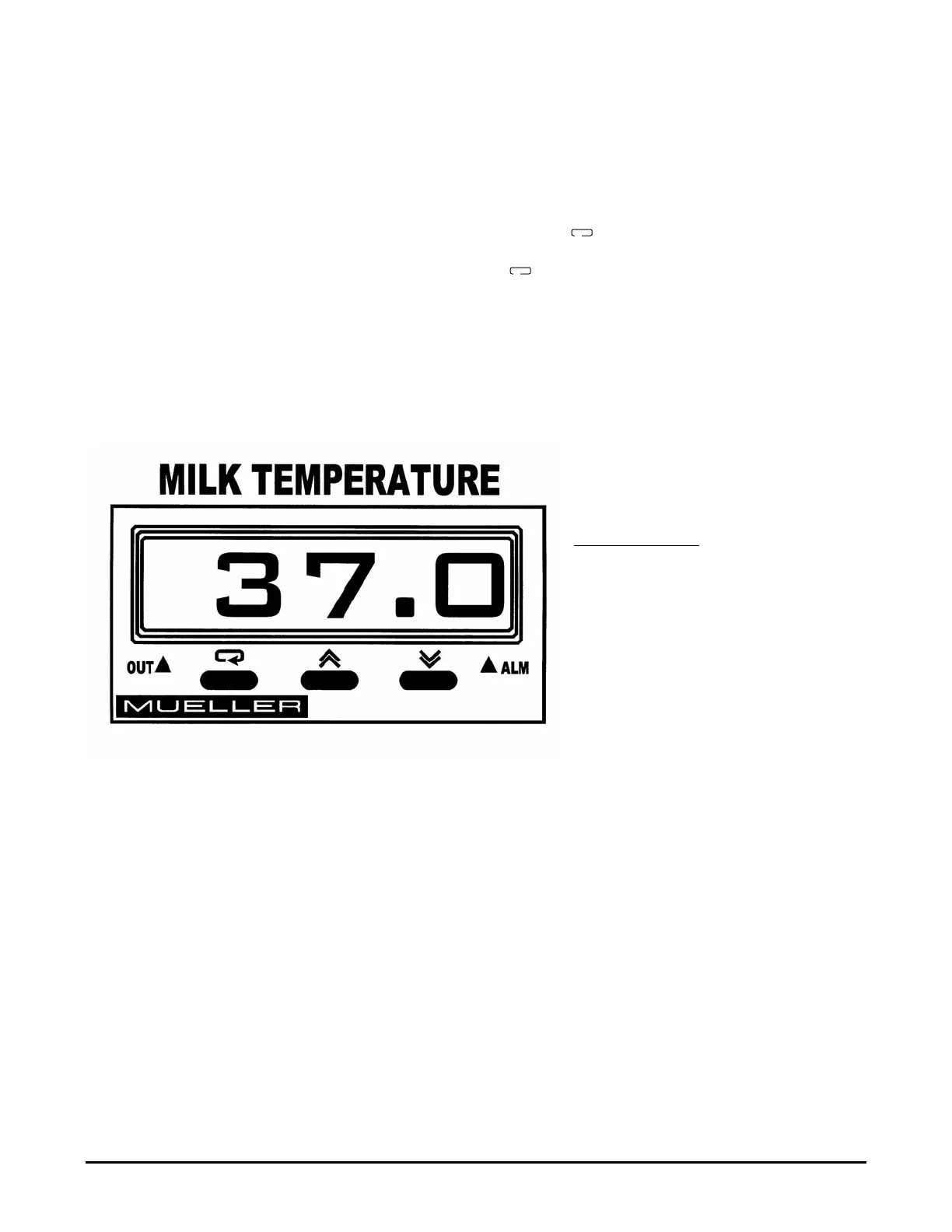
Unlock - To unlock the temperature control for adjustment, press and hold the and keys (see
Figure 28) simultaneously for two seconds. When released the display will blink once indicating a
successful unlock, otherwise repeat the process.
Lock - To lock the temperature control, press and hold the and keys simultaneously for 4
seconds. When released the display will blink once indicating a successful lock, otherwise repeat the
process. To validate a locked condition, press the key once, when released the display will
momentarily display “Lock.”
Note: The temperature control should be locked during normal operating conditions to prevent
unauthorized or accidental setting alterations.
Figure 28 - Sentry II Temperature Control
Sentry II with Auto-Dosing Assembly Operating Instructions 28 Effective April 1, 2000
Factory Temperature Control Settings:
Refrigeration On - 39°F (3.9°C)
Programmed Set Point - 38°F (3.3°C)
Refrigeration Off - 37°F (2.8°C)
Temperature Alarms:
High Alarm - 41°F (5.0°C)
Low Alarm - 35°F (1.7°C)
See Section 4.8.
➤
➤
➪
➪
➪


 To Next Page