Downloading Scanned Data
1
Start your TWAIN-compliant application.
2
Perform the scanning operations with the application.
3
Select the scanning device.
Select Muratec MFX-1820 Scan or Muratec MFX-1820 NW Scan as the scanner.
4
Select the scan box.
If an I.D. code is registered, enter the 4-digit I.D. code.
5
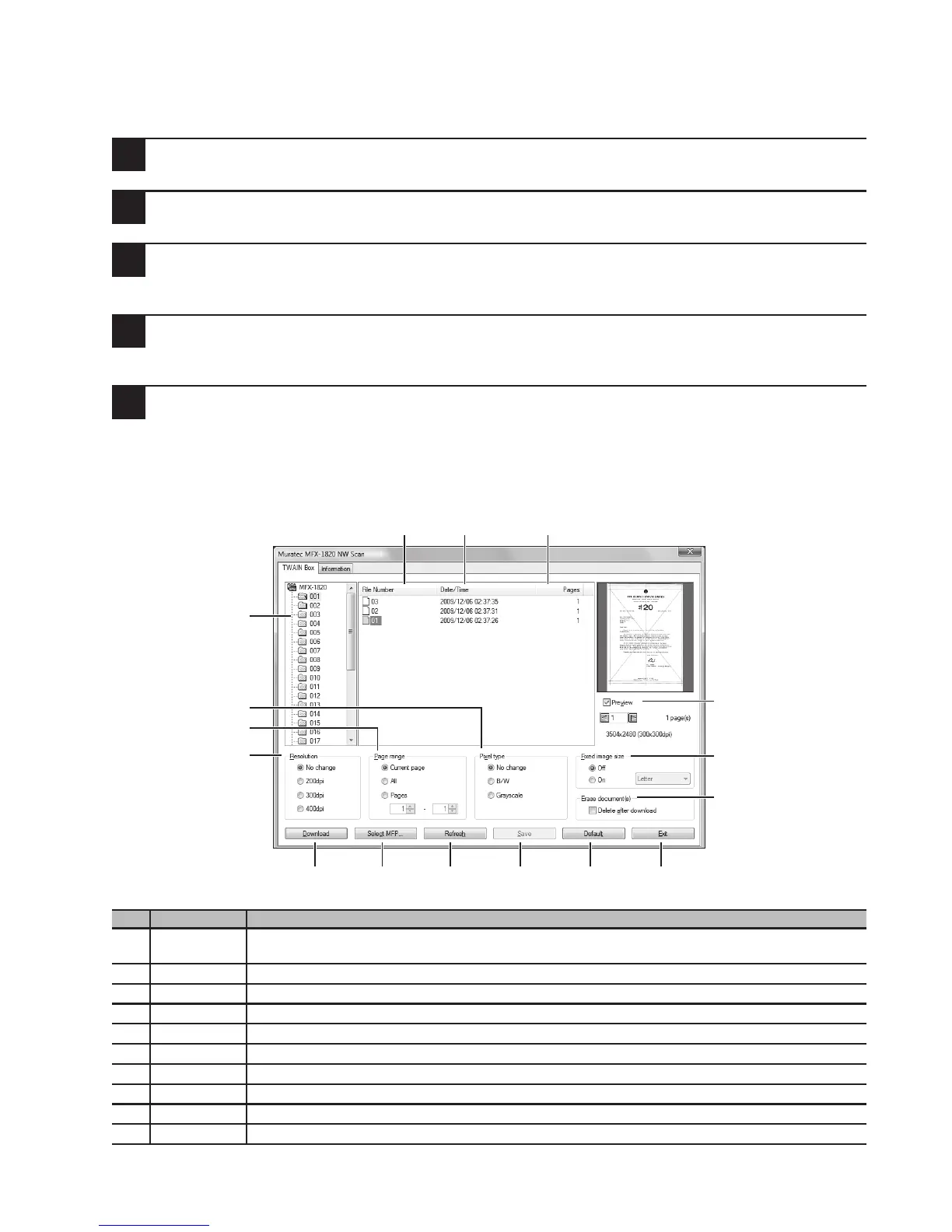
Select the image you want to download and press [Download].
For details, refer to chapter 3 of the Driver Guide on the included driver CD.
Scanner screen
No. Item Description
1 TWAIN Box
list
Click the box you want to use. There are 30 scan boxes.
2 File Number
Displays the file number automatically assigned by the machine.
3 Date/Time
Displays the time and date a document is scanned into the scan box.
4 Pages
Displays the number of pages scanned.
5 Preview
When the check box next to [Preview] is checked, you can see a preview of the content.
6 Download
Starts downloading of the selected document.
7 Select MFP
Used when the IP address for the machine is changed or if the connection is changed.
8 Refresh
Updates the file list.
9 Save
Saves the current setting. (Cannot be clicked if settings have not been changed.)
10 Default
Returns settings to the factory settings.
2
3 4
1
13
14
12
6 7 8 9 10 11
16
15
5


 To Next Page
 Loading...









