80
Calling up Frequently Used Func-
tions
Using the Basic Function Menu
Adding to the Basic Function Menu
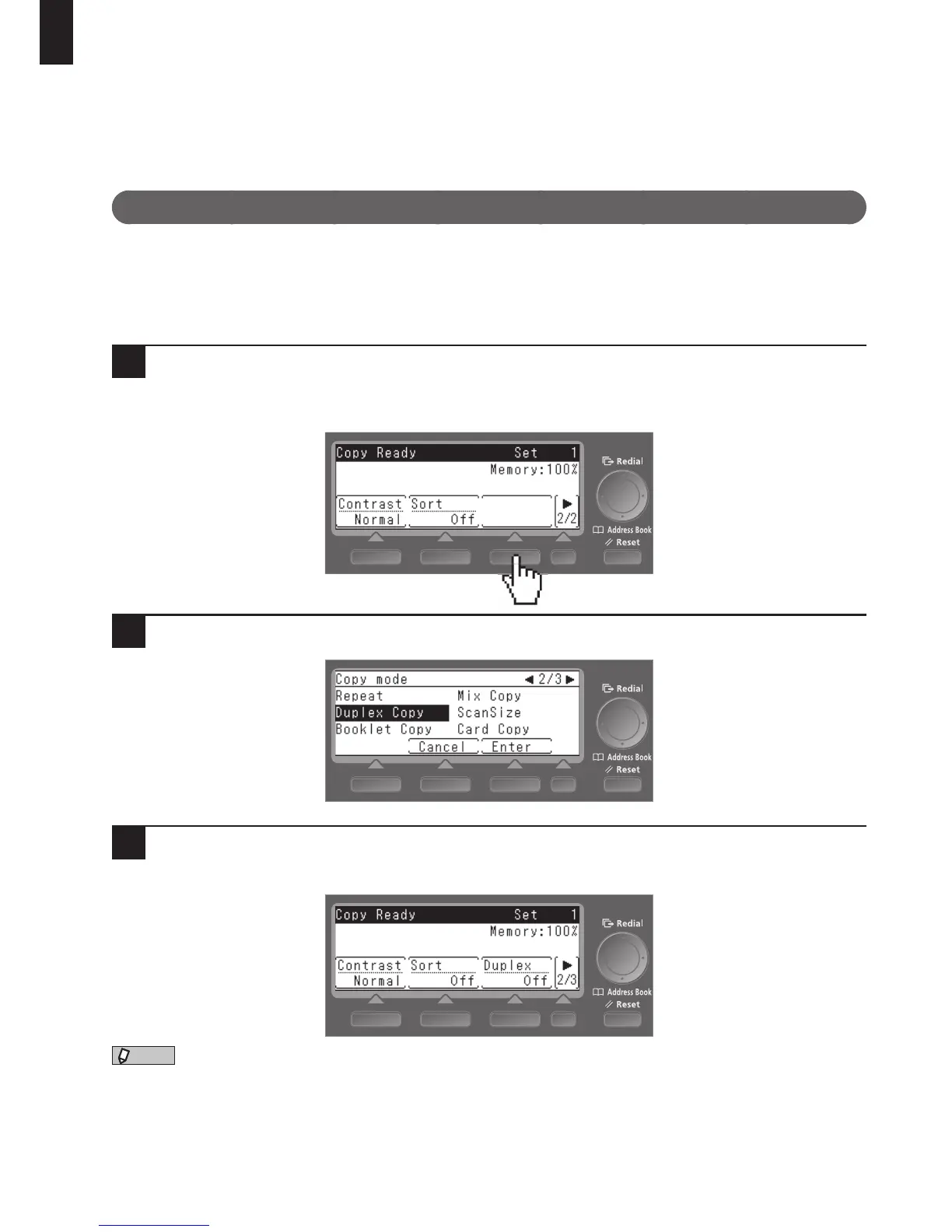
You can add frequently used functions to the Basic Function Menu that appears on the ready screen.
The following example shows copy functions.
1
Press the screen switching key ([
]) to switch the screen, and press the blank
key.
When the confirmation screen appears, press [Yes].
2
Select the function you want to add using the cursor keys and press [Enter].
3
The function you selected is added to the Basic Function Menu that appears on
the ready screen.
•Upto12functionscanberegisteredforeachofthecopy,fax,andscanmodes.
•AdvancefunctionsthatareaddedtotheBasicFunctionMenuaredeletedfromthemenuthatappearswhen
you press <Menu>.
•YoucanalsoallocatecommonfunctionstotheSoftKeysonthecontrolpanel.
“Using the Soft Keys,” page 81.
System Settings











 To Next Page