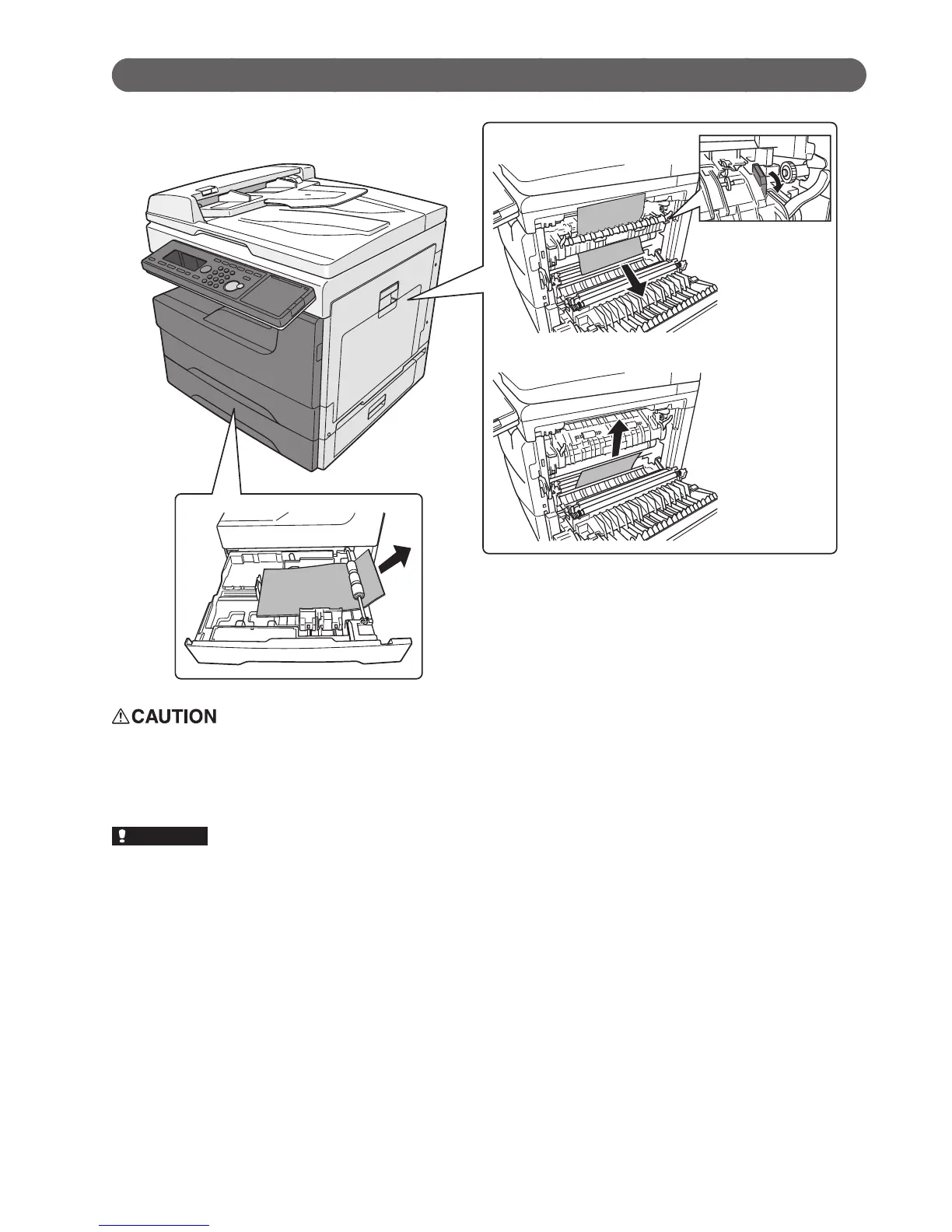
Paper jams
•Thefuserunitandareaarounditinsidethemachineareextremelyhotwhenoperating.Whenyouclearthe
paper jam or inspect inside, be careful not to touch around the fuser unit. It may cause burns.
•Whenyouremovethepaper,becarefulnottogetthetonerinyoureyesormouth.Ifthetonergetsinyour
eyes or mouth, immediately flush with clean water and seek medical assistance.
•Ifapaperjamoccursduringprinting,thetonerwillnotbexedonthepaper.Becarefulnottostainyour
hands or clothes with the toner. If your hands or clothes get stained, wash them immediately with cold water.
The stains may become permanent if washed using warm water.
•Carefullyremovethejammedpapernottoleaveapieceofpaperinsidethemachine.
•Donottouchtheterminalsinsidethemachineorfeederroller.Thiscouldcausedefectsinprintingquality.
•Donotexposethedrumunittothelightforveminutesormore.
•Donottouchthedrumsurface.Thiscouldcausearecordingerror.








 To Next Page