7 of 35
www.NabcoEntrances.com OpusControlWiringandProgrammingInstallaonManual
Rev. 3-9-18 P/N C-00139
CHAPTER 6: THE OPUS CONTROL
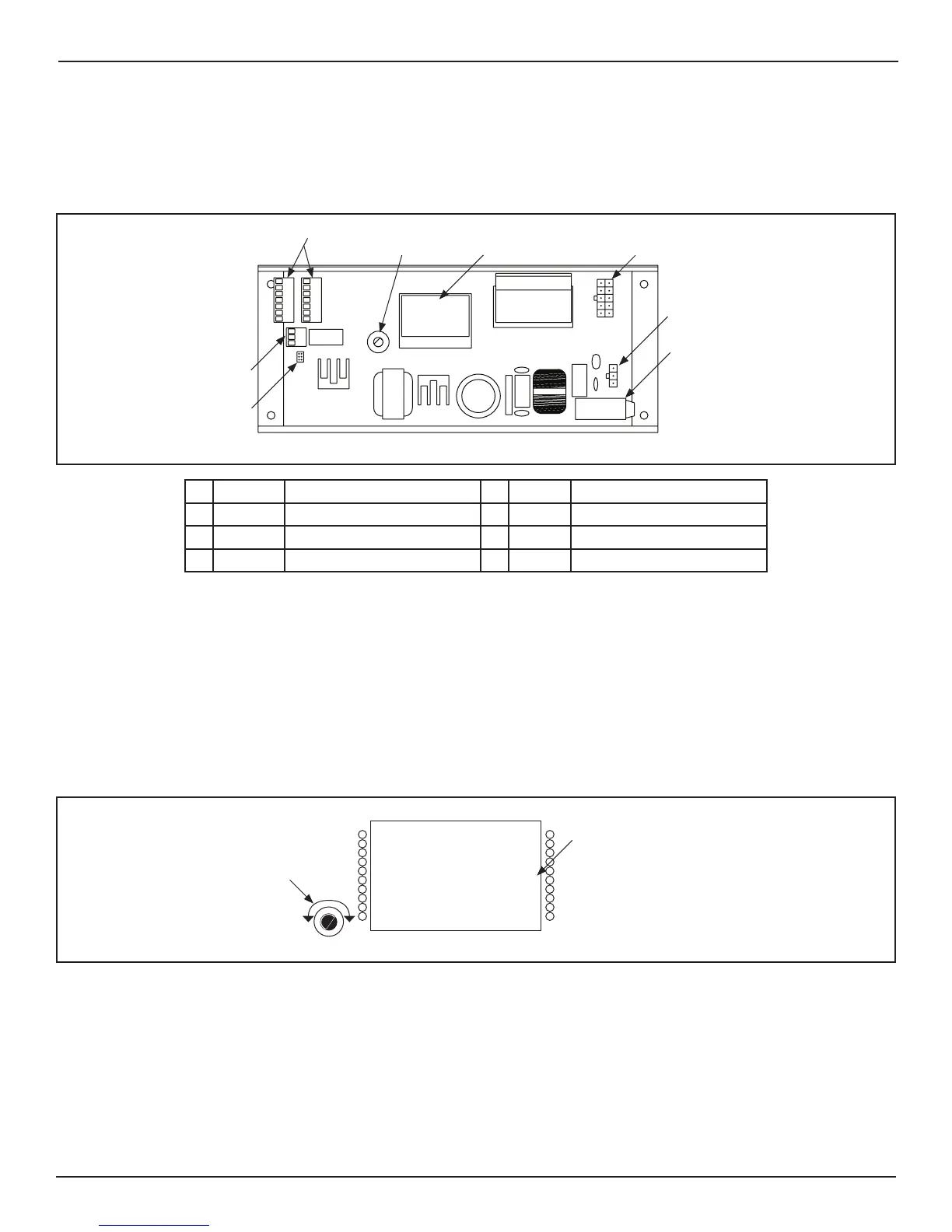
The Opus Control is used to power and control operang characteriscs of the door with the use of harnesses and wiring.
Note: When the LCD Screen is LIT, the Hold Close feature is disabled. When the LCD screen is OFF, the Hold Close feature is
enabled.
Figure 1
DN 1328
1413121110
98
7
6
54
321
①
②
③
④
⑤
⑥
⑦
⑧
1 CN3 I/O Terminal Strip 5 - LCD Screen
2 CN5 Relay Output Terminal Strip 6 CN2 Motor Connector
3 CN4 CAN Bus Communicaon 7 CN1 Power Connector
4 - Rotary Dial 8 - Fuse
CHAPTER 7: THE ROTARY DIAL
X
X
DN 1242
Type: GT710 Swing
Status: Slow Closing
Error: -----
Ac va on: IN EXT
Switch: LCHK BCHK
Other: BA 6B SWL
Push and Hold Dial
Go to Se ng Mode
Rotary Dial
11
20
10
12
LCD Screen
Figure 2



 To Next Page