IOM-EZVAVINST
Date: 10-2016 Supersedes: 7-2016
Nailor reserves the right to change any information concerning product or specification without notice or obligation.
Page 15 of 48
Installation and Operation Manual
●
EZvav Digital Controls
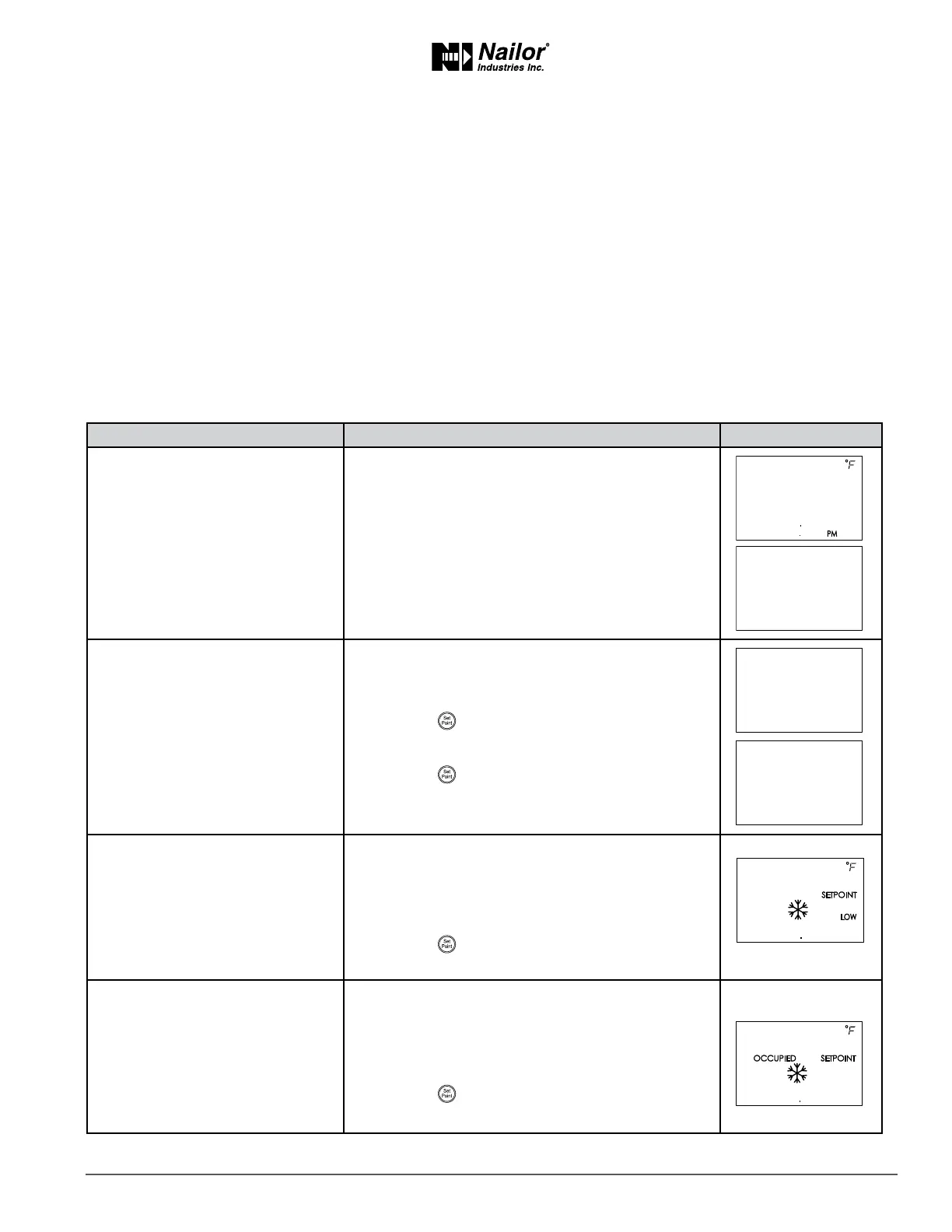
EnteringSystemTemperatureSetPointsandLimits
The system temperature set points set the operaonal parameters and limits for the VAV terminal unit.
The temperature set points include the following items.
• Minimum cooling and maximum heang set points
• Occupied and unoccupied cooling set points
• Occupied and unoccupied heang set points
• Changeover dierenal set point
• Standby dierenal set point
Seng the temperature set points requires entering Password 2 which is described in detail in the topic Geng started with
conguraon on page 14.
Tip: Once the following procedure is started, all steps must be completed in order.
Proceduretosetthetemperaturesetpoints
PROCEDURE STEPS STEDISPLAY
1 Start at the temperature display.
1. Start at the temperature display.
2. Press the
∆
and
buons together.
• If Password 2 is not required, the display changes
to CNFG.
• If required, enter Password 2. The display changes
to CNFG when Password 2 is correct.
2 Set the minimum cooling set
point.
1. From the CNFG display, press the
∆
or
buons
to show STPT.
2. Press the
buon to select the CNFG opons.
The display changes to STPT.
3. Press the
buon to select STPT. The display
changes to MIN.
3 Set the maximum heang set
point.
This set point limits the highest temperature a user can
enter as the acve set point.
1. Press the
∆
or
buons to set the maximum
heang set point. The set point will change in 0.5°
increments.
2. Press the
buon to save the set point and
advance to the next funcon.
4 Set the occupied cooling set point.
This set point is used as the acve set point when the
space is occupied.
1. Press the
∆
or
buons to set the occupied
cooling set point. The set point will change in 0.5°
increments.
2. Press the
buon to save the set point and
advance to the next funcon.
∆
∆
∆
∆



 To Next Page