Napco iSecure Security System All technical manuals are available in PDF format at tech.napcosecurity.com 51
Programming: Panic Buttons
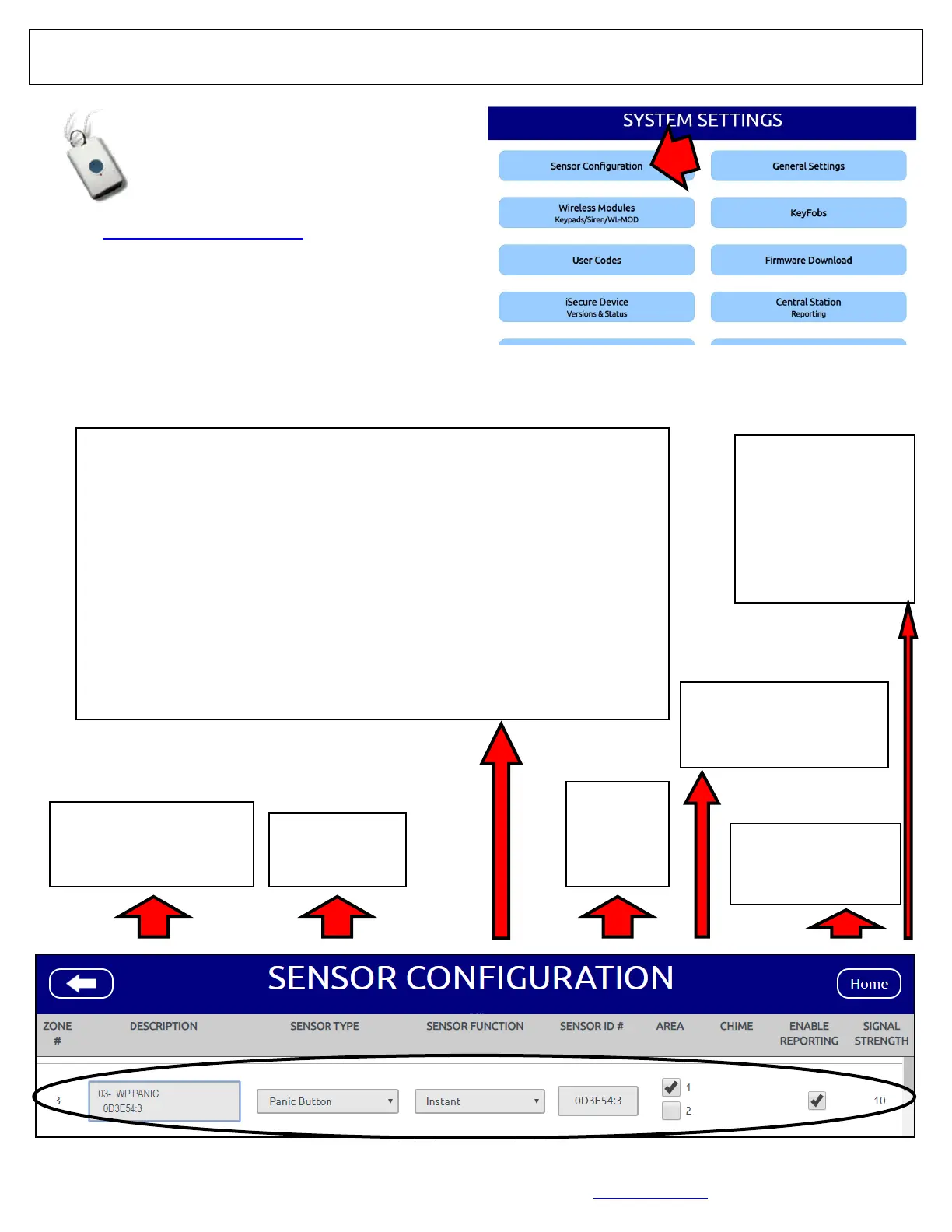
1. Go to www.iSecureByNapco.com and log into your iSe-
cure account.
2. Click Sensor Configuration.
3. In the SENSOR CONFIGURATION screen (shown be-
low), program each ISEC-PANIC as indicated (when fin-
ished, click Save).
ISEC-PANIC Single Button Waterproof Panic
DESCRIPTION
Type the sensor descrip-
tion you wish to appear
on the keypad display
SENSOR TYPE
Select "Panic
Button".
SENSOR ID
Type in the
7 digit sen-
sor ID # for
the device
AREA
Default = 1. See the key-
pad Operating Guide for
the definition of "Area".
ENABLE
REPORTING
Check to enable cen-
tral station reporting
1
2
4
5
6
3
SENSOR FUNCTION
Each transmitter can be designated to function in a particular manner. Select
one of the following:
Instant: Allows for an immediate alarm when the panic button is pressed,
providing instant protection.
24Hr Zone Audible: Provides protection at all times, whether or not the system
is armed, by sounding a siren when the panic button is pressed. Reports as
E150.
24Hr Zone Silent: Provides protection at all times, whether or not the system is
armed. When the panic button is pressed; when armed and the panic button
is pressed, a silent alarm is sent to the central station. Reports as E150.
Audible Panic: Pressing the panic button causes the siren to immediately
sound and an emergency report sent to the central station. Reports as E123.
Silent Panic: Pressing the panic button causes a silent report to be sent to the
central station (i.e. the user can silently signal an emergency). Reports as
E122.
SIGNAL STRENGTH
Relative intensity of the
last transmission, on a
scale of 1-10 (10 being
the strongest). Note: A
reading of 3 or less indi-
cates reception may be
erratic; relocating the
Hub may be necessary.
7




 To Next Page