Napco iSecure Security System All technical manuals are available in PDF format at tech.napcosecurity.com 43
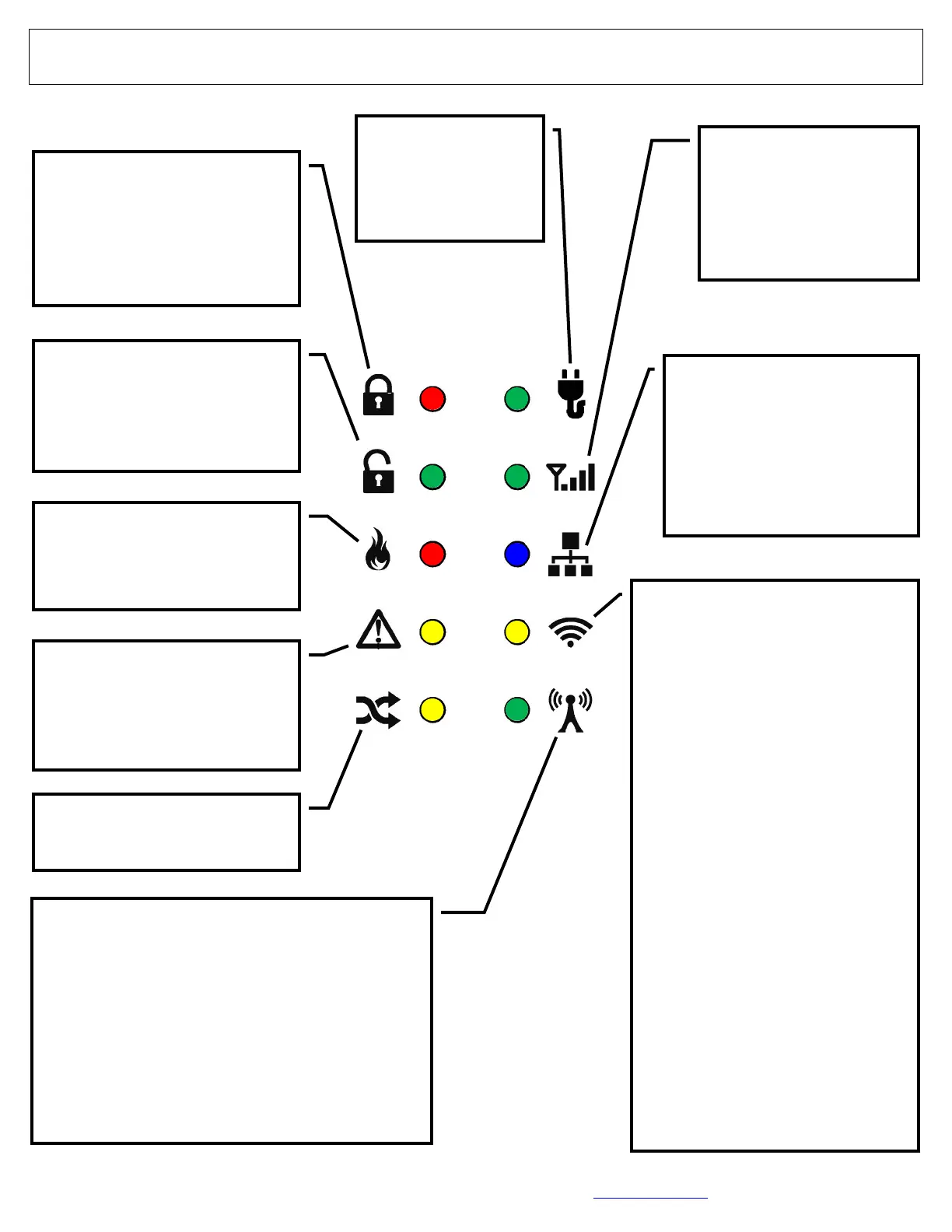
Go-Anywhere Smart Hub Icons
"ARMED" Light (Red)
• Steady On: Armed
• Slow Flash: Alarm
• Rapid Flash: Instant
• Off: Disarmed
"Smart Hub AC"
(Green)
• On: AC On
• Off: AC Off
"Cellular Signal
Strength" (Green)
• Flashes: Smart Hub
cellular signal
strength 1-8
"STATUS" Light (Green)
• On Steady: Disarmed and
all zones secured
• Off: Open Zone
"Fire" (Red)
• On Steady: Fire Silenced
• Pulsing: Fire Alarm
"Trouble" (Yellow)
• Steady: System Trouble
Acknowledged
• Flashing: System Trouble
"Bypassed" (Yellow)
• On: Zone(s) Bypassed
Wireless Sensor Transmissions (Green)
• On: Receiver trouble due to excessive radio
noise in area. Try relocating the Smart Hub.
Otherwise, call for service
• Rapid Flicker: Transmissions in progress
• Flashing: 900MHZ peripheral download
Status
• Off: No transmissions
"Operational Status" (Blue)
• Normal: Momentary Blink
every 10 seconds
• All Other Blinks: Cellular
Communications in
progress
"IP Network Wi-Fi" (Yellow)
• OFF: Network OK
• Rapid Flashes: No IP connec-
tion
• 1 blink: No network cable de-
tected
• 2 blinks: No access to Internet
via network cable
• 3 blinks: Ethernet failed to com-
municate
• 4 blinks: Ethernet poll / checkin
failure
• 5 blinks: Wi-Fi enabled but no
Wi-Fi installed
• 6 blinks: No Wi-Fi access to in-
ternet
• 7 blinks: Wi-Fi failed to com-
municate
• 8 blinks: Wi-Fi poll / checkin fail
• 9 blinks: Wi-Fi no serial data
response
• 10 blinks: Wi-Fi security authen-
tication failed




 To Next Page