User & Service Manual Natus Quantum Amplifier
41
7. Setup
7.1. Connecting the Natus Base Unit
The Quantum amplifier system is designed to work with a Natus computer system running Natus
NeuroWorks/SleepWorks software.
1. Confirm the base unit is mounted via the Quick Disconnect Bracket to either a system cart or wall
mount track.
2. Connect the amplifier base unit to the acquisition computer using a network cable or via USB. The
base unit can be connected to a standard switched gigabit network jack or to a secondary gigabit
network interface card (recommended) on the acquisition computer.
3. Connect the power cable, base to breakout cable, patient event button, and any additional
accessories (DC input cables, Stimulator adapter cable etc.) as required.
7.2. Potential Equalization Conductor
The Natus base unit provides a potential equalization conductor for optional use. To install, connect a
bus cable from the potential equalization conductor to the potential equalization busbar of the electrical
insulation in the room where the Quantum system is used.
7.3. Connecting the Breakout Boxes to the Natus Base Unit
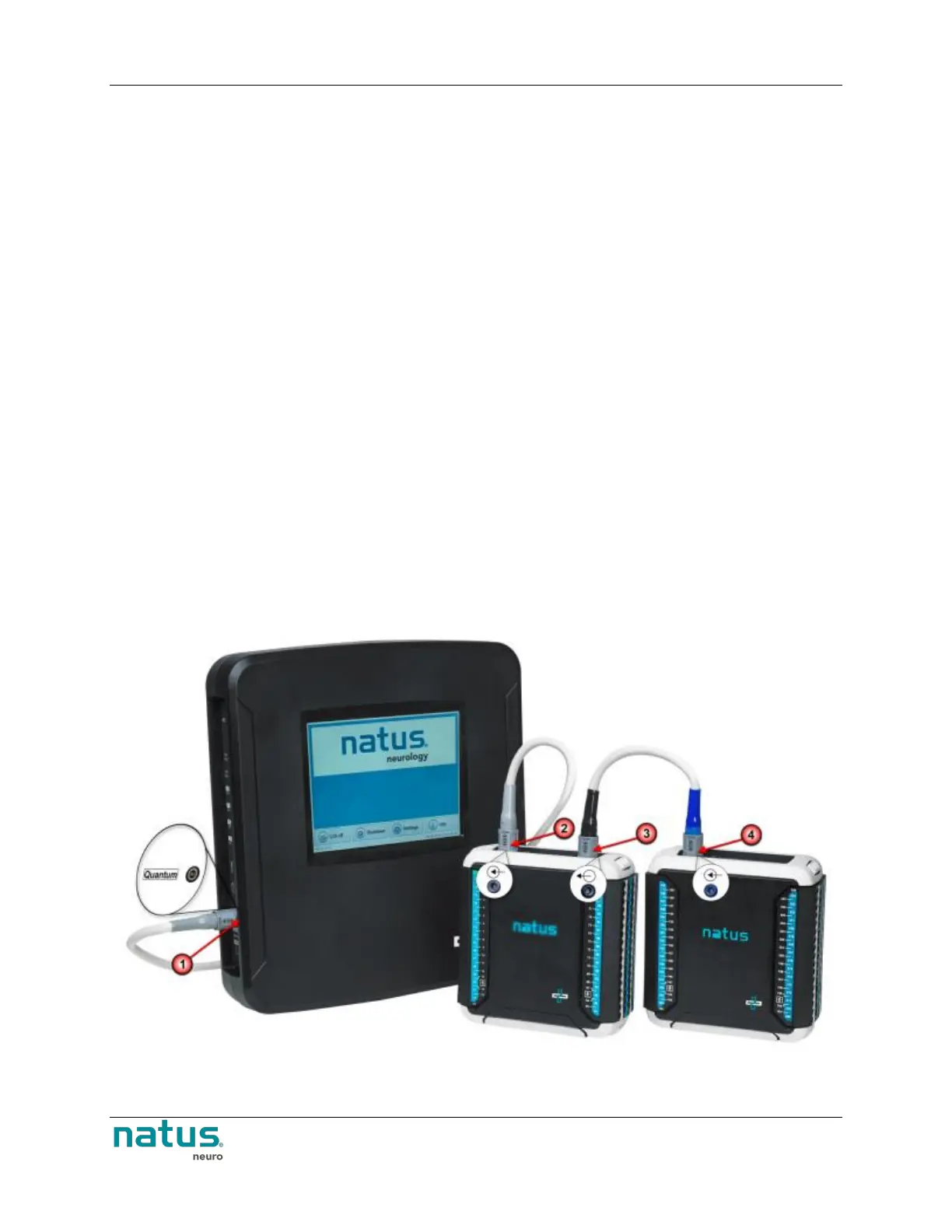
The Natus Base unit and Breakout Boxes can be interfaced with a quick and easy connection of the
patient tether cable. The connection on the Breakout and the Natus Base unit are light gray for easy
identification.











 To Next Page