User & Service Manual Natus Quantum Amplifier
43
7.4. Connecting the Standard or Bulk Connector Pin Boxes to the
Breakout Box
Quantum provides multiple Pin Box options for input connections. The Standard Pin boxes, Quantum 10-
10/10-20 Pin box, and Bulk Connector Pin boxes are easily connected to the Quantum Breakouts by
following the steps described in this section.
To Connect the Standard or Bulk Connector Pin Boxes:
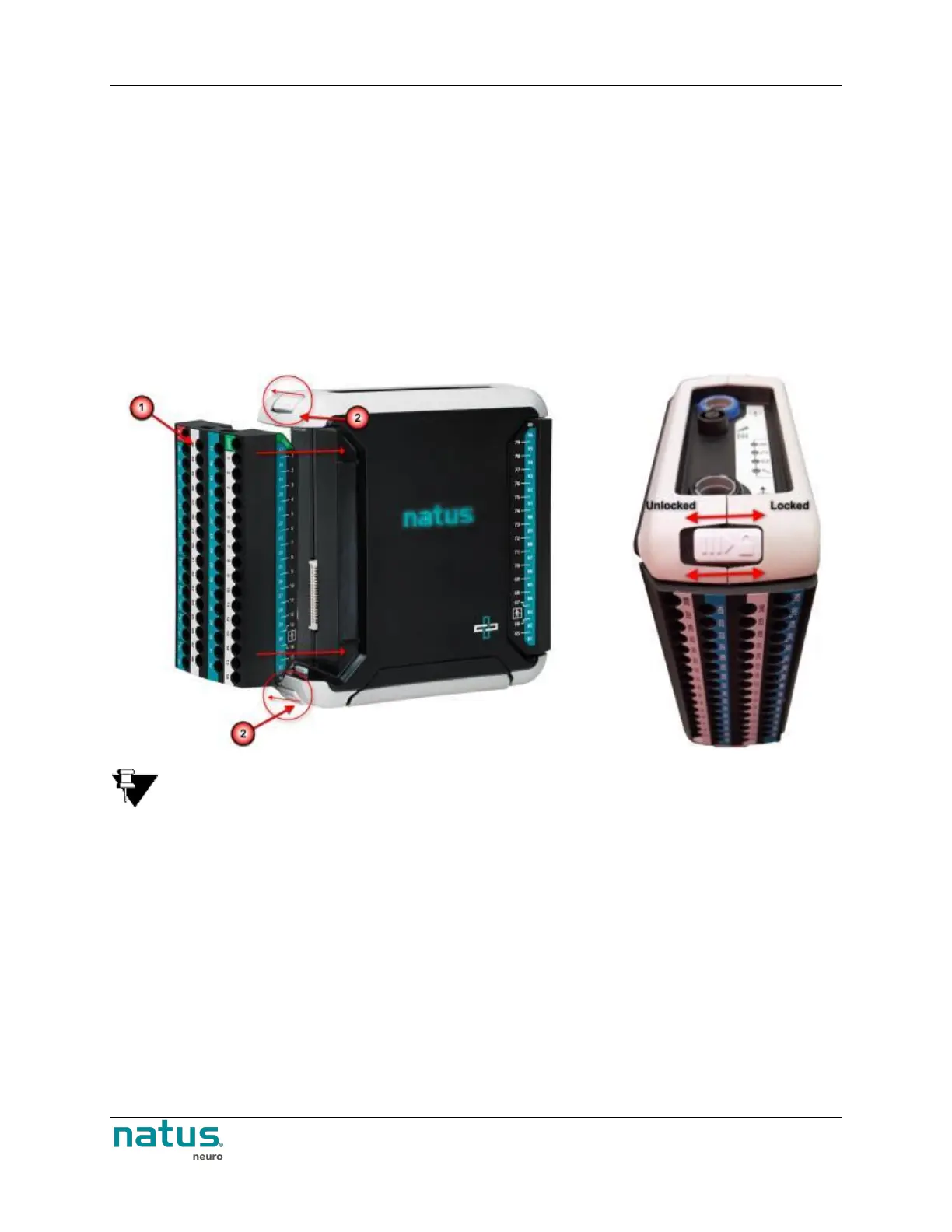
1. Connect the Standard (#1 in the image below) or Bulk Connector (Not Shown) Pin box to the
Breakout box by seating the pin box module into place.
2. Once the pin box module has been seated into position, lock the module onto the breakout box
(#2 in the image below) by sliding the lock towards the back of the breakout box.
3. Seat and lock additional pin boxes into the breakouts as required.
NOTE: Prior to removing the Standard or Bulk Connector pin boxes from the breakout, ensure
you have unlocked the unit by sliding the locks toward the front of the breakout box.
7.5. Quantum 10-10/10-20 Pin box
The Quantum 10-10/10-20 Pin box option can be connected directly to the Quantum’s main Breakout to
facilitate EEG recordings while using the 10-10 and 10-20 electrode placement systems. The Quantum
10-10/10-20 Pin box can be used for routine EEG recordings, extended EEG recordings, PSG recordings,
and more, by providing the following:
75 10-10 EEG inputs
6 additional EEG inputs – Sp1, Sp2, T1, T2, Cb1, and Cb2
2 dedicated EOG inputs – LOC and ROC
2 dedicated ECG inputs – ECG+ and ECG-
38 additional universal EEG inputs











 To Next Page