Natus Quantum Amplifier User & Service Manual
44
Dedicated REF and GND inputs
Uniquely colored 10-20 inputs to facilitate Routine EEG recordings
A secondary Breakout (129-256) may be connected to the system for additional channels.
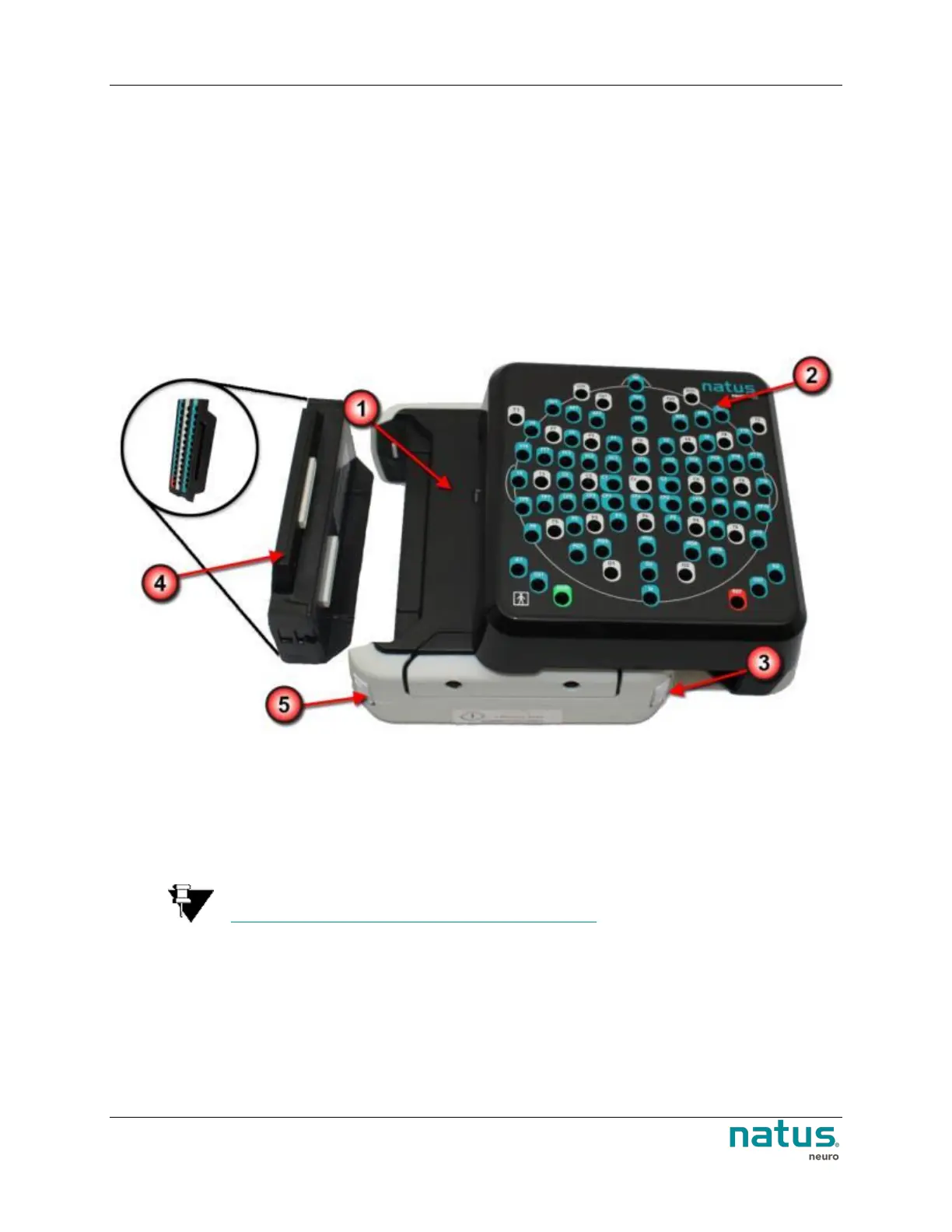
To connect the 10-10/10-20 Pin box to the Quantum Main Breakout:
1. Connect the 10-10/10-20 Pin box (#2 in the image below) to the Quantum Main Breakout (#1 in
the image below) by seating and locking (#3 in the image below) the larger pin box module into
place.
2. Once the larger pin box module has been connected, seat (#4 in the image below) and lock (#5 in
the image below) the smaller input module into position.
3. Create or select a Quantum montage which uses the 10-10 or 10-20 labels. Please refer to the
NeuroWorks or SleepWorks user manuals for additional information on how to create or select
the montage.
4. Ensure the 10-10/10-20 Pin box is enabled in the NeuroWorks/SleepWorks software by selecting
Edit | Settings | Acquisition (tab).
NOTE: Additional Breakout boxes can be added for additional channels. See
Connecting the Natus Base Unit and Breakout Boxes for additional information.











 To Next Page