www.naxa.com Page 27
Initial Setup
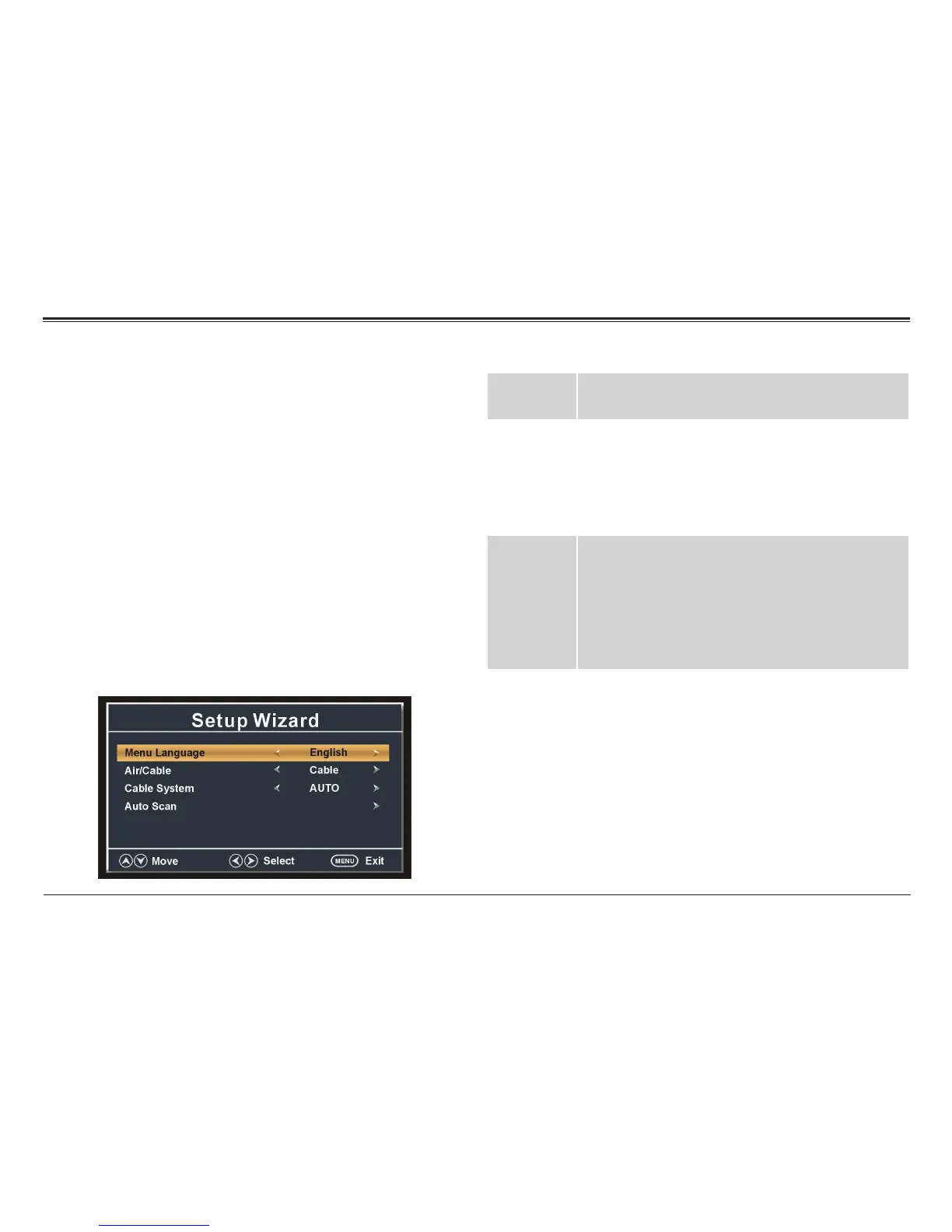
A setup wizard menu will appear the rst time you turn
on the TV. Adjusting the options on this menu will help
you get your TV ready for use.
• Press the CH–/CH+ buttons on the TV to select an
option.
• Press the VOL–/VOL+ buttons on the TV to adjust a
selected option.
• Press MENU to return to the previous screen and to
exit the menu when you are nished adjusting the
options.
⚠L
You may also use the arrow keys on the
remote control as indicated on screen.
Menu
Language
Set the system menu language.
Air/Cable Set the antenna system that will be used with
the TV.
• Select Air if you are using an antenna to receive
over-the-air TV broadcasts.
• Select Cable if you are using a cable TV system.
Cable
System
Set the cable system type. (This option cannot be
adjusted if the Air/Cable option is set to Air.)
• Select Auto, Std, IRC, or HRC to match your
cable system type.
Note: Select AUTO if you are not familiar with your
cable system type.
Auto Scan Automatically detect available channels and
save them to the Channel list.
Note: Set the Air/Cable and Cable System options
above before using the Auto Scan feature.
⚠L
The Setup Wizard options can also be set in
the TV system menu. Set the source mode
to TV, then press MENU to access the TV
system menu.



 To Next Page