47
Install Cabinets for Bottom-Row on Power Bar 6.3.2
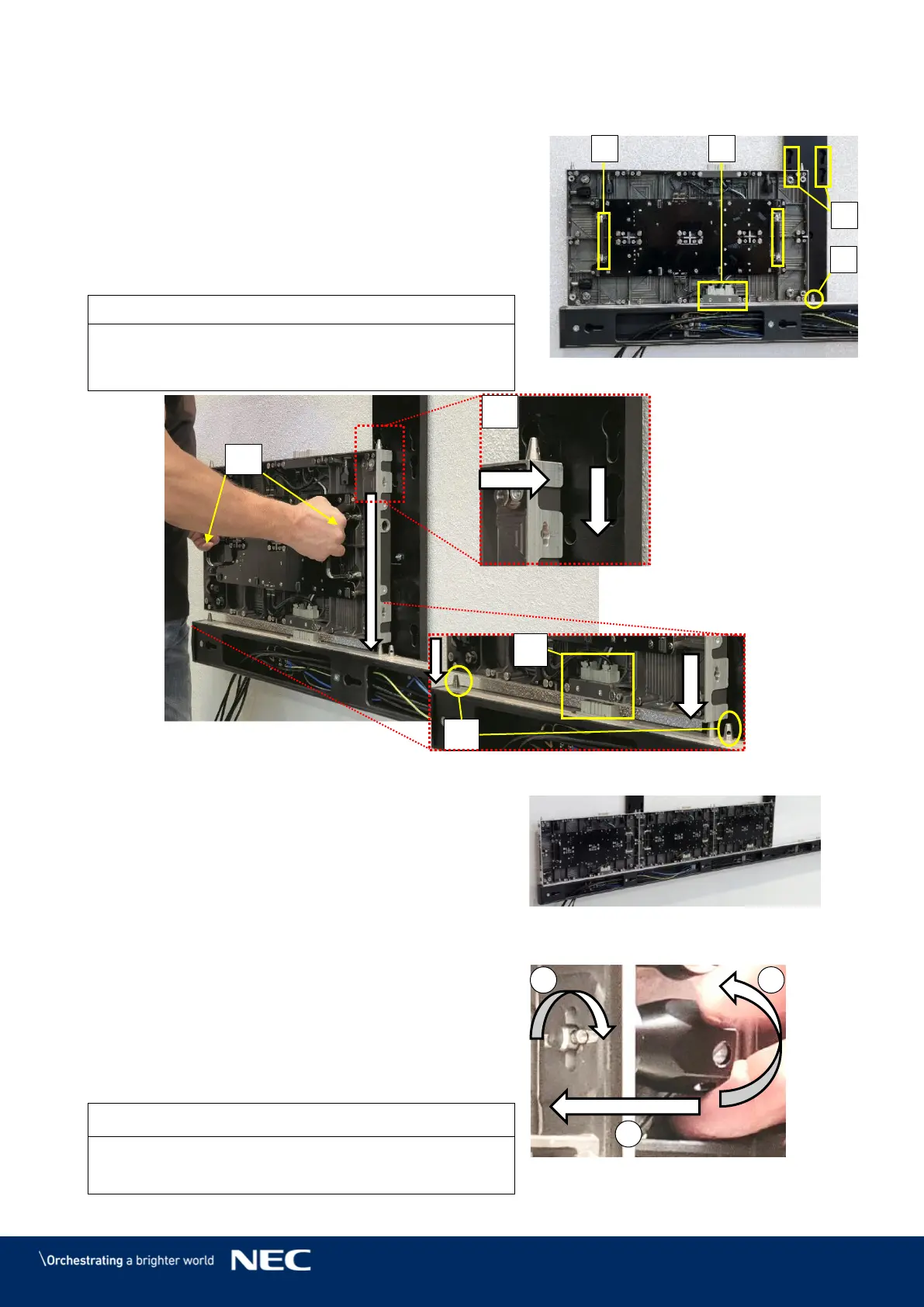
Use the grip handles on the cabinet (Figure 49,
A) to bring it into position at left corner on the
Power bar.
Align together the Cabinet hanger pins with the
Mounting bar sockets (B) and the Corner
alignment pins on the Power bar (C).
Lower the cabinet onto the Network-PS socket
(D), gently pressing it until it sits firmly.
Place the cabinet carefully and straight on top of the
Network-PS socket. Otherwise, the data connection
may be pushed out and not function properly.
Figure 49: Installing the First Cabinet
Install further cabinets until the first row is
Figure 50: Installing Additional
Cabinets – First Row
Connect each cabinet to its adjacent cabinets
with the Cabinet interlocks.
Push in the lock bolt.
Turn the lock bolt 90° to lock.
Fix the black nut to secure the lock finger
Figure 51: Locking Two Modules
Do not tighten the Cabinet interlocks too much.
Otherwise the cabinets cannot be aligned later on.



 To Next Page