50
6.4
Connect Power and Data Cables to Power Bar
This section is a guide to power and data connection in the Power bar.
Only trained personnel, such as electricians or NEC personnel, may
connect the internal power supply to mains power supply.
Table 10: Cable Connection Requirements
Cabinets securely installed
External power cable (not included in delivery)
Data cables from LED Wall to NovaStar Controller (Cat cable, FTP Cat5e)
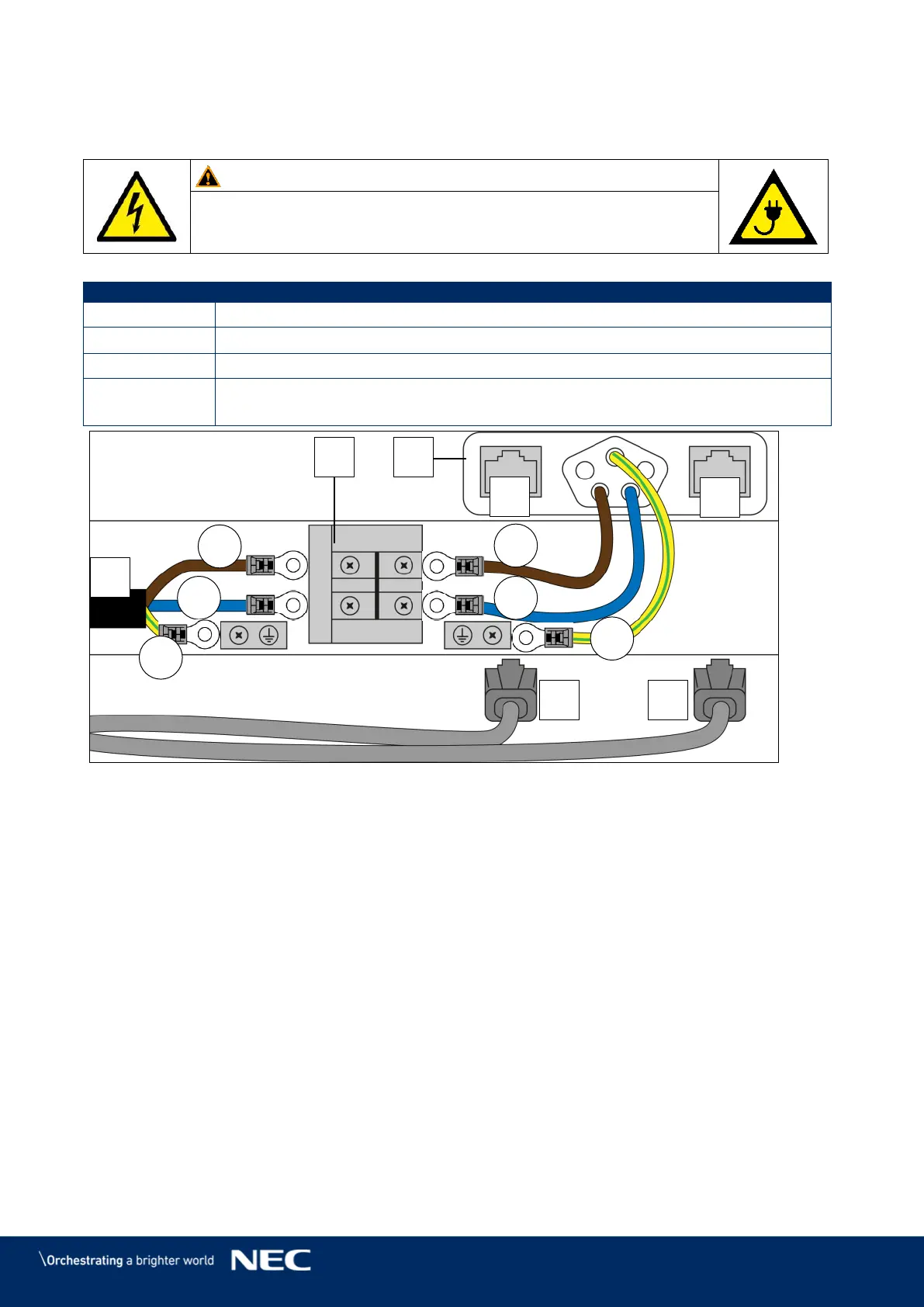
Figure 57: Connections in Power Bar
Ethernet port backup data
Network and supply socket in Power bar
Connect Data Cables to the Power Bar 6.4.1
Prepare the data connection according to the cabling plans, see 15.1 Cable Plans. Step 1)
Each column of cabinets needs one main and one backup data input.
Connect the main data input to the left Ethernet ports and the backup data input to the Step 2)
right Ethernet ports in the Power bar. See also Figure 57.



 To Next Page