Chapter 6: Component Locations 167
Component
Locations on
the CDE3994
Controller-Drive
Tray and the
CDE3992
Controller-Drive
Tray
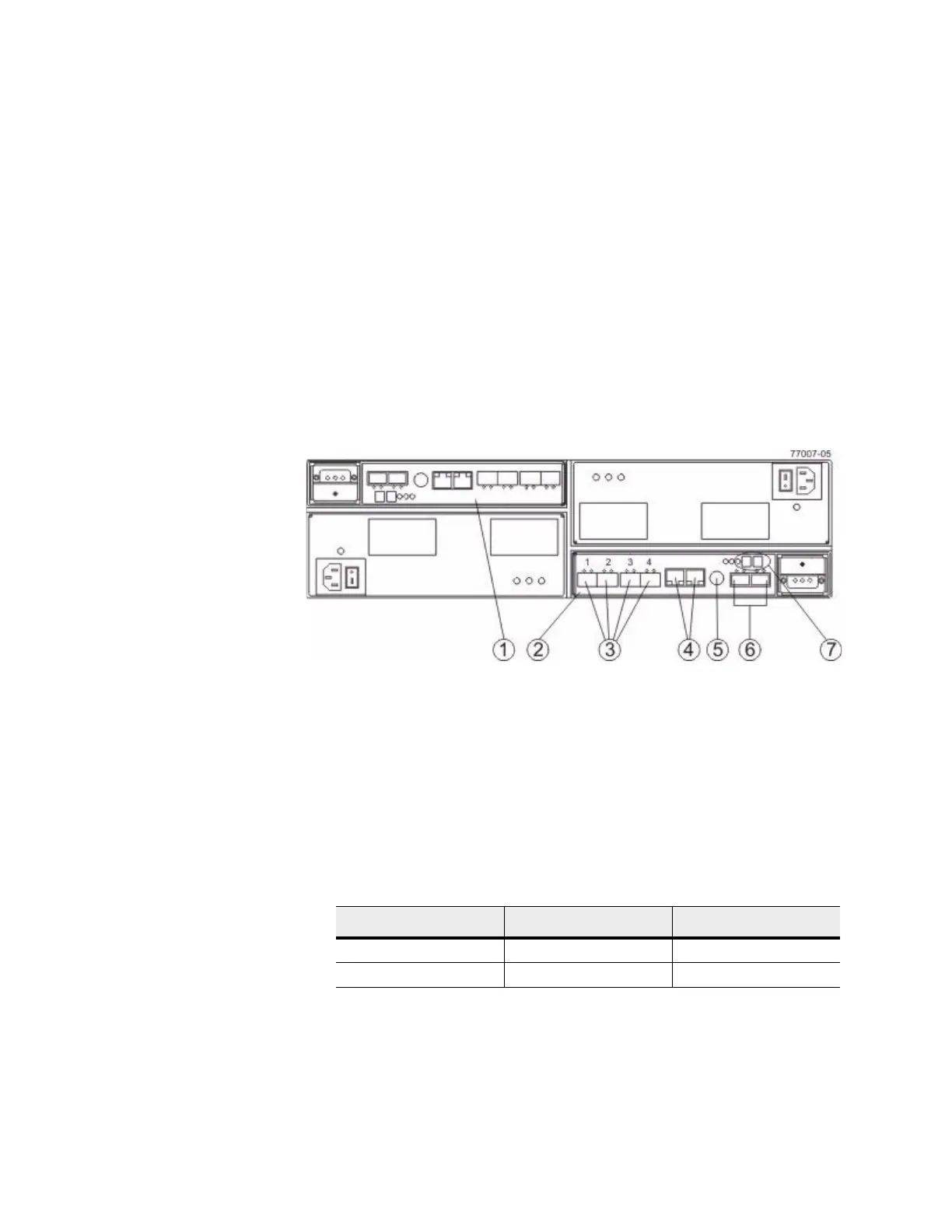
The following figure shows the AC power option.
Figure 13 Component Locations on the CDE3994 Contr
oller-Drive Tray and the
CDE3992 Controller-Drive Tray – Rear View
1. Controller A (Inverted)
2. Controller B
3. Host Ports (2 Ports for the CDE3992 Controller-Drive Tray
or 4 P
o
rts for the CDE3994 Controller-Drive Tray)
4. Ethernet Ports
5. Serial Port
6. Dual-Ported Drive Ports
7. Seven-Segment Display
Table 2 Drive Ports and Drive Channels on the CDE3994 Controller-Drive Tray
and the CDE3992 Controller-Drive Tray
Drive Channel Number Controller Drive Port Identifier
1 A 2 and 1
2 B 1 and 2









 To Next Page