168
Component
Locations on
the E2600
Controller-Drive
Tray
The E2600 controller-drive tray is available in two different drive configurations: one
with up to twelve 3.5-in. drives and another with up to twenty-four 2.5-in. drives.
With either drive configuration, the controller-drive tray is available in two different
controller configurations: simplex and duplex.
Keep these points in mind when you compare the figures in this section to your
hardware.
The top of the controller-drive tray is the side with the labels.
The configuration of the host ports depends on which host interface card
configuration is installed.
The figures in this section show the AC power option.
NOTE On the E2600 controller-drive tray, each controller has a pair of levers with
handles for removing the controller from the controller-drive tray. If a controller has a
HIC installed, one of these handles on the controller is located next to a host port on
the HIC. The close spacing between the handle and the host port might make it difficult
to remove a cable that is attached to the host port. If this problem occurs, use a
flat-blade screwdriver to compress the release on the cable connector.
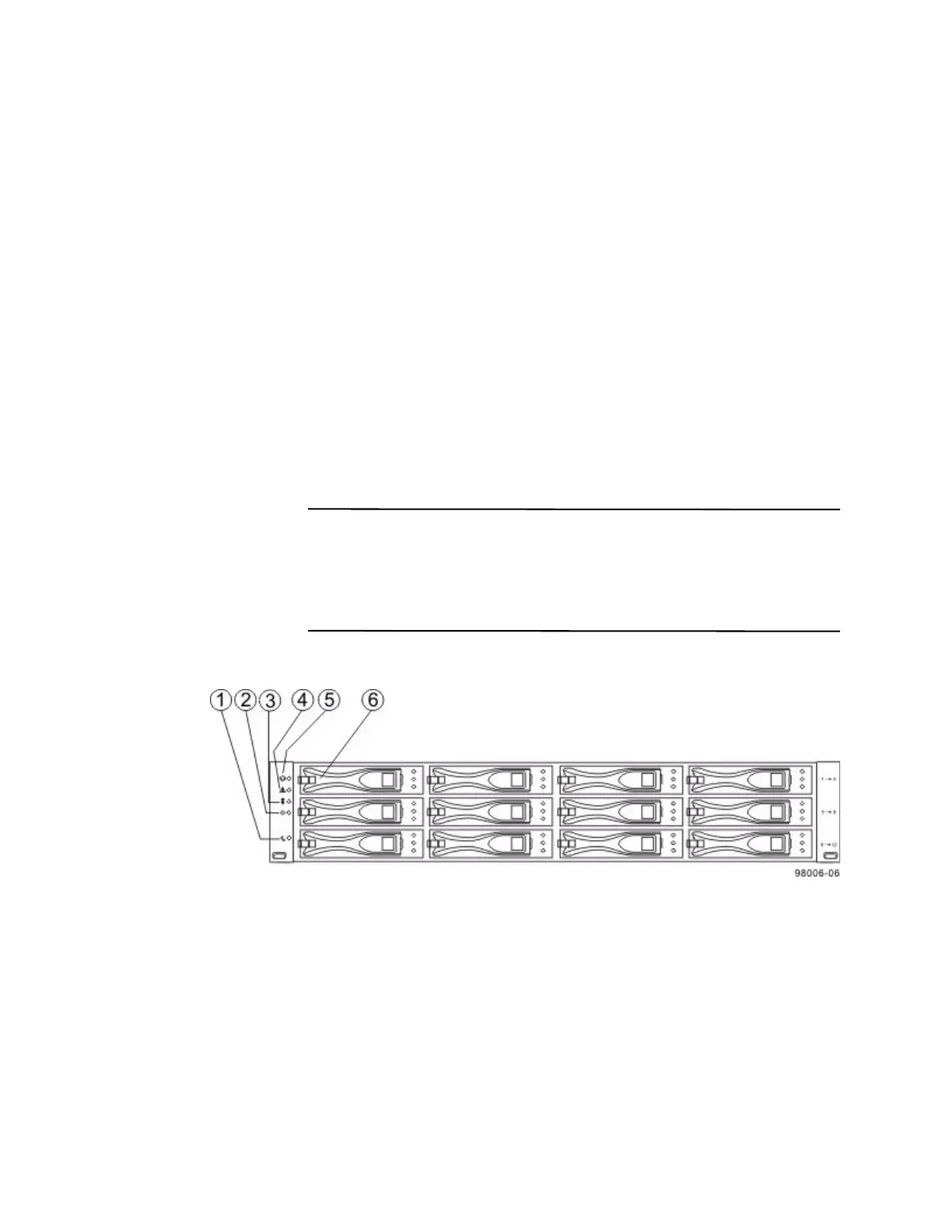
Figure 14 E2600 Controller-Drive Tray with 12 Drives – Front View
1. Standby Power LED
2. Power LED
3. Over-Temperature LED
4. Service Action Required LED
5. Locate LED
6. Drive Canister









 To Next Page