Chapter 8: Hardware Installation for Synchronous Mirroring 213
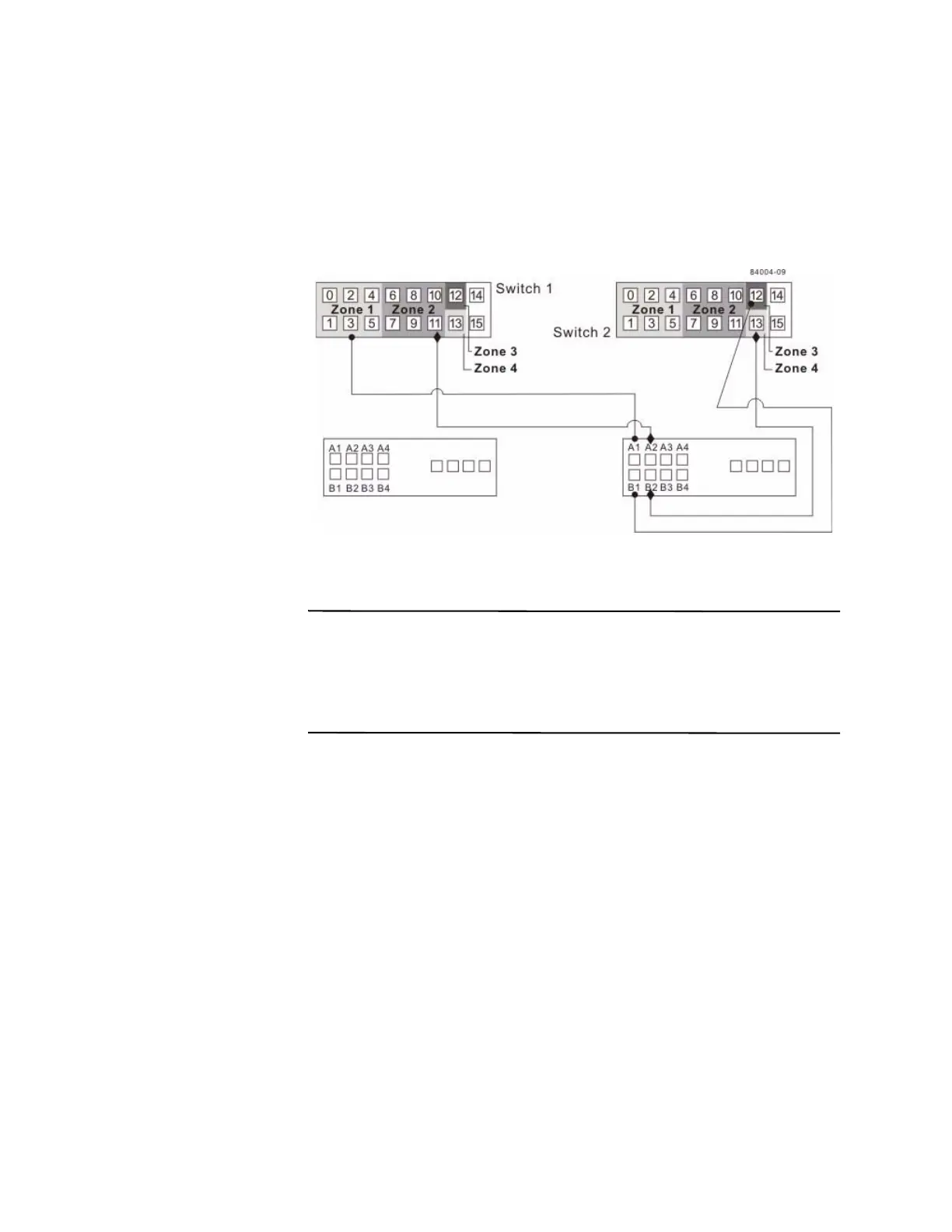
13. Connect controller port B2 of the secondary storage array to an available port in
zone 4 of switch 2. In a four-host-port system, connect controller port B4 to an
available port in zone 4 of switch 2.
Figure 18 Secondary Storage Array Connectio
ns
to Fibre Channel Switches
14. Connection for the intra-site configuration is complete. Repeat step 4 through
step 13 for any additional storage arrays that exist in the same cabinet that will
use the Synchronous Mirroring premium feature.
ATTENTION Possible hardware damage – DC-powered controller-drive trays and
drive trays have special power procedures that you must follow beyond the procedures
for AC-powered trays. To get specific power-off and power-on procedures, refer to the
topics under the storage array installation for the hardware that you are installing or to
the corresponding PDF document on the SANtricity ES Storage Manager Installation
DVD.
15. Turn on the power to all storage arrays, hosts, Fibre Channel switches, and any
other hardware where power was turned off.
16. The hardware installation is complete. Refer to the online help topics for
procedures to configure the storage management software to support mirror
relationships.









 To Next Page