5 Menu Key
134 Total Station NPL-322 Instruction Manual
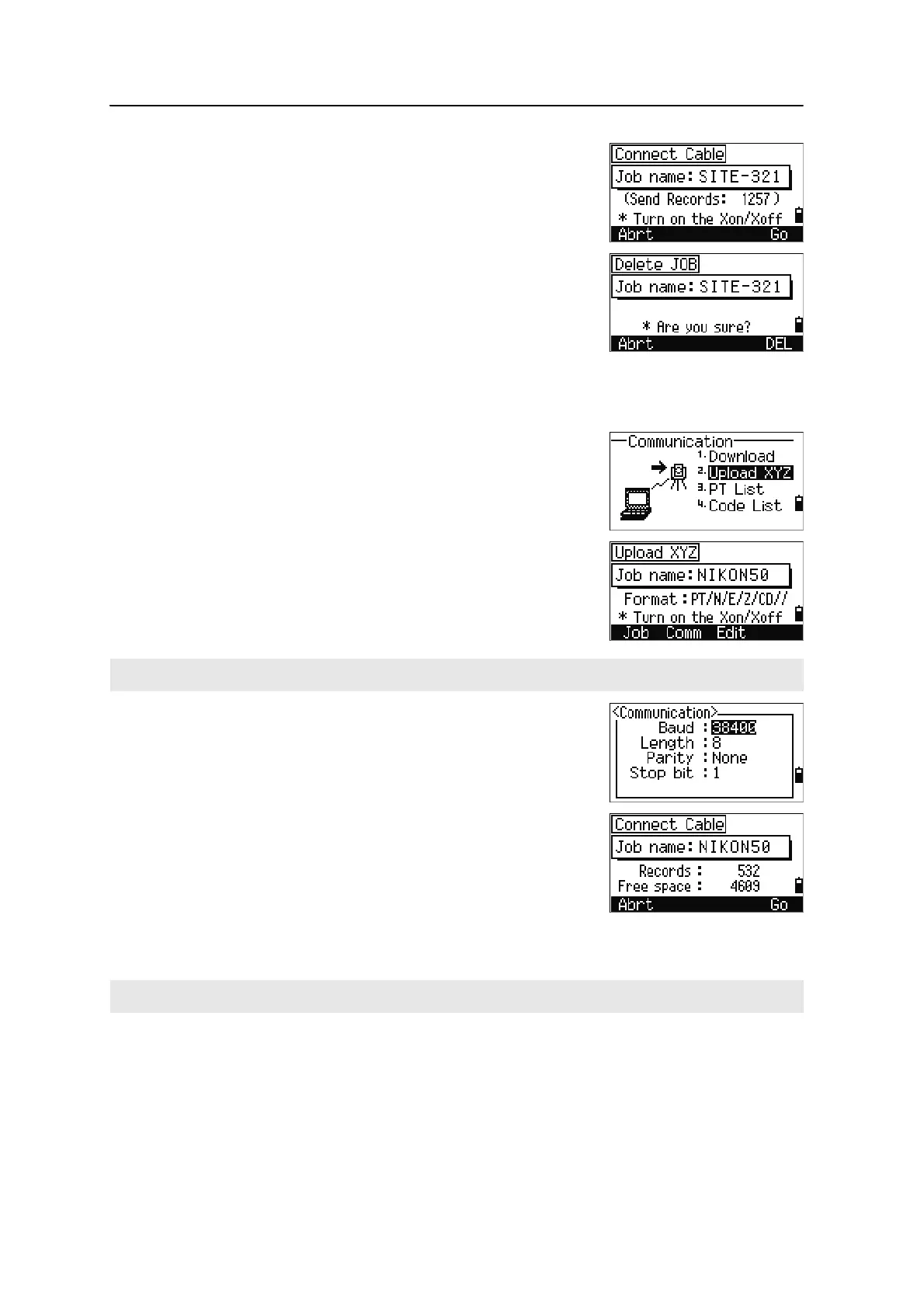
As each record in the current job is output from the
instrument (downloaded), the current line number is
updated.
After downloading is completed, you can choose to
delete the current job.
To delete the current job, press
[4]. To return to the
Basic Measurement Screen (BMS), press
[ESC] or the
Abrt softkey.
Uploading coordinate data
To upload coordinate data from a computer, press [2] or
select
Upload XYZ in the Communication menu.
The default data format appears. To change the order
of data fields, press the
Edit softkey. For more
information, see Advanced feature: Editing the data
order for upload, page 135.
Otherwise, just press
[ENT].
To change the communication settings, press the
Comm
softkey. The serial port settings must match the settings
used by the terminal software on the computer.
Use an RS-232C cable to connect the instrument to the
computer.
The Free space field shows the number of points that
can be stored.
Press
[ENT] to put the instrument in receive mode. Then
use the Send Text File command in the terminal program on the computer to start
sending data.
Press the Job softkey to go to the Job Manager screen. For more information, see Job Manager, page 98.
In the terminal program, set flow control to Xon/Xoff.


 To Next Page