Total Station NPL-322 Instruction Manual 51
Getting Started 3
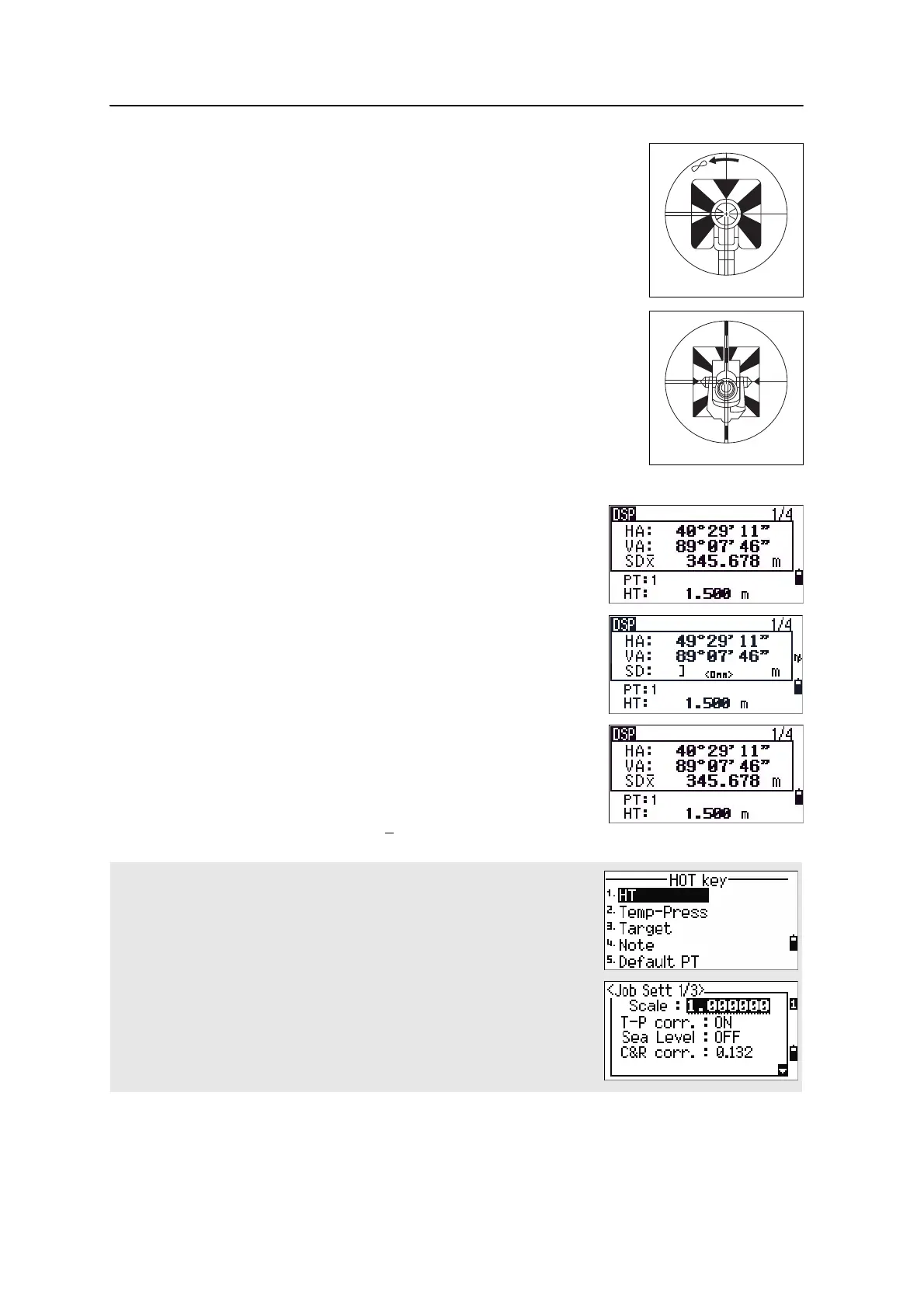
Sight the telescope to see crosshairs at the center of the prism
reflector.
Measuring distances
To take a distance measurement, press [MSR1] or [MSR2] in
the Basic Measurement Screen (BMS) or in any
observation screen.
While the instrument is taking a measurement, the
prism constant appears in a small font.
If the average count is set to 0, measurements are taken
continuously until you press
[MSR1], [MSR2], or [ESC]. Each
time a measurement is taken, the distance is updated.
If the average count is set to a value from 1 to 99, the
averaged distance appears after the last shot. The field
name SD changes to SDx
to indicate the averaged data.
To change the height of target (HT), temperature, or pressure, press [HOT]. For
more information, see [HOT] key, page 38.
Settings that relate to corrections
(T-P corr, Sea Level, C&R corr., and Map projection) are included in the job
settings. These settings are job-specific. If you need to change any of these
settings, you must create a new job. For more information, see Job settings,
page 99, and Settings, page 114.
Sighting a tiltable single prism



 To Next Page