Total Station NPL-322 Instruction Manual 13
Preparation 2
Detaching and Re-Attaching the Battery Pack
Detaching the battery pack
C
CAUTION – Avoid touching the contacts on the battery pack.
1. If the instrument is turned on, press [PWR] to turn it off.
2. Turn the battery box release knob counterclockwise, open the battery box cover
and remove the battery pack from the battery box.
Attaching the battery pack
Before attaching the battery pack, clear any dust or other foreign particles from the
battery contacts.
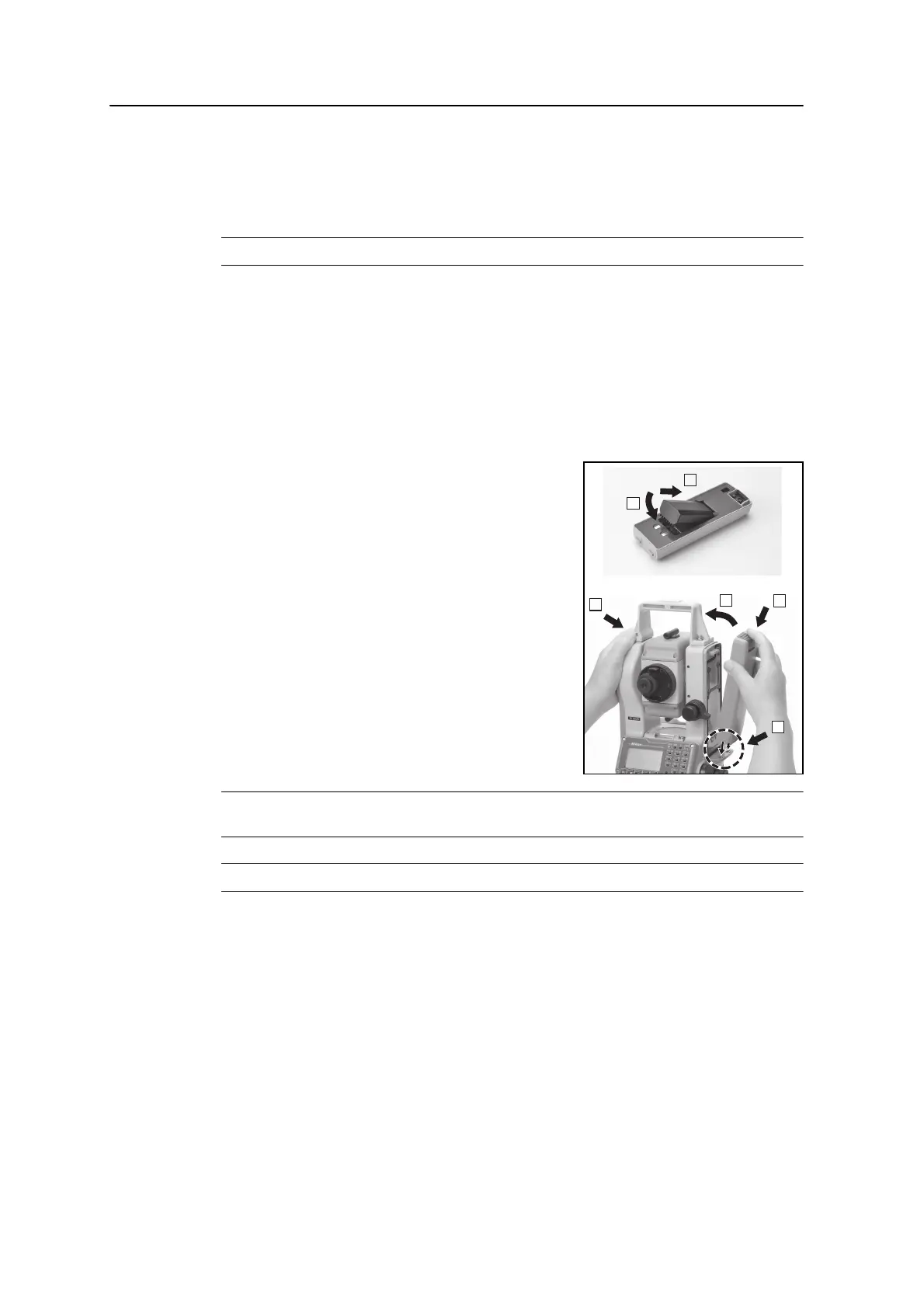
1. Hold the instrument steady with one hand.
2. Fit the two projections at the bottom of the
battery pack into the concave sections at the
bottom of the instrument.
3. Press the battery mounting button.
4. Push the battery pack against the instrument
and release the battery mounting button.
Make sure that the battery mounting button is
fully released and the battery is securely
attached to the instrument.
C
CAUTION – If the battery pack is not attached securely, this could adversely affect the
watertightness of the instrument.
C
CAUTION – BC-65 battery pack cannot be used with NPL-322 series.
5
6
4
2
3
1


 To Next Page