,QVWDOODWLRQ
Installing a UZC-256 Module
2-24 AFP-300/AFP-400 Installation PN 50253:C1 05/22/97
,QVWDOOLQJD8=&0RGXOH
2YHUYLHZ
You can mount the UZC-256 into a CAB-X3 or a CAB-400AA. This section shows
how to install the UZC-256 both ways. For information on configuring the UZC-256
module, refer to Section 5, “Applications.”
&$%; ,QVWDOODWLRQ
The UZC-256 mounts beneath the third and fourth modules on the CHS-4 chassis, to
the right of the CPU. Install the module as follows:
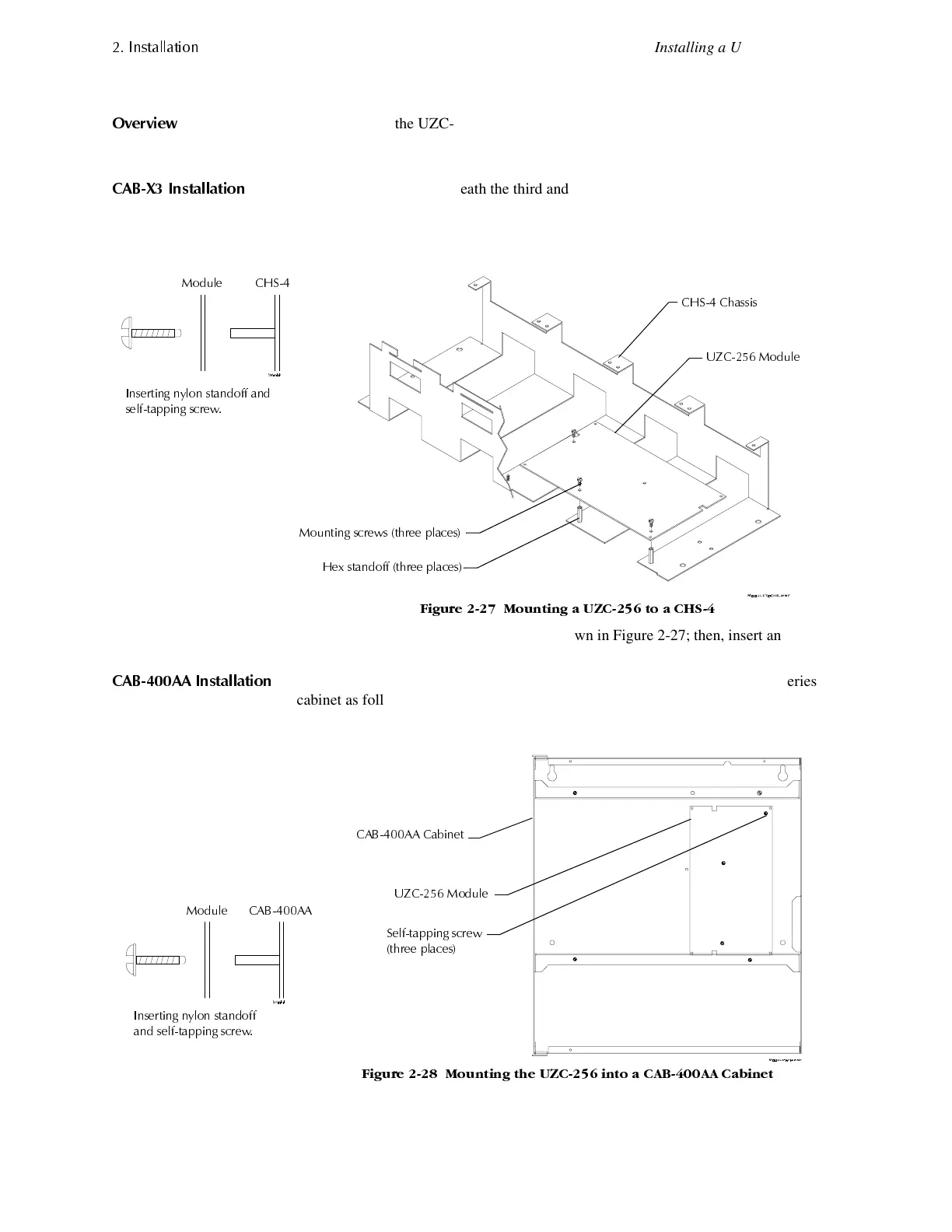
1. Thread the supplied three hex standoffs to the mounting studs on the CHS-4
chassis (Figure 2-27).
)LJXUH 0RXQWLQJ D 8=& WR D &+6
2. Place the module onto the CHS-4 as shown in Figure 2-27; then, insert and tighten
the mounting screws.
&$%$$ ,QVWDOODWLRQ
You can also mount the module to the upper right corner of the CAB-400AA Series
cabinet as follows:
1. Place the module into the CAB-400AA as shown in Figure 2-28.
)LJXUH 0RXQWLQJ WKH 8=& LQWR D &$%$$ &DELQHW
2. Attach the module to the CAB-400AA with the self-tapping screws.
+H[ VWDQGRII WKUHH SODFHV
0RXQWLQJ VFUHZV WKUHH SODFHV
8=& 0RGXOH
&+6 &KDVVLV
,QVHUWLQJ Q\ORQ VWDQGRII DQG
VHOIWDSSLQJ VFUHZ
&+60RGXOH
,QVHUWLQJ Q\ORQ VWDQGRII
DQG VHOIWDSSLQJ VFUHZ
8=& 0RGXOH
&$%$$ &DELQHW
6HOIWDSSLQJ VFUHZ
WKUHH SODFHV
&$%$$
0RGXOH
www.PDF-Zoo.com


 To Next Page
 Loading...










