1-11
1. Intro.
Instructions for Use Manual 1 Introduction
GLU
GLU
Patient Result
102
Darryl Smith
13:42
OK
_________________________
Back
1
2
3
4
5
6
7
8
9
ABC...
0
Scan
List
Scan
Op: ****
Enter Patient ID
Name: A Unit-1
Name: A Unit-1
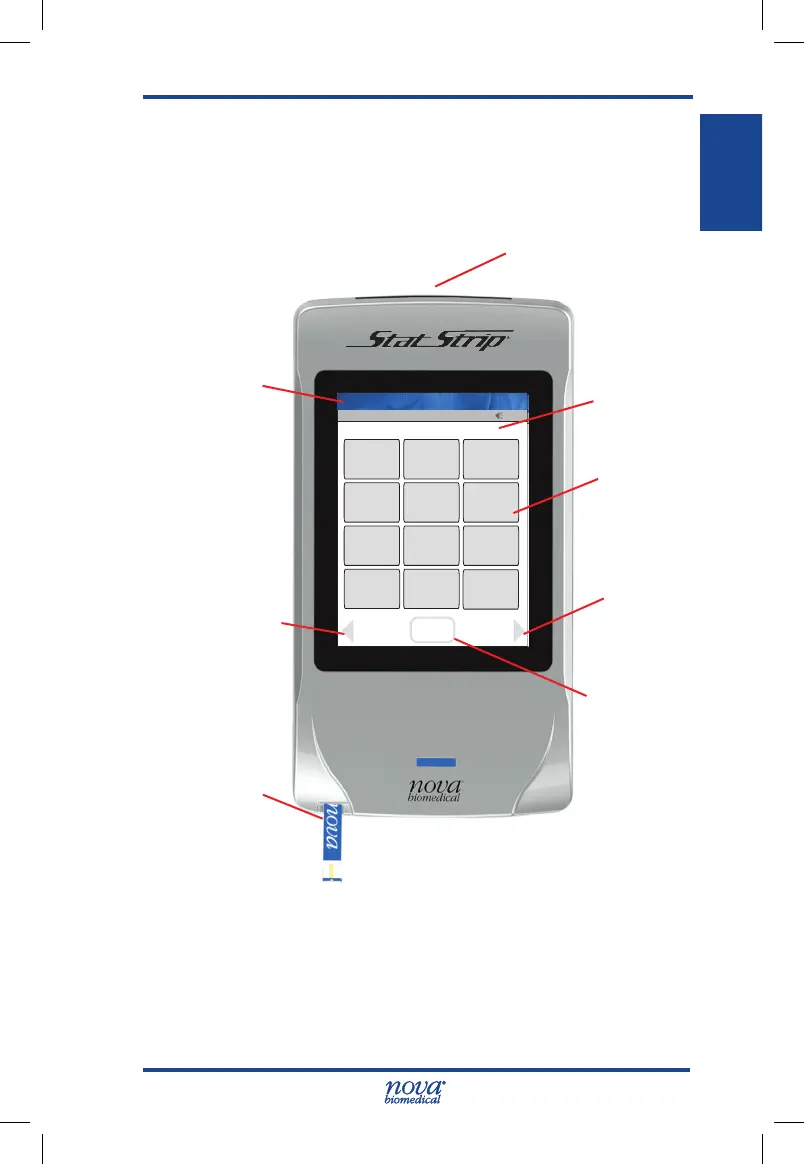
1.9 Operation Overview
The meter uses a touch screen for menu navigation and
data entry. An on-screen keypad allows manual data entry
of alphanumeric characters.
Figure 1.1 StatStrip Glucose Hospital Meter
The meter provides audible feedback of user inputs such as
key presses and barcode scans and audible and/or visual
feedback for prompts and user alerts. A built-in barcode
scanner provides automated data entry.
Laser Barcode
Scanner
Screen Title
Touch
Screen
On-screen
Keypad
Forward or
Right Soft
Key
Back or Left
Soft Key
Strip Port with
GLU Strip
OK, Scan,
Accept,etc.
Soft Key
StatStrip Glu IFU 1.86 PN55848E EN 510K.indd 11 9/13/18 8:29 AM



 To Next Page