A-43
Appendix A
Instructions for Use Manual Appendix A
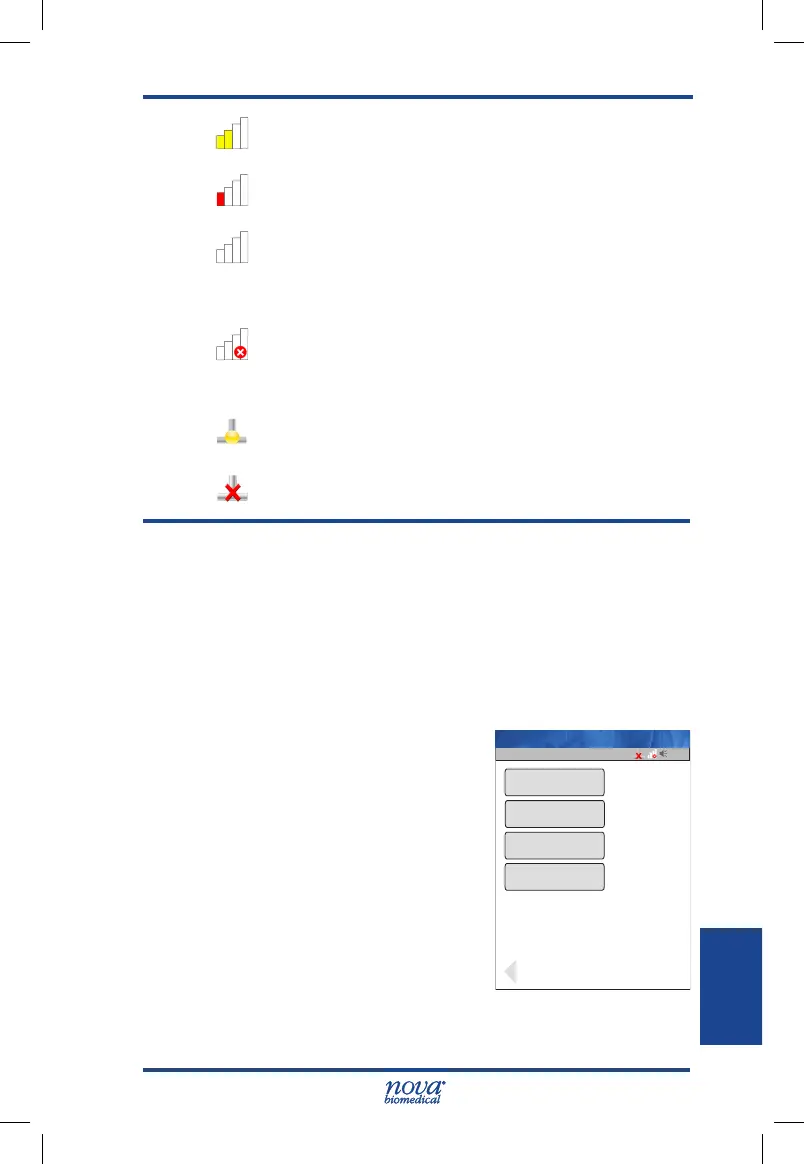
Radio is ON and connected to the WAP with ap-
proximately 1/2 signal strength..
Radio is ON and connected to the WAP with ap-
proximately 1/4 signal strength..
Radio is ON with no signal, or no connection to the
AP. In this state, the meter may be in the process
of attempting association with the local Wireless
Access Point (WAP).
Radio is OFF or no connection to WAP.
Network Connection status is displayed as follows:
Meter has established a connection and is com-
municating with the device manager.
Meter has not established communication with the
device manger.
A.9.5 Enabling/Disabling the WiFi Radio
If the meter is equipped with the wireless radio option, an
authorized operator may enable or disable it’s functionality
as required.
To enable the WiFi Radio, proceed as follows:
1. Log on to the meter with an appropriate Operator
ID.
2. Press the Menu, then the
Admin, then the Network
buttons.
3. Press the Set Srv, then
the Set WiFi buttons in the
bottom right corner of each
screen.
4. Press the Install Cert. but-
ton to load and activate the
security and encryption
certicates (if applicable
for the radio setup).
5. Press the WiFi ON/OFF button to toggle the radio
ON.
13:42
Factory/Custom
OffWiFi ON/OFF
Set Svr
Op: ****
Factory
SSID
Install Cert.
Name: A Unit-1
StatStrip Glu IFU 1.86 PN55848E EN 510K.indd 43 9/13/18 8:29 AM



 To Next Page