6-2
StatStrip Glucose Hospital Meter
6.2 Changing the Battery
If you have a spare fully charged battery, it can be changed
to allow for continuous operation.
WARNING: Replace the battery with Nova Biomedical Part
Numbers 46827 or 50436 only. Using another battery
may present a risk of re or explosion. If discarding,
dispose of the battery promptly. Keep the bat-
tery away from children.
1. Press the Power button to enter the Sleep Mode.
This will allow the operator approximately 20 sec-
onds to change the battery and not lose date/time
settings.
NOTE: If it takes longer than 20 seconds to change the
battery, power up the meter, log in, and set the date
and time: see Section 1.7.1 Power Up Procedure,
Section 1.8 Operator Login, and Section 1.9 Setting
the Time/Date.
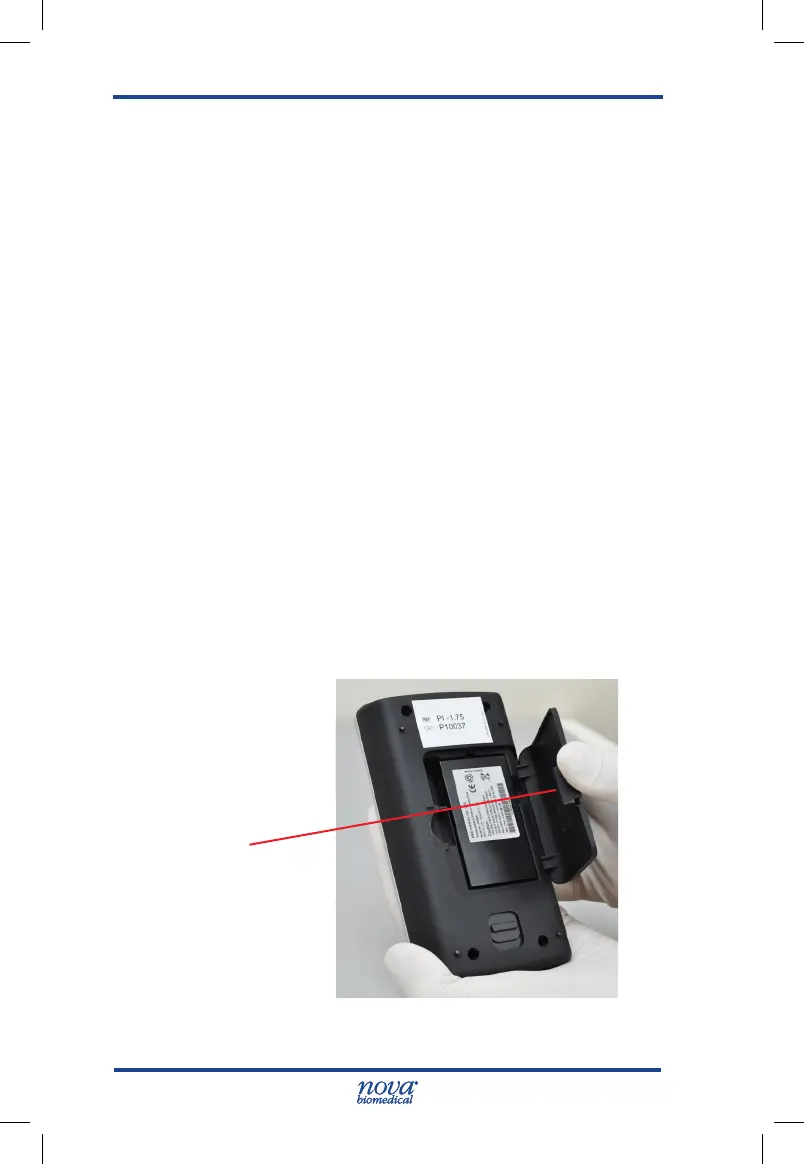
2. Pull back on the cover latch to release the cover.
Take the battery cover off the back of the meter.
Figure 6.3 Removing the Battery Cover
Cover Latch
StatStrip Glu IFU 1.86 PN55848E EN 510K.indd 2 9/13/18 8:29 AM



 To Next Page