1-13
1. Intro.
Instructions for Use Manual 1 Introduction
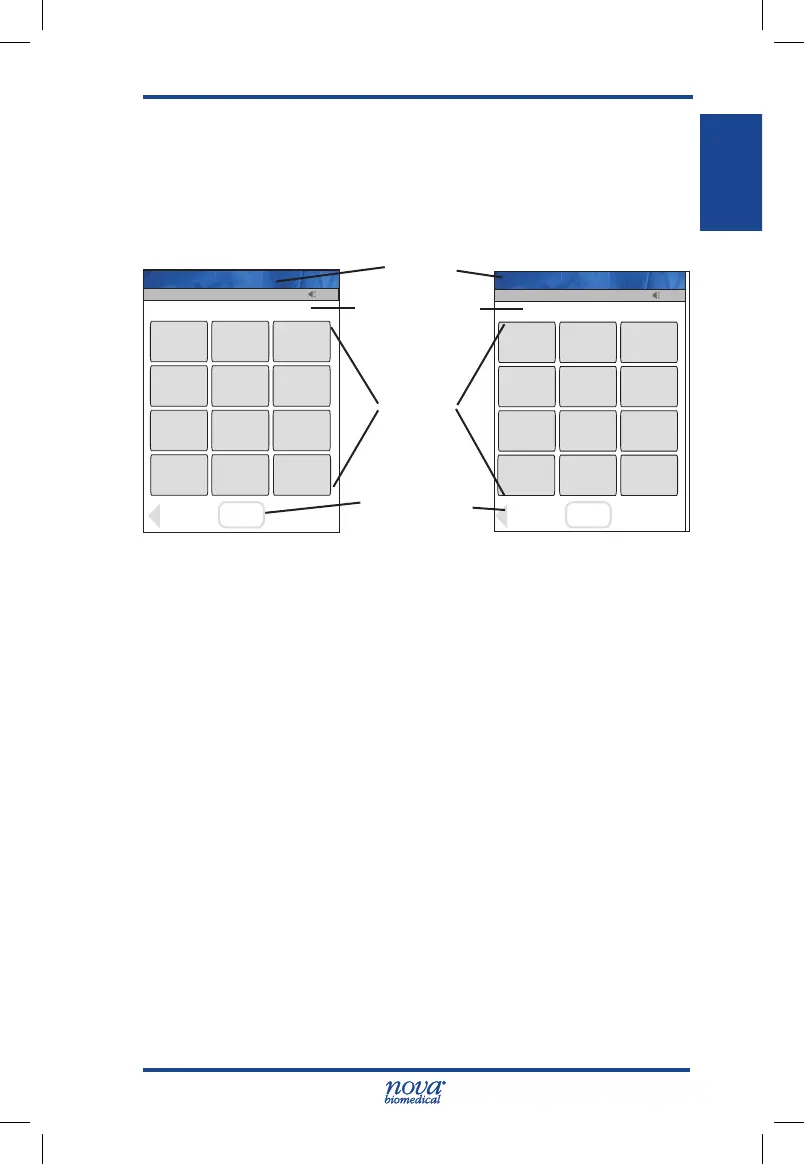
1.9.1 Using the Display Keypad
The Display Keypad has 2 formats: numeric and alphanu-
meric. To display the alphanumeric keypad from the numeric
display, press the 'ABC...' key. To display the numerical
display from the alphanumeric display, press the '0..9' key.
Figure 1.2 The Numerical and the Alphanumerical Keypad Screens
To use the alphanumeric keys, press the key with the letter
of choice until it is displayed in the text display above the
keypad.
The screen is composed of 3 sections:
1. A Title Bar (top) – the title of the screen, Time of day,
logged-in operator ID, Sound status, Meter name
2. The Body – data entries, selections, and screens
3. TheSoftKeyBar–conrmationofdataentryand
screen navigation
The StatStrip Glucose Hospital Meter has the following op-
erator input mechanisms:
• Soft buttons for menu navigation and menu prompt
acknowledgement
• Soft keyboard for data input
13:42
OK
_________________________
Back
1
2
3
4
5
6
7
8
9
ABC...
0
Scan
Scan
Name: A Unit-1
13:42
OK
_________________________
Back
/+-.!,
1
ABC
2
DEF
3
GHI
4
JKL
5
MNO
6
PQRS
7
TUV
8
WXYZ
9
0..9
space
0
Scan
Scan
Enter Operator ID
Name: A Unit-1
Title Bar
Data Entry:
cursor in active
entryeld
Body
Soft Buttons
StatStrip Glu IFU 1.86 PN55848E EN 510K.indd 13 9/13/18 8:29 AM



 To Next Page