CHAPTER 3 - MAINTENANCE PROCEDURES
Explorer
®
Series Service Manual 43 Ohaus Corporation www.ohaus.com
3.8 Replacing the Touch Panel
If the touch panel needs to be replaced, the whole Terminal top housing needs to be replaced. The
Function Label also needs to be removed when the terminal top housing is replaced. The Function
Label cannot be reused.
x Remove the Terminal Main PCBA and the LC Display (see above).
x Remove the Function Label (see above).
x Remove the Terminal top housing.
x Install a new Function Label (see above).
x Calibrate the Touch Panel. See Appendix A or the User Manual for the procedure to
calibrate the Touch Panel.
3.9 Replacing the Feet
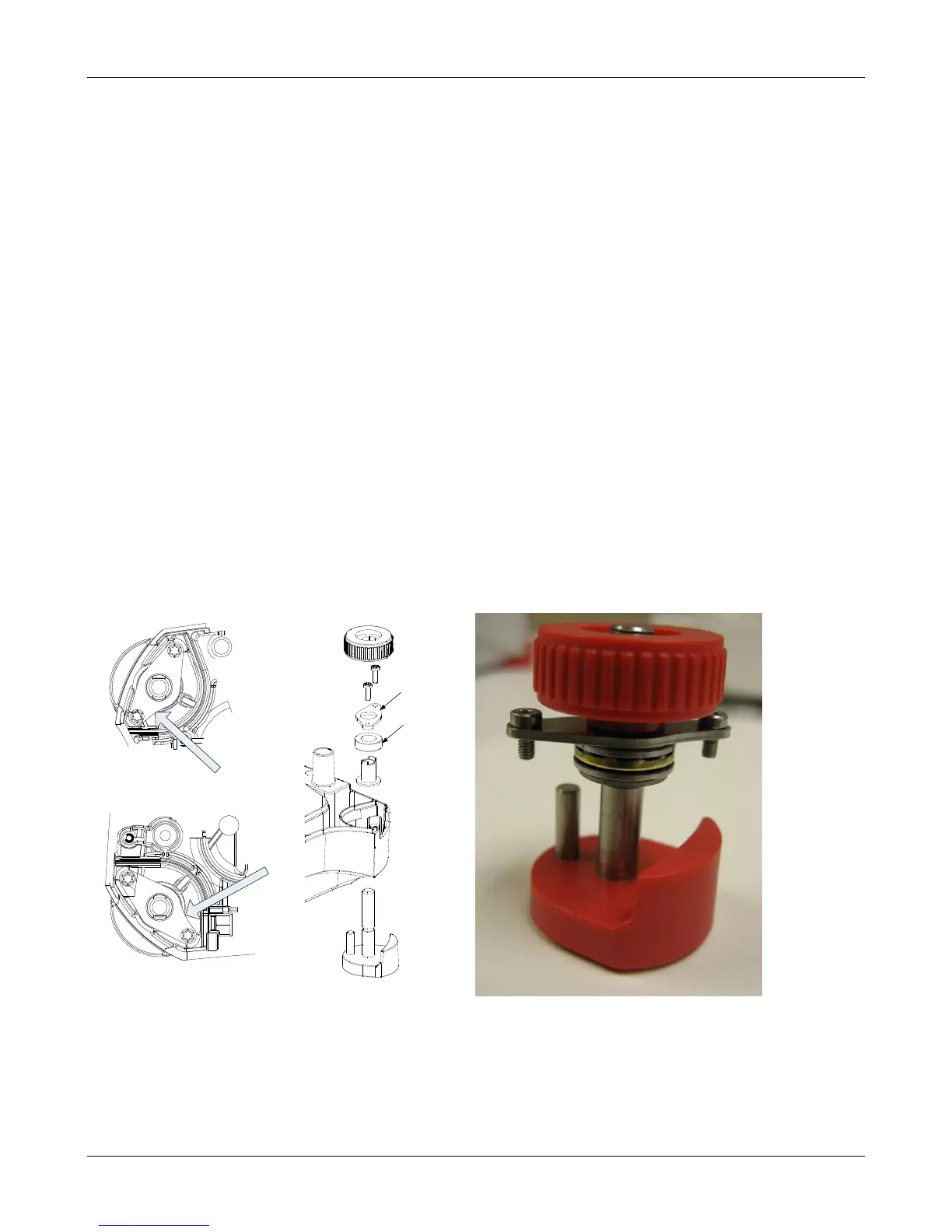
The feet assemblies incorporate a bearing assembly that allows for easy adjustment of the feet.
There is a load bearing plate that transmits the load to the Base. The plate is not symmetrical so its
placement is different in the front and rear locations (see sketch below). One edge of the plate has a
slight curve. This curve should face inward and be towards the front of the balance in all locations.
The bearing assembly is made of three parts, two disks with a bearing ring in the center. The curved
surface of the dicks should face the ball bearings. Assemble the foot components in the order
shown in the sketch below.













 To Next Page