APPENDIX B - SERVICE MENU
Ohaus Corporation www.ohaus.com 68 Explorer
®
Series Service Manual
5 Point- LINEARITY CALIBRATION
A five point linearization is rarely required and is the most difficult to perform accurately under the
less than ideal conditions outside the factory. This service calibration requires that accurate
calibration weights be used. Calibration points are done at approximately 0, 25%, 50%, 75% and
100% of maximum capacity.
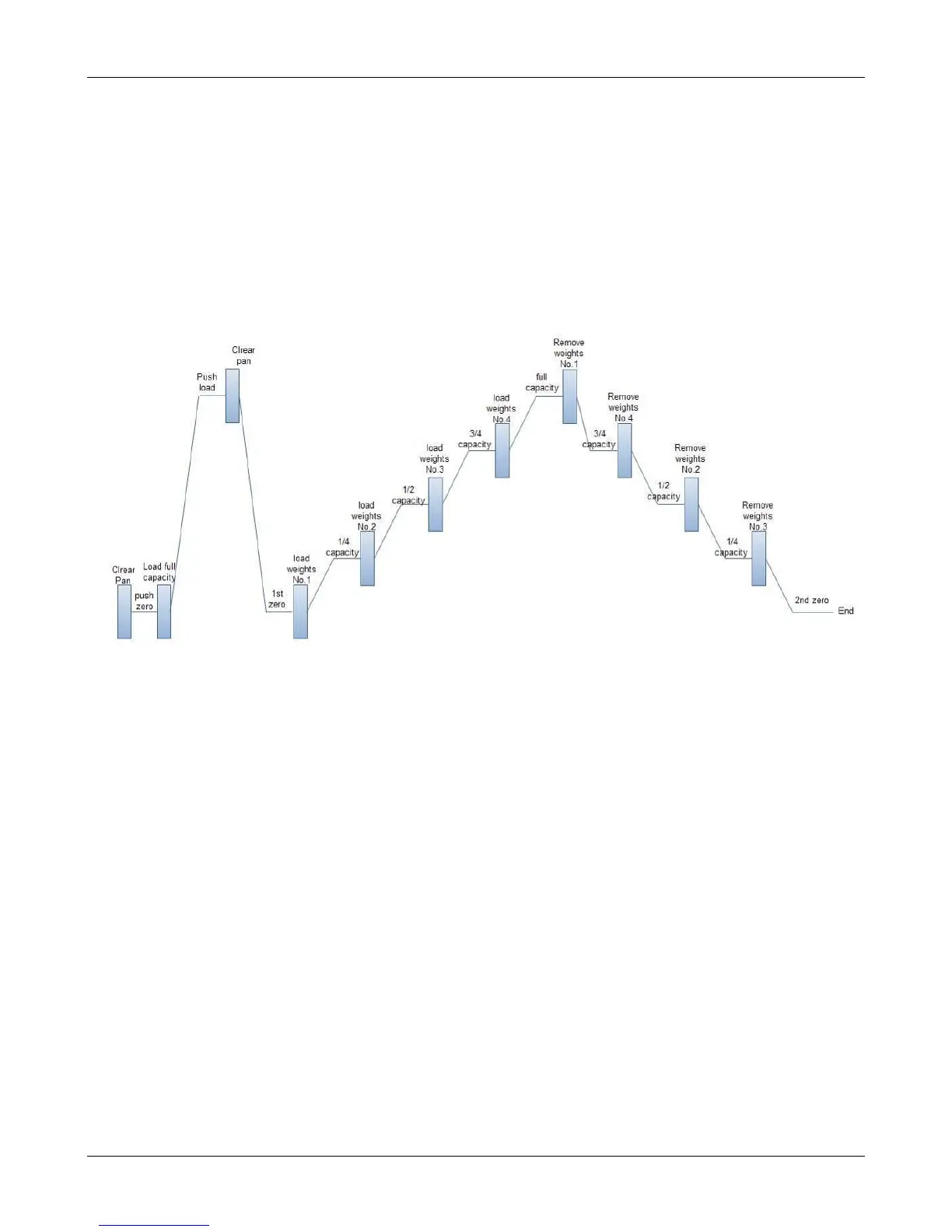
The sequence of loading the test weights on the platform is very important to insure a correct
linearity calibration. Refer to the diagram below for the correct weight sequence. Load each
numbered weight (or group of weights if required) in the order indicated (No.1, No.2, No.3, No.4)
then remove in the correct order (No.1, No.4, No.2, No.3). This is done to reduce the affect of the
individual weight inaccuracies on the linearity calibration.
INTERNAL WEIGHT CALIBRATION
Internal weight calibration in the Service Menu is used to determinethebalance’sinternalweight.
This establishes a ratio between the internal weight and an external calibration weight.
SERVICE SPAN CALIBRATION
Service span calibration allows a new zero and maximum setting using an external calibration
weight.
SERVICE INTERNAL CALIBRATION
The internal calibration weight is used to calibrate the balance.
If a pan, pan support or load-cell is changed a Service Span Calibration or Service Internal
Calibration should be done.













 To Next Page