Need help?
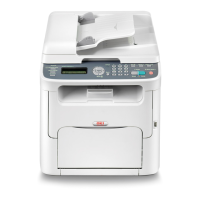
Do you have a question about the Oki MC160 and is the answer not in the manual?
Details the recommended space requirements for operating and maintaining the machine.
Illustrates machine dimensions with Tray 2 and duplex unit installed.
Illustrates machine dimensions with attachment and duplex option installed.
Identifies and labels the external components visible from the front of the machine.
Identifies and labels the external components visible from the rear of the machine.
Shows front views of the machine with various optional accessories installed.
Illustrates rear views of the machine with optional accessories installed.
Shows side views of the machine with optional accessories installed.
Lists printer drivers available on the CD and their benefits.
Lists scanner drivers on the CD and their functionalities.
Lists PC Fax drivers on the CD and their purposes.
Describes software applications included on the CD and their uses.
Lists the documentation available on the CD and their content.
Identifies and explains the function of each indicator and key on the control panel.
Explains the elements displayed on the main screen when the machine is in Copy Mode.
Details the indicators and their meanings within the copy settings menu.
Explains the elements displayed on the main screen during Scan Mode.
Details the indicators and their meanings within the scan settings menu.
Explains the elements shown on the main screen during Fax Mode.
Details the indicators and their meanings within the fax settings menu.
Explains the display indications shown when a print job is in progress.
Introduces the menu for checking printer status and changing modes.
Shows how to view the estimated remaining toner levels for each cartridge.
Explains modes for replacing toner cartridges and cleaning print head window.
Details the process for cleaning the print head window.
Introduces the menu for viewing printed page counts and fax transmission results.
Explains how to check the percentage of remaining toner and imaging cartridge life.
Refers to the Facsimile User's Guide for details on transmission/reception results.
Lists printable reports related to fax operations.
Explains how to print a list of programmed speed dial destinations.
Explains how to print a list of one-touch dialing groups.
Explains how to print the UTILITY menu and its settings.
Explains how to print toner remaining, settings, and status information.
Explains how to print a demo page.
Describes how to access and navigate the UTILITY menu for machine settings.
Introduces the menu for configuring fax reception operations.
Introduces the menu for configuring reporting options.
Introduces the menu for configuring scan settings.
Outlines the options available within the MACHINE SETTING menu.
Explains how to set the auto panel reset function for clearing settings.
Details how to configure the machine's energy saving mode.
Explains how to adjust the brightness of the message window.
Describes settings for cursor movement speed when keys are held.
Explains how to select the display language for menus and messages.
Details how to adjust the volume of key presses and alarms.
Explains how to set the default mode when the machine is turned on.
Describes whether printing stops when toner runs out.
Explains how to enable/disable toner low warning messages.
Explains how to enable/disable printing continuation after size errors.
Describes the function for fixing thin white horizontal lines in images.
Explains how to select print speed for double-sided printing.
Explains how to enable or disable image stabilization.
Details how to set paper type and size for Tray 1.
Introduces the administrator-managed settings menu.
Details network and email settings within administrator management.
Details SMTP and LDAP settings within administrator management.
Details USB and communication settings within administrator management.
Details user settings and auto redial options within administrator management.
Details administrator and network settings, specifically TCP/IP.
Details DNS, DHCP, BOOTP, ARP/PING, HTTP, FTP, SMB, Bonjour, IPP, SLP settings.
Details SNMP, Speed/Duplex, and SMTP settings for email.
Details SMTP Timeout, Text Insert, and POP Before SMTP settings for email.
Details SMTP authentication and LDAP settings.
Details LDAP settings, USB setting, and communication settings.
Details communication settings like Line Monitor, PSTN/PBX, Tel/Fax Mode, RBT Signal Time.
Details PTT SETTING for user settings.
Details Date/Time, Date Format, Preset Zoom, User Fax Number, User Name, Auto Redial settings.
Details interval for auto redial.
Introduces the menu for configuring copy settings.
Details density level and duplex copy settings.
Introduces the menu for registering favorite, speed dial, and group dial destinations.
Introduces the menu for configuring fax transmission operations.
Details default transmission methods and header settings.
Introduces the menu for configuring fax reception operations.
Details number of rings, reduction settings, and receive print options.
Details forward, footer, and select tray options for fax reception.
Introduces the menu for configuring reporting options.
Details transmission and reception result report configurations.
Introduces the menu for configuring scan settings.
Details coding method, file size, quality, and density settings for scanning.
Lists media types and sizes supported by the machine for various functions.
Describes the characteristics and usage of plain paper, including notes on media to avoid.
Details specifications and usage guidelines for thick stock paper.
Provides specifications and warnings for using label sheets.
Details specifications and usage guidelines for letterhead paper.
Provides general instructions and notes on loading paper and other media.
Introduces the process of loading media into the multipurpose tray.
Details steps 2 and 3 for loading plain paper into Tray 1.
Introduces loading special media types.
Details steps 1 to 3 for loading special media types into Tray 1.
Details steps 1 and 2 for removing Tray 2 to load plain paper.
Lists types and sizes of documents suitable for the original glass and ADF.
Lists documents that should not be loaded into the ADF due to potential issues.
Explains how to position a document on the original glass for copying.
Details how to place a document into the Automatic Document Feeder (ADF).
Provides steps to display printer driver settings for Windows XP/Server 2003.
Provides steps to display printer driver settings for Windows 2000.
Explains the common buttons used in printer driver properties dialog boxes.
Describes the functions and options available on the Basic Tab of the printer driver.
Explains options for page layout settings like N-up and booklet printing.
Details how to use and manage overlay forms with print jobs.
Explains how to add, edit, and print watermarks on documents.
Covers settings for print quality, color matching, and resolution.
Explains how to view printer driver version information.
Outlines the fundamental steps for making copies using the machine.
Details how to select document type and adjust copy quality settings.
Explains how to adjust the darkness or lightness of copies.
Details how to set preset or custom zoom ratios for copying.
Explains how to choose the paper tray for copying operations.
Describes how to copy two document pages onto a single sheet.
Explains how to set specific copy functions like ID card or poster copying.
Details the process for copying the front and back of a card onto one sheet.
Explains how to tile small documents and print them on a single page.
Details how to enlarge documents to print them across multiple pages as a poster.
Explains how to perform double-sided copying from the ADF.
Details how to perform double-sided copying using the original glass.
Explains how to print multi-page documents in sorted copy sets.
Outlines the fundamental steps for scanning documents from a computer.
Details the settings and options available in the Windows TWAIN driver.
Details the settings and options available in the Windows WIA driver.
Details the settings and options available in the Macintosh TWAIN driver.
Outlines the fundamental steps for scanning documents directly from the machine.
Continues basic scanning operation steps, including sending data and error handling.
Explains how to save scanned data to a connected computer.
Details the procedure for saving scanned data to a USB memory device.
Explains how to manually enter an email address as a scan destination.
Describes how to select a destination from the favorite list for scan data.
Explains how to select a speed dial destination for scan data.
Details how to select a group dial destination for scan data.
Describes how to select a destination from the machine's address book.
Explains how to search the address book for scan destinations.
Details how to search an LDAP server for email addresses as scan destinations.
Explains how to edit a specified destination email address.
Details how to delete a specified destination address.
Explains how to register addresses in the favorite list for quick access.
Details how to delete entries from the favorite list.
Guides on registering speed dial destinations using direct input.
Explains how to register speed dial destinations using LDAP search.
Details how to edit or delete registered speed dial destinations.
Guides on registering email addresses as group dial destinations.
Details how to edit or delete registered group dial destinations.
Explains how to set the scanning resolution for scanned images.
Details how to select the scan mode (Mix, Text, Photo).
Explains how to adjust the darkness or lightness of scanned images.
Provides general information about the machine's toner cartridges.
Offers guidelines for handling and storing toner cartridges to maintain quality.
Provides step-by-step instructions for replacing a single toner cartridge.
Provides instructions for replacing all toner cartridges simultaneously using EJECT MODE.
Outlines the procedure for replacing the imaging cartridge.
Provides instructions for replacing the fuser unit, including safety precautions.
Provides instructions for cleaning the external parts of the machine.
Details how to clean the media feed roller to prevent paper feeding issues.
Provides instructions on how to clean the print head window.
Lists common media misfeed messages and references to their clearing procedures.
Provides instructions for clearing a media misfeed within the main body of the machine.
Provides instructions for clearing a misfeed from Tray 1.
Provides instructions for clearing a misfeed from Tray 2.
Provides instructions for clearing a misfeed from the ADF.
Provides instructions for clearing a misfeed from the duplex option.
Explains various status messages displayed by the machine and their meanings.
Lists common error messages, their causes, and troubleshooting steps.
Explains service messages indicating serious faults and actions to take.
Lists the components included in the Tray 2 lower feeder unit kit.
Lists the components included in the Duplex Option kit.
Lists the expected lifespan for user-replaceable consumables like toner and imaging cartridges.
Lists the expected lifespan for service-replaceable components like the transfer roller.
Explains how to use the keypad to enter numbers, letters, and symbols.
Details how to enter fax numbers using the keypad.
Provides guidance on entering names using the keypad.
Details how to enter email addresses using the keypad.
Explains how to switch between number and letter input modes.
Provides an example of entering text using the keypad.
Offers tips for correcting entered text and input precautions.
Details the recommended space requirements for operating and maintaining the machine.
Illustrates machine dimensions with Tray 2 and duplex unit installed.
Illustrates machine dimensions with attachment and duplex option installed.
Identifies and labels the external components visible from the front of the machine.
Identifies and labels the external components visible from the rear of the machine.
Shows front views of the machine with various optional accessories installed.
Illustrates rear views of the machine with optional accessories installed.
Shows side views of the machine with optional accessories installed.
Lists printer drivers available on the CD and their benefits.
Lists scanner drivers on the CD and their functionalities.
Lists PC Fax drivers on the CD and their purposes.
Describes software applications included on the CD and their uses.
Lists the documentation available on the CD and their content.
Identifies and explains the function of each indicator and key on the control panel.
Explains the elements displayed on the main screen when the machine is in Copy Mode.
Details the indicators and their meanings within the copy settings menu.
Explains the elements displayed on the main screen during Scan Mode.
Details the indicators and their meanings within the scan settings menu.
Explains the elements shown on the main screen during Fax Mode.
Details the indicators and their meanings within the fax settings menu.
Explains the display indications shown when a print job is in progress.
Introduces the menu for checking printer status and changing modes.
Shows how to view the estimated remaining toner levels for each cartridge.
Explains modes for replacing toner cartridges and cleaning print head window.
Details the process for cleaning the print head window.
Introduces the menu for viewing printed page counts and fax transmission results.
Explains how to check the percentage of remaining toner and imaging cartridge life.
Refers to the Facsimile User's Guide for details on transmission/reception results.
Lists printable reports related to fax operations.
Explains how to print a list of programmed speed dial destinations.
Explains how to print a list of one-touch dialing groups.
Explains how to print the UTILITY menu and its settings.
Explains how to print toner remaining, settings, and status information.
Explains how to print a demo page.
Describes how to access and navigate the UTILITY menu for machine settings.
Introduces the menu for configuring fax reception operations.
Introduces the menu for configuring reporting options.
Introduces the menu for configuring scan settings.
Outlines the options available within the MACHINE SETTING menu.
Explains how to set the auto panel reset function for clearing settings.
Details how to configure the machine's energy saving mode.
Explains how to adjust the brightness of the message window.
Describes settings for cursor movement speed when keys are held.
Explains how to select the display language for menus and messages.
Details how to adjust the volume of key presses and alarms.
Explains how to set the default mode when the machine is turned on.
Describes whether printing stops when toner runs out.
Explains how to enable/disable toner low warning messages.
Explains how to enable/disable printing continuation after size errors.
Describes the function for fixing thin white horizontal lines in images.
Explains how to select print speed for double-sided printing.
Explains how to enable or disable image stabilization.
Details how to set paper type and size for Tray 1.
Introduces the administrator-managed settings menu.
Details network and email settings within administrator management.
Details SMTP and LDAP settings within administrator management.
Details USB and communication settings within administrator management.
Details user settings and auto redial options within administrator management.
Details administrator and network settings, specifically TCP/IP.
Details DNS, DHCP, BOOTP, ARP/PING, HTTP, FTP, SMB, Bonjour, IPP, SLP settings.
Details SNMP, Speed/Duplex, and SMTP settings for email.
Details SMTP Timeout, Text Insert, and POP Before SMTP settings for email.
Details SMTP authentication and LDAP settings.
Details LDAP settings, USB setting, and communication settings.
Details communication settings like Line Monitor, PSTN/PBX, Tel/Fax Mode, RBT Signal Time.
Details PTT SETTING for user settings.
Details Date/Time, Date Format, Preset Zoom, User Fax Number, User Name, Auto Redial settings.
Details interval for auto redial.
Introduces the menu for configuring copy settings.
Details density level and duplex copy settings.
Introduces the menu for registering favorite, speed dial, and group dial destinations.
Introduces the menu for configuring fax transmission operations.
Details default transmission methods and header settings.
Introduces the menu for configuring fax reception operations.
Details number of rings, reduction settings, and receive print options.
Details forward, footer, and select tray options for fax reception.
Introduces the menu for configuring reporting options.
Details transmission and reception result report configurations.
Introduces the menu for configuring scan settings.
Details coding method, file size, quality, and density settings for scanning.
Lists media types and sizes supported by the machine for various functions.
Describes the characteristics and usage of plain paper, including notes on media to avoid.
Details specifications and usage guidelines for thick stock paper.
Provides specifications and warnings for using label sheets.
Details specifications and usage guidelines for letterhead paper.
Provides general instructions and notes on loading paper and other media.
Introduces the process of loading media into the multipurpose tray.
Details steps 2 and 3 for loading plain paper into Tray 1.
Introduces loading special media types.
Details steps 1 to 3 for loading special media types into Tray 1.
Details steps 1 and 2 for removing Tray 2 to load plain paper.
Lists types and sizes of documents suitable for the original glass and ADF.
Lists documents that should not be loaded into the ADF due to potential issues.
Explains how to position a document on the original glass for copying.
Details how to place a document into the Automatic Document Feeder (ADF).
Provides steps to display printer driver settings for Windows XP/Server 2003.
Provides steps to display printer driver settings for Windows 2000.
Explains the common buttons used in printer driver properties dialog boxes.
Describes the functions and options available on the Basic Tab of the printer driver.
Explains options for page layout settings like N-up and booklet printing.
Details how to use and manage overlay forms with print jobs.
Explains how to add, edit, and print watermarks on documents.
Covers settings for print quality, color matching, and resolution.
Explains how to view printer driver version information.
Outlines the fundamental steps for making copies using the machine.
Details how to select document type and adjust copy quality settings.
Explains how to adjust the darkness or lightness of copies.
Details how to set preset or custom zoom ratios for copying.
Explains how to choose the paper tray for copying operations.
Describes how to copy two document pages onto a single sheet.
Explains how to set specific copy functions like ID card or poster copying.
Details the process for copying the front and back of a card onto one sheet.
Explains how to tile small documents and print them on a single page.
Details how to enlarge documents to print them across multiple pages as a poster.
Explains how to perform double-sided copying from the ADF.
Details how to perform double-sided copying using the original glass.
Explains how to print multi-page documents in sorted copy sets.
Outlines the fundamental steps for scanning documents from a computer.
Details the settings and options available in the Windows TWAIN driver.
Details the settings and options available in the Windows WIA driver.
Details the settings and options available in the Macintosh TWAIN driver.
Outlines the fundamental steps for scanning documents directly from the machine.
Continues basic scanning operation steps, including sending data and error handling.
Explains how to save scanned data to a connected computer.
Details the procedure for saving scanned data to a USB memory device.
Explains how to manually enter an email address as a scan destination.
Describes how to select a destination from the favorite list for scan data.
Explains how to select a speed dial destination for scan data.
Details how to select a group dial destination for scan data.
Describes how to select a destination from the machine's address book.
Explains how to search the address book for scan destinations.
Details how to search an LDAP server for email addresses as scan destinations.
Explains how to edit a specified destination email address.
Details how to delete a specified destination address.
Explains how to register addresses in the favorite list for quick access.
Details how to delete entries from the favorite list.
Guides on registering speed dial destinations using direct input.
Explains how to register speed dial destinations using LDAP search.
Details how to edit or delete registered speed dial destinations.
Guides on registering email addresses as group dial destinations.
Details how to edit or delete registered group dial destinations.
Explains how to set the scanning resolution for scanned images.
Details how to select the scan mode (Mix, Text, Photo).
Explains how to adjust the darkness or lightness of scanned images.
Provides general information about the machine's toner cartridges.
Offers guidelines for handling and storing toner cartridges to maintain quality.
Provides step-by-step instructions for replacing a single toner cartridge.
Provides instructions for replacing all toner cartridges simultaneously using EJECT MODE.
Outlines the procedure for replacing the imaging cartridge.
Provides instructions for replacing the fuser unit, including safety precautions.
Provides instructions for cleaning the external parts of the machine.
Details how to clean the media feed roller to prevent paper feeding issues.
Provides instructions on how to clean the print head window.
Lists common media misfeed messages and references to their clearing procedures.
Provides instructions for clearing a media misfeed within the main body of the machine.
Provides instructions for clearing a misfeed from Tray 1.
Provides instructions for clearing a misfeed from Tray 2.
Provides instructions for clearing a misfeed from the ADF.
Provides instructions for clearing a misfeed from the duplex option.
Explains various status messages displayed by the machine and their meanings.
Lists common error messages, their causes, and troubleshooting steps.
Explains service messages indicating serious faults and actions to take.
Lists the components included in the Tray 2 lower feeder unit kit.
Lists the components included in the Duplex Option kit.
Lists the expected lifespan for user-replaceable consumables like toner and imaging cartridges.
Lists the expected lifespan for service-replaceable components like the transfer roller.
Explains how to use the keypad to enter numbers, letters, and symbols.
Details how to enter fax numbers using the keypad.
Provides guidance on entering names using the keypad.
Details how to enter email addresses using the keypad.
Explains how to switch between number and letter input modes.
Provides an example of entering text using the keypad.
Offers tips for correcting entered text and input precautions.
 General
| Brand | Oki |
|---|---|
| Model | MC160 |
| Category | All in One Printer |
| Language | English |


 To Next Page