3 – 25
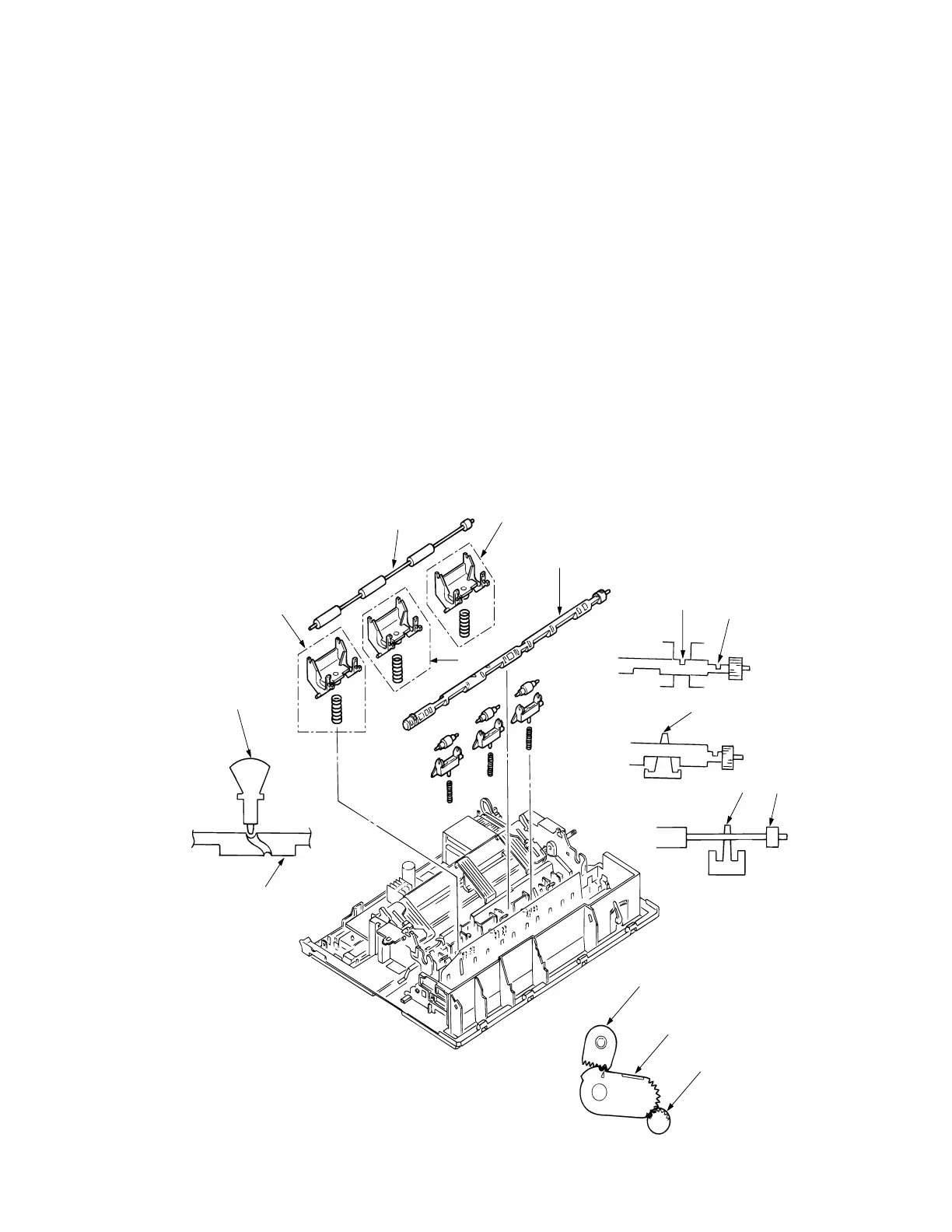
3.3.21 Rear Pressure Assy
(1) Remove the upper cover (see 3.3.4).
(2) Remove the change lever and gears (see 3.3.17).
(3) Remove the paper pan (see 3.3.19).
(4) Remove the rear pressure roller 1.
(5) Rotate the release shaft 2 and move it to the left to detach the release shaft 2.
Match the main frame rib A with the protrusion B of the release shaft.
(6) Remove rear pressure SP assy 3.
(7) To install, follow the removal steps in reverse order.
Note: (1) When installing the release shaft 2, pay attention to the gear engagement of
release shaft 2, change arm lever 6, and change gear shaft 7.
(2) On the ML321 Turbo there are 5 rear pressure spring assemblies. Use the
two pieces which have larger spring diameter on the right side. Use the three
remaining pieces on the left side.
(3) Make sure that the release shaft 2 will be on top of the support spring 4.
(4) To assemble the release shaft 2, make sure that the protrusion of the switch
lever 5 is in the U groove of the release shaft 2.
7
6
2
4
1
4
2
5
3
1
3
2
A
B



 To Next Page