82
Preparing and Mounting Flat Connectors Section 4-3
■ Attaching the Cable
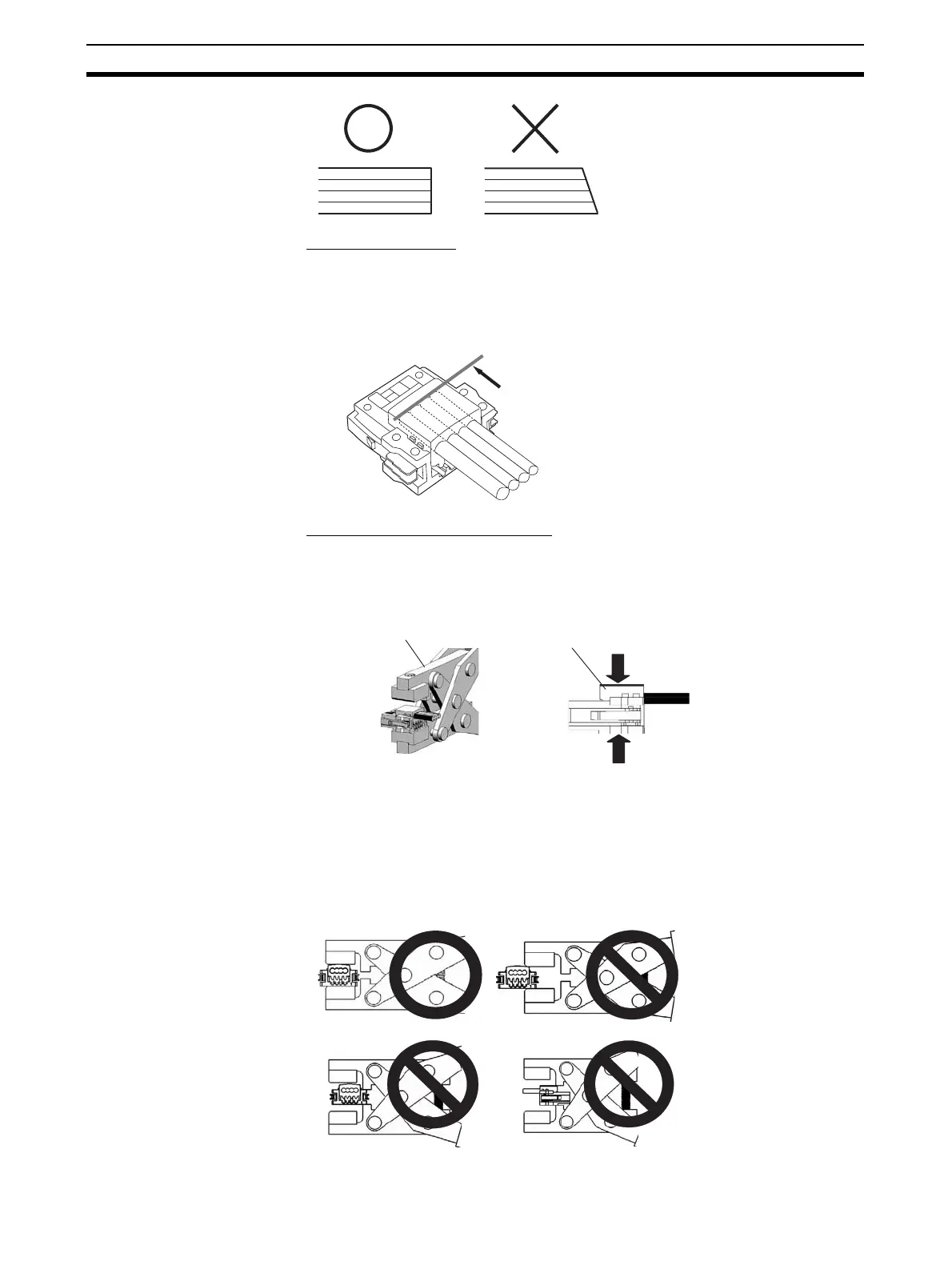
1,2,3... 1. Align the cable labels and cable colors and insert the cable into the con-
nector.
2. Confirm that the cable is inserted all the way to the back. (The cover is
semi-transparent.)
■ Pressure-welding the Connector
The connector is pressure-welded using the DWT-A01 Pliers.
1,2,3... 1. Align the center (see arrow) or the connector cover with the center of the
pressure-welding block on the Pliers and set the cover in the Pliers.
2. Squeeze firmly on the Pliers until the lock on the connector clicks into
place.
Note (a) Do not pressure-weld the connector cover at the edges.
(b) Do not pressure-weld the connector cover at the back of the pres-
sure-welding block.
(c) Set the connector in the correct orientation.
Confirm that the cable in inserted to this point.
Connector cover
Special tool (DWT-A01 Pliers)
OK
NG
NG
NG












 To Next Page