177
Handling Errors Section 8-1
: Not lit
---: Not applicable
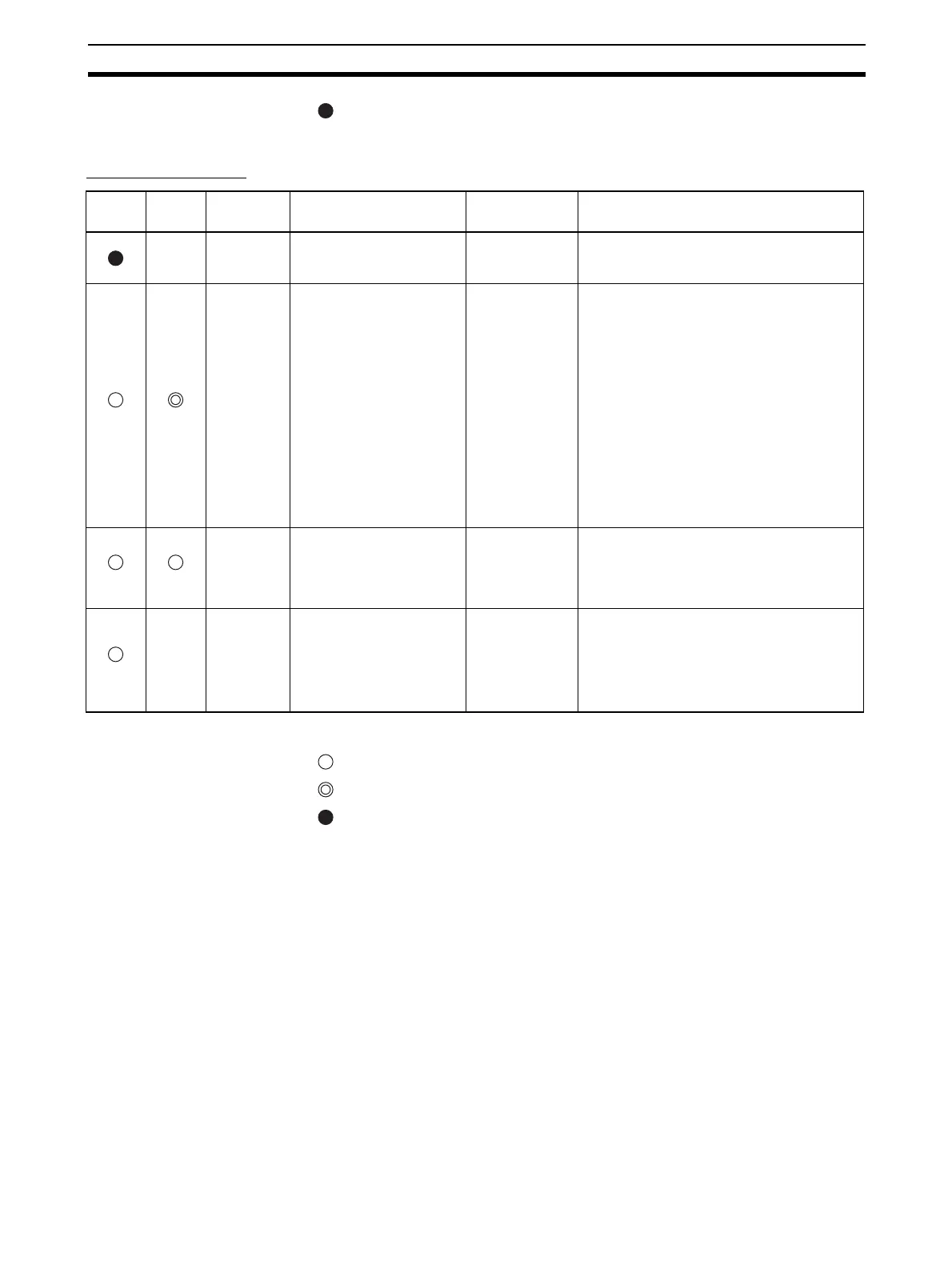
Slave Unit Errors The following indicator patterns show that a Slave Unit has detected an error.
Indicators
: Lit
: Flashing
: Not lit
---: Not applicable
MS
indicator
NS
indicator
Item Probable cause of error Unit operation
after error
detection
Countermeasures
---
No power sup-
ply input
The specified power supply volt-
age is not being supplied from the
communications power supply.
Slave Unit opera-
tion stops.
Remove the cause of the error, and turn ON the power
again. If the Slave Unit still does not operate normally
when the power supply voltage is being supplied in the
specified range, then replace the Slave Unit.
Green Red
Communica-
tions error
Remote I/O communications with
the Master Unit timed out and
stopped after a connection had
been established.
Slave Unit opera-
tion continues. Out-
put Units control
output functions
according to the
communications
error output setting
function for when
errors occur.
Any of the following may be the cause of the communi-
cations error.
1) Operation was stopped by a PLC System error,
including the Master Unit.
Check the PLC System status and clear the error.
There is no need to restart the Slave Unit.
2) Communications with the Master Unit are impossible
because of a problem such as a disconnected line or
a malfunction.
Check the cables, terminals, and Repeater Units.
Clear the error, and then turn the communications
power supply back ON again.
3) Communications with the applicable Slave Unit had
to continue to be retried because of noise. The num-
ber of retries exceeded the specified value, so the
Master Unit stopped communications.
Check for noise interference around the affected
Slave Unit.
Aside from 1) above, there is no need to restart the
Master Unit.
Green Red
Address dupli-
cation error
A Slave Unit with the same node
address exists on the network.
Slave Unit opera-
tion stops.
Check and correct the Slave Unit's node numbers, and
then perform the following procedure:
1) Turn OFF the communications power supply for the
Master Unit and the Slave Unit.
2) Turn the communications power supply back ON
again.
Red
---
Unit error An error occurred at the Slave
Unit itself for one of the following
reasons.
1) The Slave Unit failed to write
to internal memory
(EEPROM).
2) The Slave Unit failed to read
internal memory (EEPROM).
Slave Unit opera-
tion stops. For Out-
put Units, outputs
stop.
To eliminate the first possibility, check the set value for
the Slave Unit's node address. Then restart the Slave
Unit (i.e., turn the communications power supply OFF
and back ON again). If the same error occurs again,
replace the Slave Unit.












 To Next Page