8
CompoNet Network Specifications Section 1-2
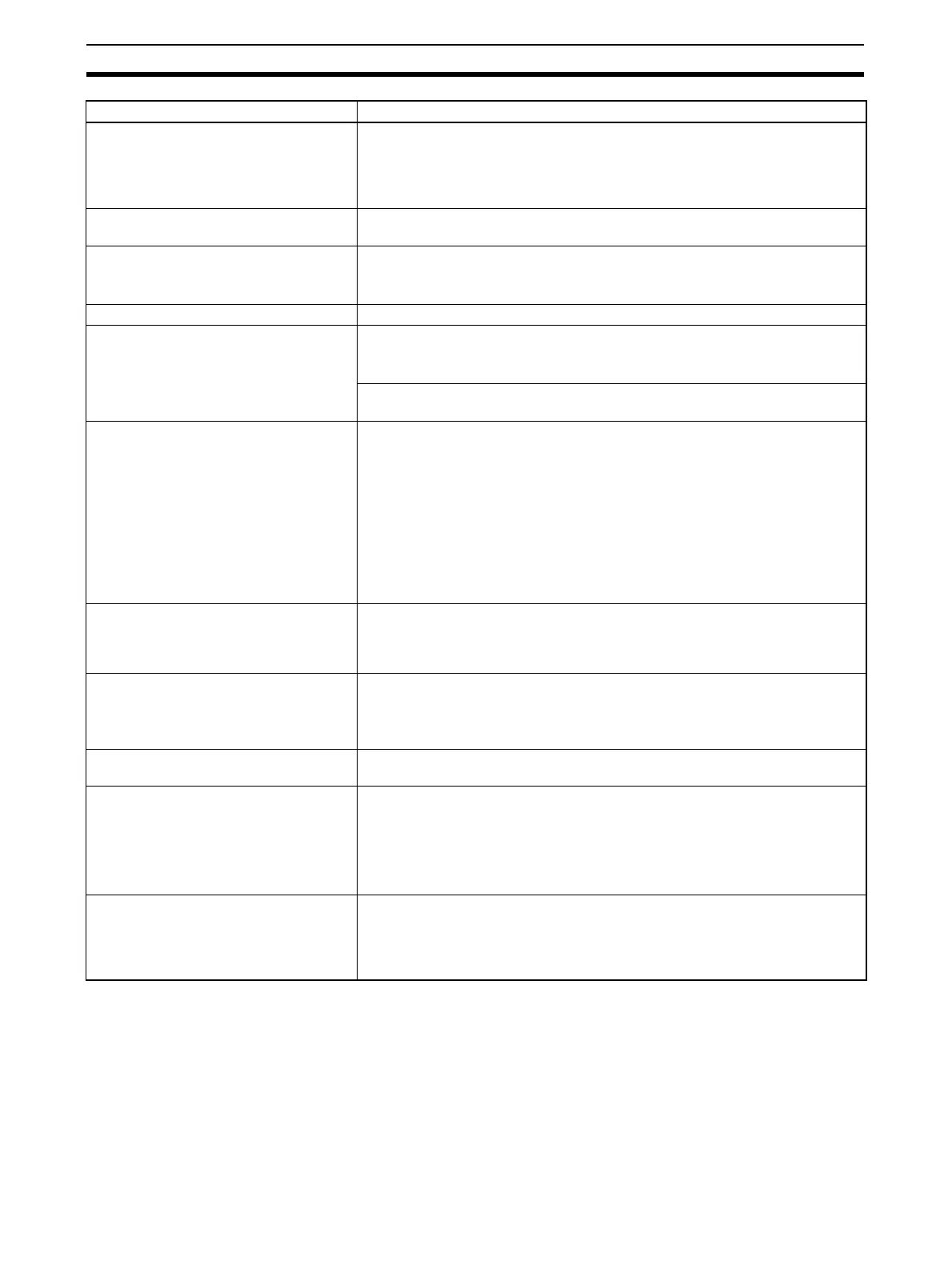
Repeater Unit application conditions Up to 64 Repeater Units can be connected per network (i.e., per Master Unit).
Up to 32 Repeater Units can be connected per trunk line or per sub-trunk line.
When Repeater Units are connected in series from the Master Unit, up to two
extra segment layers can be created (i.e., up to 2 Repeater Units are allowed
between a Slave Unit and the Master Unit).
Signal lines Two lines: BDH (communications data high) and BDL (communications data
low)
Power lines Two lines: BS+ and BS- (power for communications and internal Slave Unit cir-
cuits)
• Power is supplied from the Master Unit and Repeater Units.
Communications power supply voltage 24 VDC ±10%
Connection forms Round Cable II, Flat Cable I, or Flat Cable II cables at a baud rate of 93.75
kbps: No restrictions
Other cables or other baud rates: Trunk line and branch lines
Connections for Slave Units and Repeater Units: T-branch or multidrop connec-
tions
Remote I/O communications Automatic startup when power is turned ON (see note) or manual startup using
the Remote I/O Communications Start Switch in I/O Communications Manual
Start Mode
Note When power is turned ON to the PLC and the Slave Unit communica-
tions power is turned ON. Communications are not started in the follow-
ing cases:
• In Registered Slave Unit Participation Standby Mode, communications is not
started until all registered Slave Units are participating in the network.
• In Communications Error Communications Stop Mode, communications stop
when a communications error occurs.
I/O Communications Manual Startup
Mode
I/O Communications Manual Startup Mode can be set from the CX-Integrator
so that remote I/O communications are not started when the power is turned
ON. Remote I/O communications will not start until the Remote I/O Communi-
cations Start Switch is turned ON in memory.
Communications Error Communications
Stop Mode
All remote I/O communications are stopped if a communications error occurs in
any Slave Unit.
Note Communications will not stop for verification errors for registration tables
or duplicated address settings.
Communications Error Input Data Zero
Clear Mode
All input data will be cleared to zeros in any Slave Unit in which a communica-
tions error occurs.
Duplicated Slave Unit address check If the same address is set for two different Slave Units or the same memory is
allocated to two different nodes, the Slave Unit that joins communications last
will cause a duplicated address error and will leave the network. The Dupli-
cated Address Error Flag will turn ON.
Note This error will also occur if a Slave Unit leaves the network and then a
different type of Slave Unit joins the network.
Registration Tables The Slave Units that can participate for each node address are registered in a
table so that only the registered Slave Units can participate. If a different Slave
Unit attempts to join the network, the Registration Table Verification Error Flag
will turn ON. The Registration Table is generated automatically or manually
edited from the CX-Integrator.
Item Specifications












 To Next Page