61
Installation Section 4-1
Installing the Master Unit
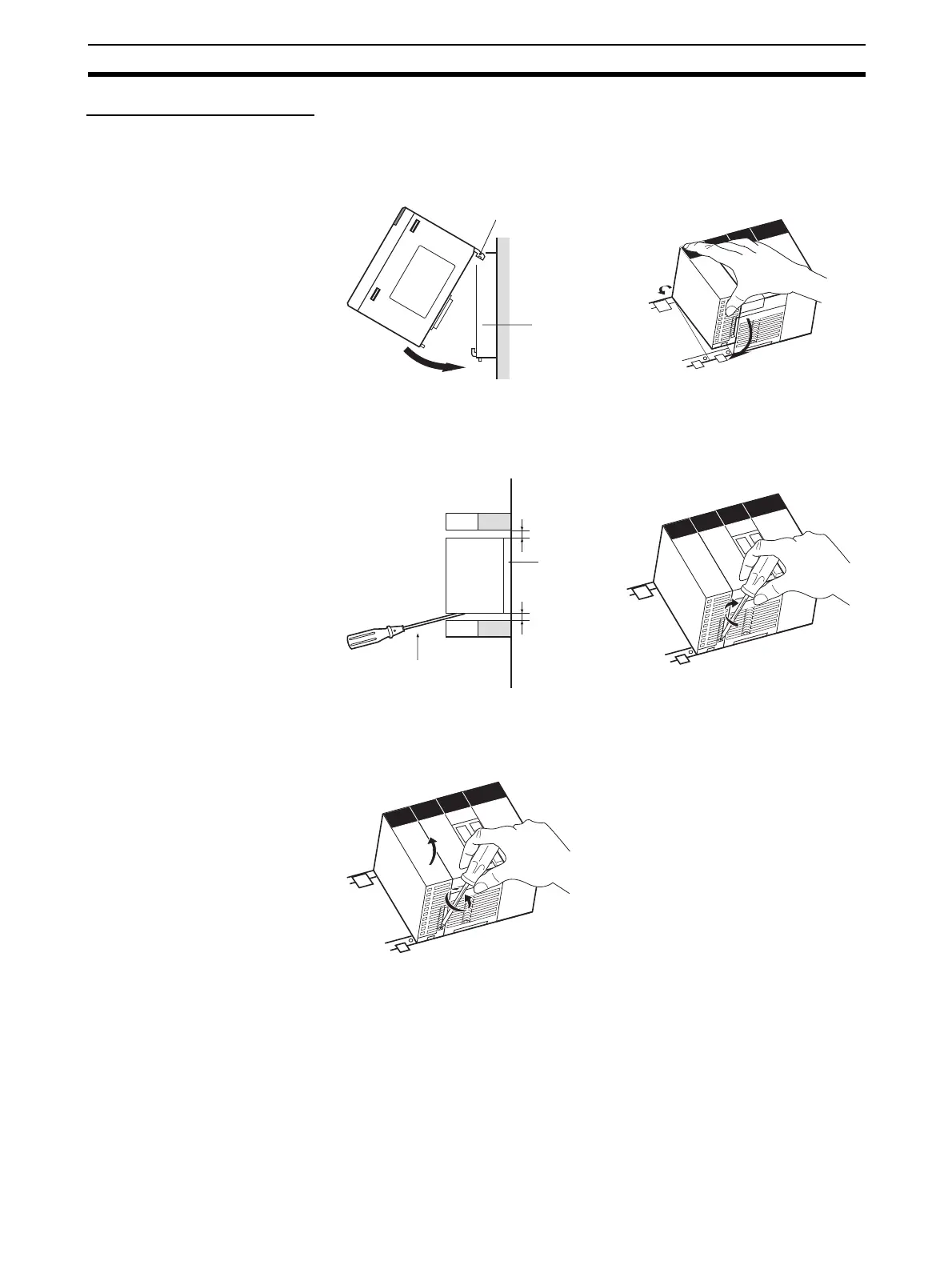
CS-series Master Unit Use the following procedure to install the CS-series Master Unit.
1,2,3... 1. Mount the Unit to the Backplane by attaching it with the top and bottom
hooks.
2. Properly insert the Unit into the Backplane connector.
3. Tighten the screen on the bottom of the Unit with a Phillips screwdriver.
The screwdriver must be held at a slight angle to tighten the screw; be sure
to leave sufficient space below the Backplane.
Note Tighten the screen on the bottom of the Unit to a torque of 0.4 N·m.
To remove the Unit, loosen the screw at the bottom with a Phillips screw-
driver, lift up on the bottom of the Unit, and remove the Unit.
Backplane
Hook
Duct
Duct
20 mm min.
20 mm min.
Backplane
Unit
Phillips screwdriver












 To Next Page