Settings 121
Date and Time Overview
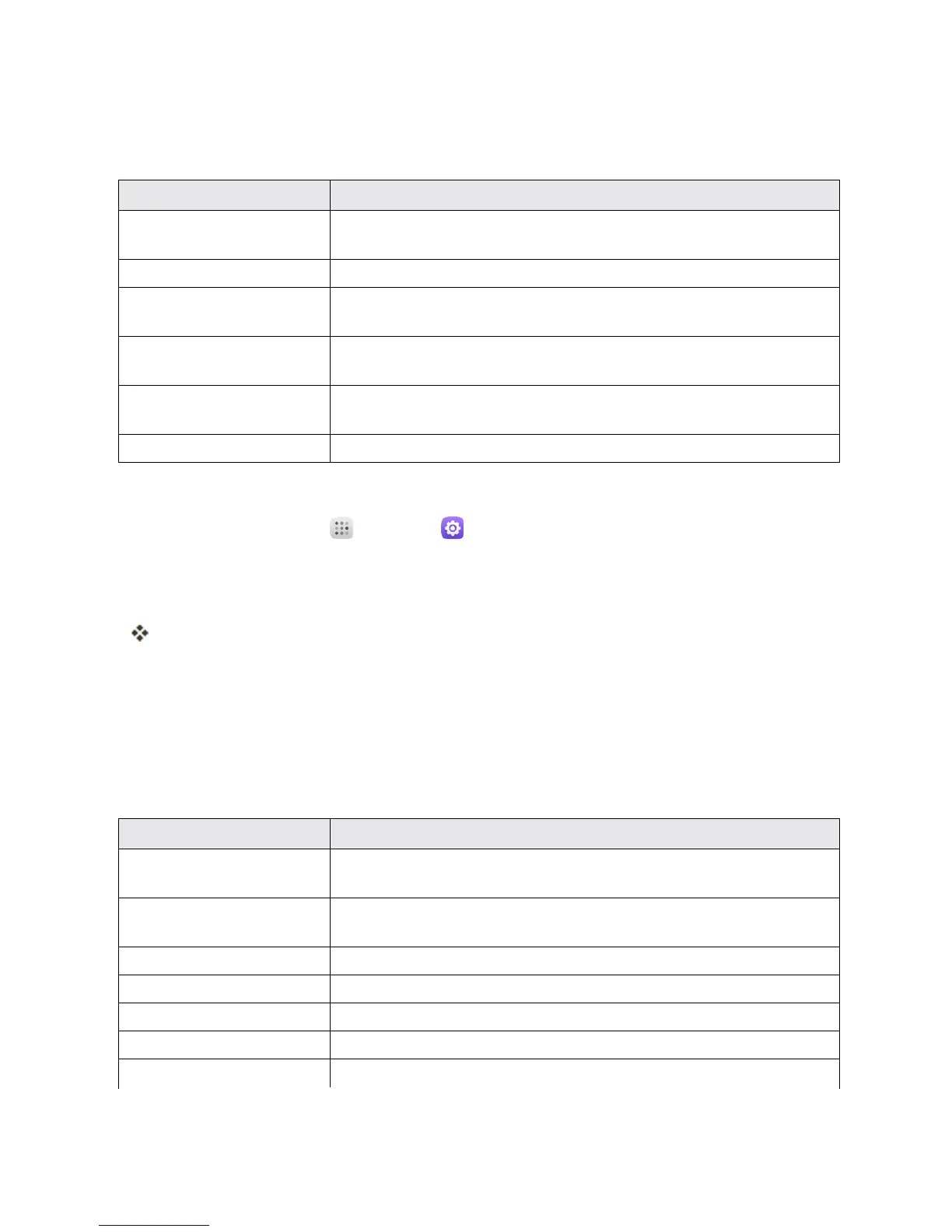
ThefollowingDateandtimeoptionsmaybeconfigured:
Date and Time Option Description
Automatic date & time Setthedateandtimeautomaticallyviatheconnectedwireless
network.
Automatic time zone Setthetimezoneautomaticallyviatheconnectedwirelessnetwork.
Set date Setthedatemanually(onlyavailablewhenAutomaticdateandtime
optionisdisabled).
Set time Setthetimemanually(onlyavailablewhenAutomaticdateandtime
optionisdisabled).
Select time zone Setthetimezonemanually(onlywhenAutomatictimezoneis
disabled).
Use 24-hour format Enableordisable24-hourformat.
Access Date and Time Options
1.
Fromhome,touchApps >Settings .
2. Touch Date & time.
3. Setavailabledateandtimeoptions.
Yourdateandtimesettingsareappliedandsaved.
ACCESSIBILITY SETTINGS
TheAccessibilitymenuletsyouenableandmanageaccessibility-relatedapplications.
Accessibility Settings Overview
ThefollowingAccessibilityoptionsmaybeconfigured:
Accessibility Option Description
TalkBack WhenTalkbackison,yourdeviceprovidesspokenfeedbacktohelp
blindandlow-visionusers.
Switch access Switchaccessallowsyoutocontrolyourdeviceusingconfigurable
keycombinations.
Captions Touchtosetcaptionssettings.
Magnification gestures Touchtoturnon/offtheMagnificationgestures.
Large text Markthecheckboxtoenlargethescreentext.
High contrast text Markthecheckboxtoenablehighcontrasttext.
Power button ends call Markthecheckboxtoenablethisfunction.



 To Next Page