Get Started 2
GET STARTED
Thefollowingtopicsgiveyoualltheinformationyouneedtosetupyourphoneandwirelessservicethe
firsttime.
PARTS AND FUNCTIONS
Thesetopicsillustrateyourphone’sprimarypartsandkeyfunctions.
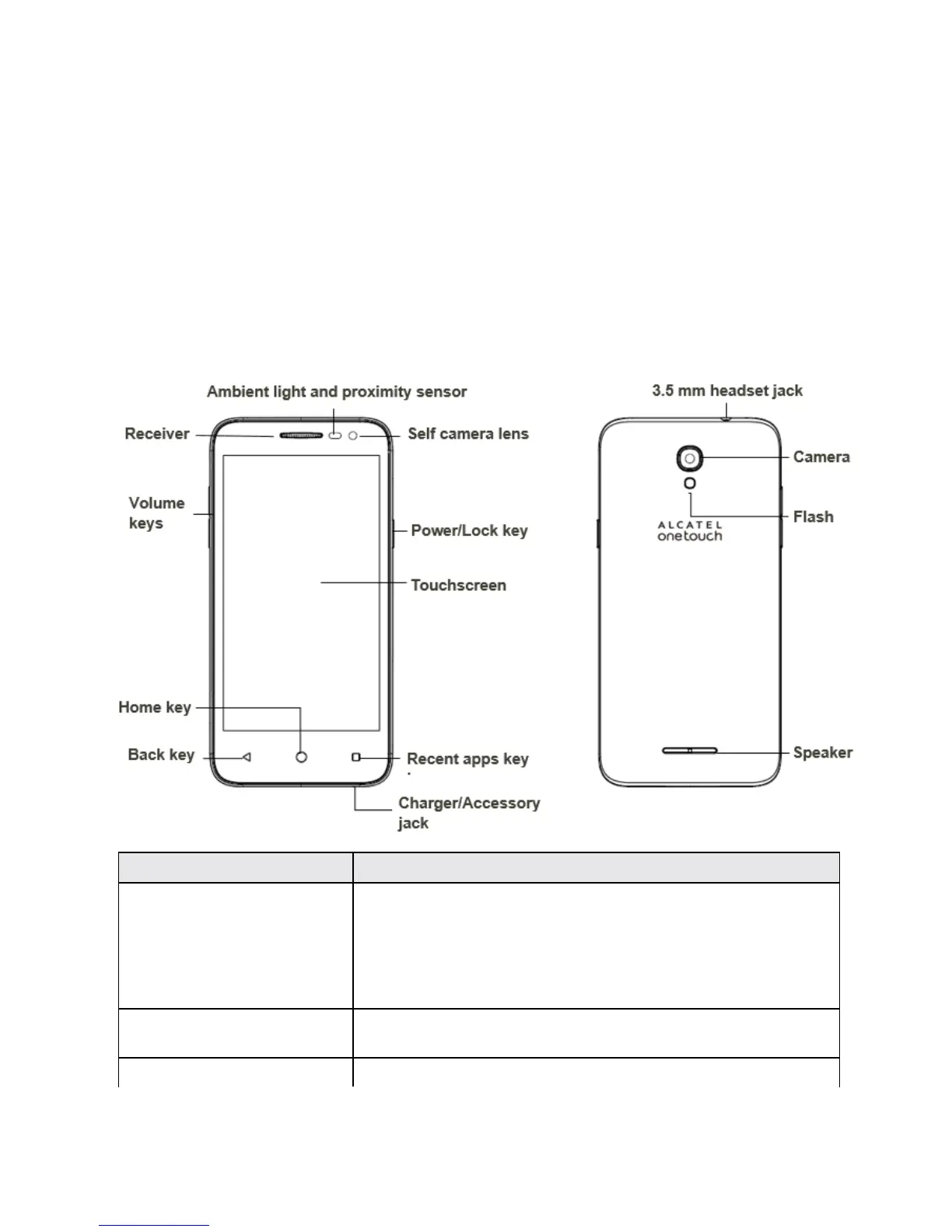
Phone Layout
Thefollowingillustrationoutlinesyourphone’sprimaryexternalfeaturesandbuttons.
Part Description
Ambient light and proximity
sensor
Detectshowcloseanobjectistothesurfaceofthescreen.Thisis
typicallyusedtodetectwhenyourfaceispressedupagainstthe
screen,suchasduringaphonecall.
Whiletalkingonthephone,thesensordetectstalkactivityand
locksthekeypadtopreventaccidentalkeypress.
Self camera lens Takespicturesandrecordsvideoswhilefacingthescreen,and
allowsyoutovideoconference.
Receiver Letyouhearthecallerandautomatedprompts.



 To Next Page