Your Phone Interface 43
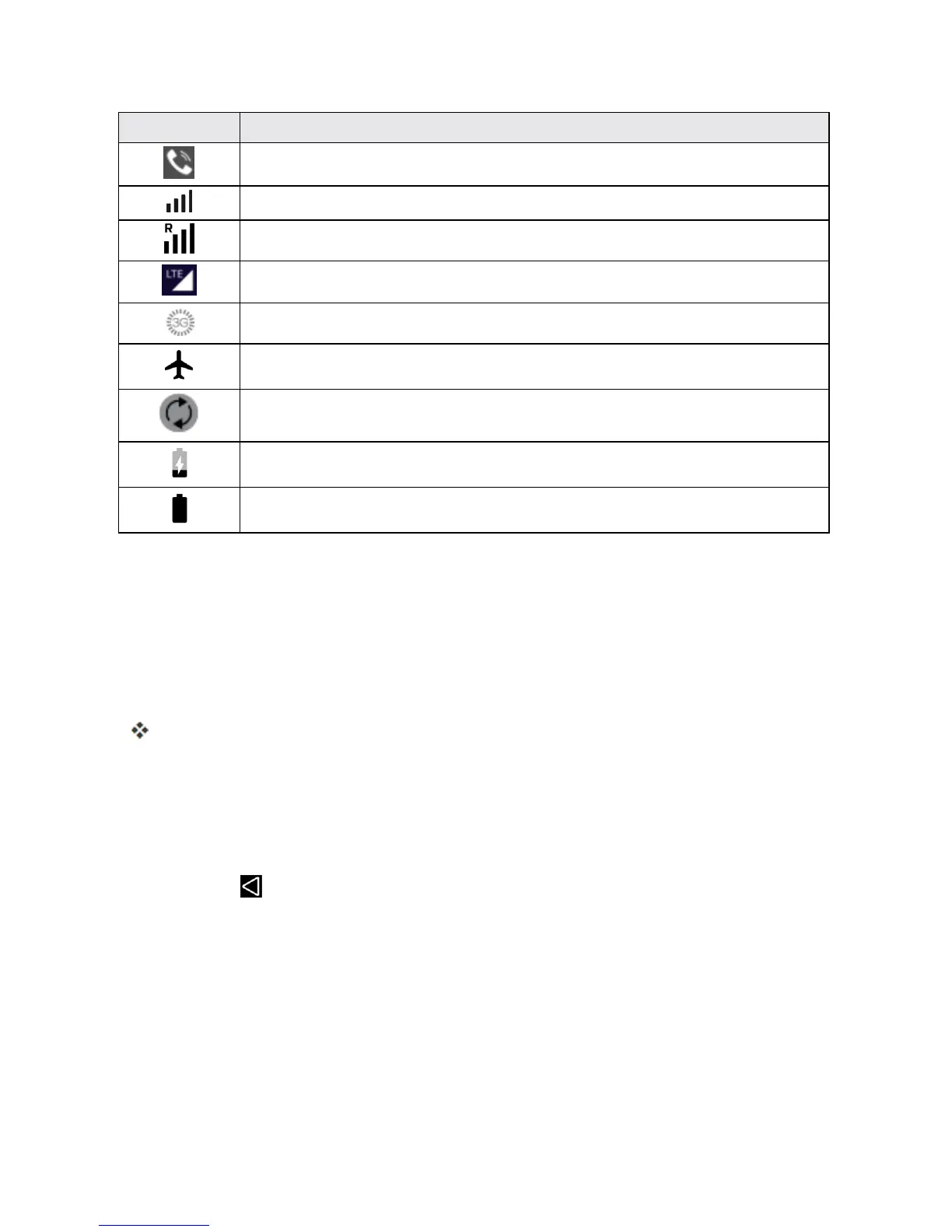
Icon Status
Speakerphoneactive
Network(fullsignal)
Network(roaming)
Enhanced4GLTEdataservice
3G(dataservice)
Airplanemode
Syncactive
Battery(charging)
Battery(fullcharge)
NOTIFICATIONS WINDOW
Dragthestatusbardowntoopenthenotificationswindow.Fromthere,youcanchecknotifications,
downloadupdates,openmessagingapps,usethequicksettingsmenu,andmore.
Open the Notifications Window
n Dragthestatusbardown.(Slideyourfingerdownfromthetopofthescreen.)
Thenotificationswindowopens.Tochecknotifications,touchaniteminthelist.
Close the Notifications Window
n Dragthenotificationswindowup.(Slideyourfingerupfromthebottomofthescreen.)
–or–
n
TouchBack toclosethenotificationswindow.
Notifications Window Layout
Thenotificationswindowgivesyouaccessbothtonotificationsandthequicksettingsmenu.
CUSTOMIZE THE HOME SCREEN
Learnhowtosetthewallpaperandadd,move,orremoveshortcuts,widgets,andfoldersfromthe
Homescreen.



 To Next Page