Settings 122
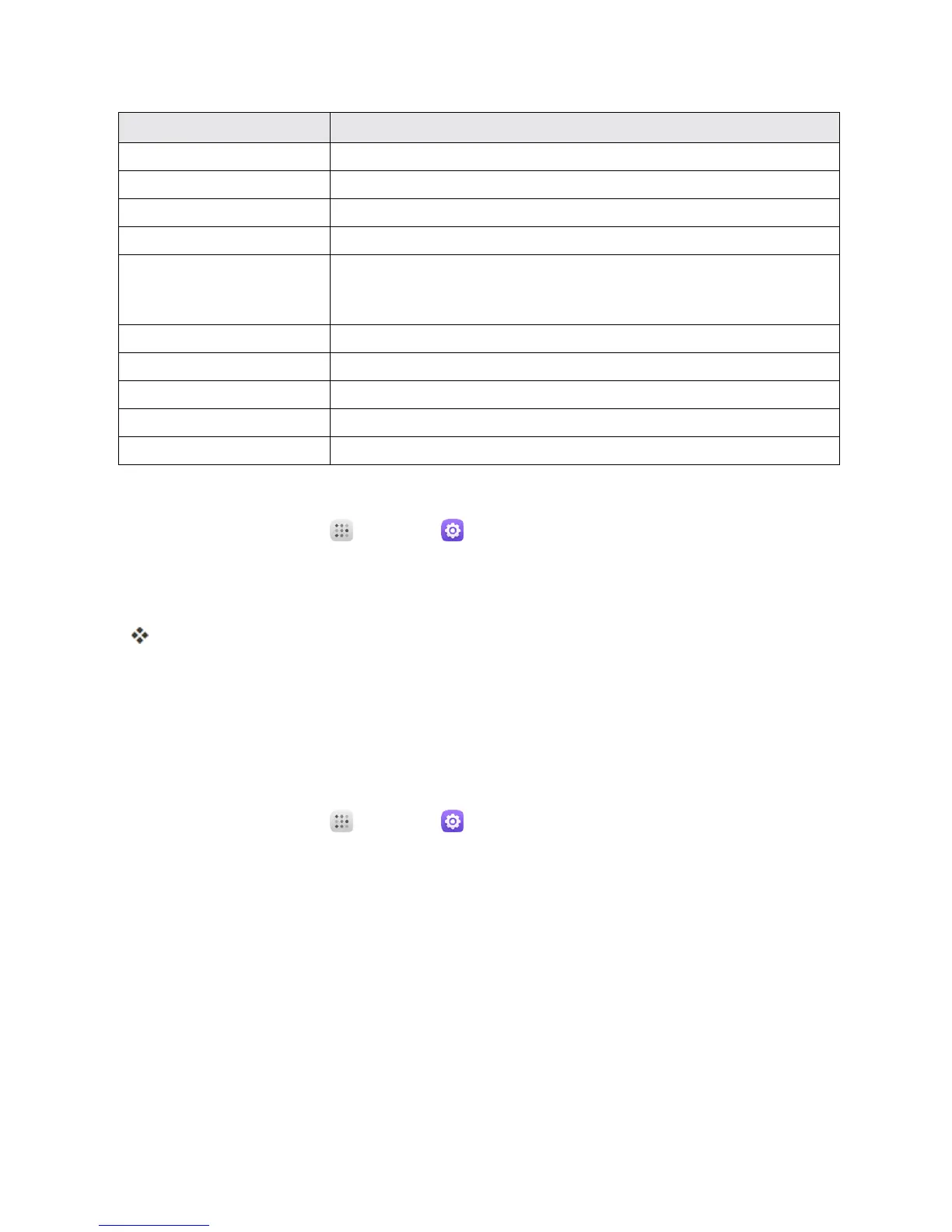
Accessibility Option Description
Auto-rotate screen Setthescreentorotateautomaticallywhenthephoneisrotated.
Speak passwords Setthephonetoreadpasswordsastheyareentered.
Accessibility shortcut Touchtoturnon/offtheAccessibilityshortcut.
Text-to-speech output Settext-to-speechoptions.
Touch & hold delay Touchtoadjustthedurationoflongpressdelay.Thisfunction
enablesyourphonetodiffertouchandtouch&hold,whichmay
avoidincorrectoperations.
Stereo and mono TouchtosetStereoormono.
Sound balance Touchtosetsoundbalance.
Persistent alerts Markthecheckboxtoenablepersistentalerts.
Color inversion Setcolorinversionmayaffectperformance.
Color correction Touchtosetcolorcorrection.
Access Accessibility Options
1.
Fromhome,touchApps >Settings .
2. TouchAccessibility.
3. Setavailableaccessibilityoptions.
Youraccessibilitysettingsareappliedandsaved.
PRINTING
ThePrintingmenuletsyouconfigureGoogle'sCloudPrintservice.Youcanconnectyourprinterto
yourGoogleaccountandthenaddtheprinteronyourphoneinthePrintingmenu.Afterthat,you
cansenddocuments,pictures,emails,orWebpagesfromyourphonetotheprinterwirelesslyand
havethemprintedout.
1.
Fromhome,touchApps >Settings .
2. TouchPrinting > Cloud Print > Print jobs.
Note:TouseCloudPrint,youneedtoaddaGoogleaccounttoyourdevice.
ACTIVATE THIS DEVICE
TheActivatethisdevicemenuletsyouactivateanewphoneoruseadditionalself-serviceoptions
suchascheckingthestatusofanin-servicephone.



 To Next Page