La interfaz del teléfono 43
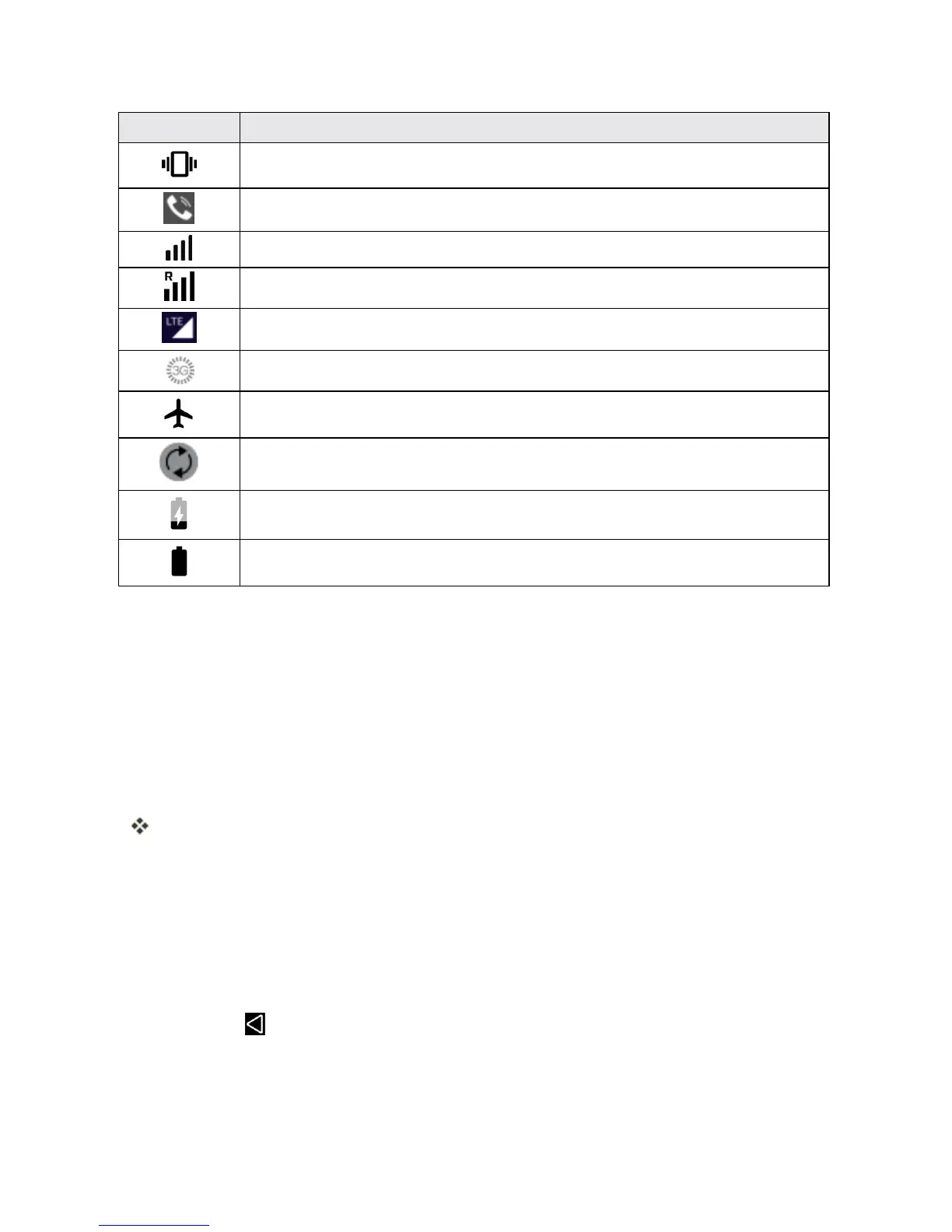
Icono Estado
Vibrar
Bocinaactivada
Red(señalcompleta)
Red(roaming)
ServiciodedatosLTE4Gmejorado
3G(serviciodedatos)
Modovuelo
Sincronizaciónactivada
Batería(cargando)
Batería(cargacompleta)
VENTANA DE NOTIFICACIONES
Arrastrelabarradeestadohaciaabajoparaverlaventanadenotificaciones.Desdeaquípuede
comprobarlasnotificaciones,descargaractualizaciones,abriraplicacionesdemensajería,utilizar
elmenúdeajustesrápidos,etc.
Cómo abrir la ventana de notificaciones
n Arrastrelabarradeestadohaciaabajo.(Desliceeldedohaciaabajodesdelapartesuperiordela
pantalla).
Seabrirálaventanadenotificaciones.Paracomprobarnotificaciones,toqueunelementodela
lista.
Cómo cerrar la ventana de notificaciones
n Arrastrelaventanadenotificacioneshaciaarriba.(Desliceeldedohaciaarribadesdelaparte
inferiordelapantalla).
–o–
n
ToqueAtrás paracerrarlaventanadenotificaciones.
Diseño de la ventana de notificaciones
Laventanadenotificacionesledaaccesoalasnotificacionesyalmenúdeajustesrápidos.



 To Next Page