Oset: Osets the registers by the amount that is written in the certain field.
OnRobot: Shows the number of registers that OnRobot uses of the certain type.
Total: Shows the maximum number of registers of the certain type that is available in UR.
Check other vendors' registers to make sure that the registers that you are using are not used
by other vendors. If your registers overlap other vendors' registers, oset them by writing a
certain value in the
Oset fields. If the oset value is too high, the number of OnRobot
registers can exceed the number of Total registers. In this case the values will turn red in the
OnRobot row.
Hide Variables
A list of selectable variables. When a variable is selected to hide, it will not appear on the
configuration panel.
TCP
In the normal view of the panel the TCP of the robot can be overwritten by the TCP of the tool
by pressing the Automatic overwrite of the robot TCP
configuration checkbox.
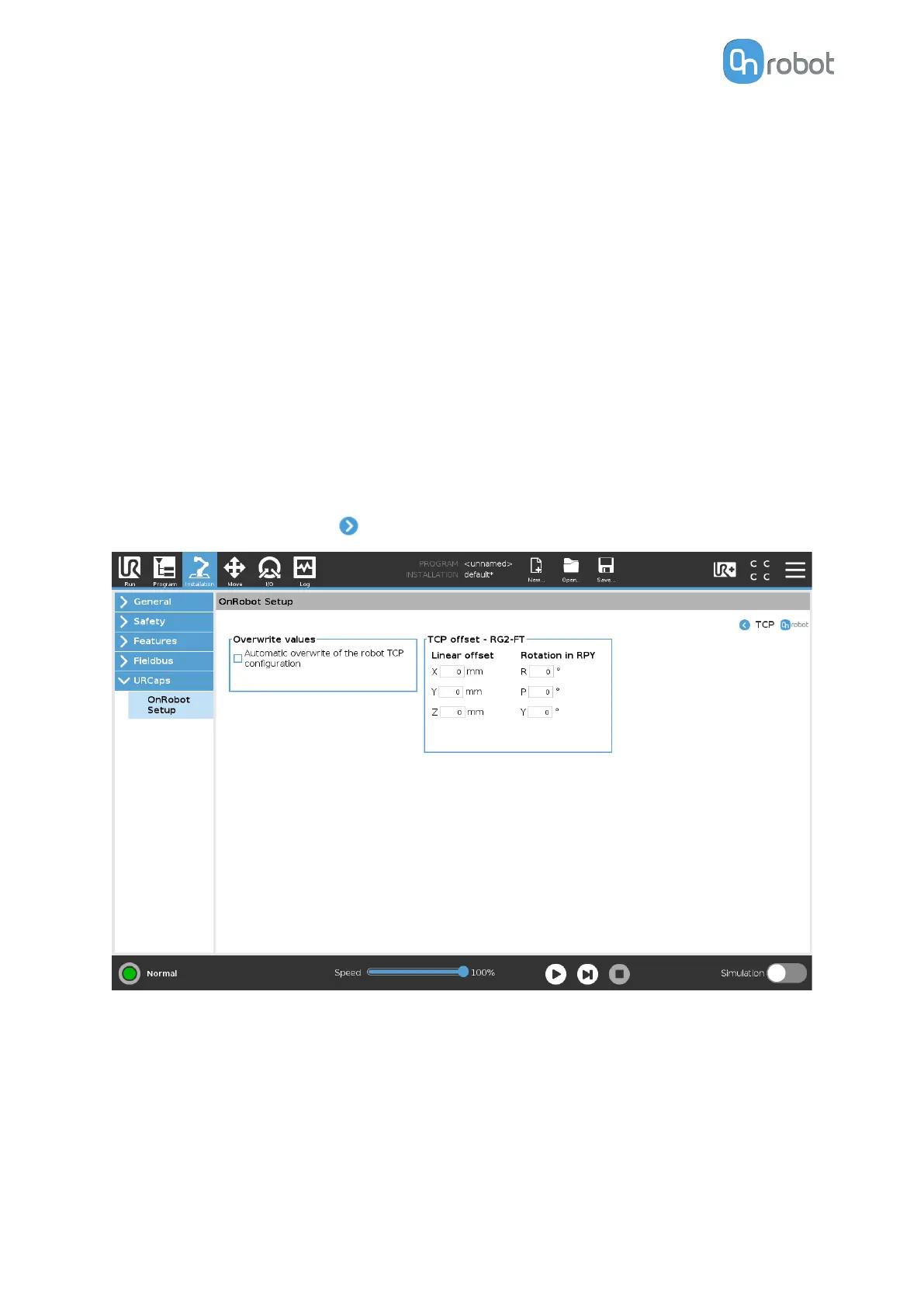
To see more options press on
and the following screen will show:
Overwrite values
Automatic overwrite of the robot TCP
configuration: when checked, the UR's TCP
configuration is automatically overwritten (Dynamic TCP mode). When unchecked the TCP
is left unchanged (Static TCP mode).
For further information and best practices on the TCP setting see 6.4. TCP Configuration
section.
TCP oset
SW INSTALLATION
23



 To Next Page